Forum Discussion

Funky Menu States and Quiz Scoring
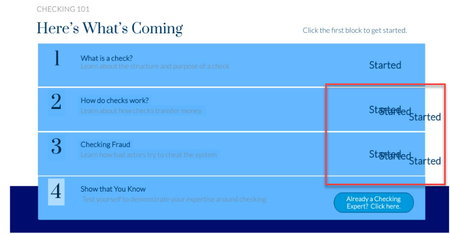

Hello Jean Marrapodi, I reviewed your SL and file and here is what I found so far:
Issue 1: On slide 2.1: Topics in this course: For items 2,3, & 4 apart from the blue rectangle, the text boxes have individual states. Delete those extra states and you can get rid of the repeating words.
Issue 2: On the results slide, select the Review Quiz button, edit the highlighted trigger and double click on that trigger. On the pop up screen, uncheck the Show correct/incorrect responses when reviewing. Thus you can get rid of the excess text displayed on the quiz slides.
Issue 3: Change the reference text to display the Quiz score points. Delete the existing reference text and add a new reference variable by selecting the right one from the built in variables.
Let me know if you need any further help and I'll be glad to help you with!!

Bless you!! I never thought to check the states of the text. That fixed it. Now to fiddle with the quizzes. You've absolutely made my day @Sandeep. Thanks so much.
Related Content
- 1 month ago
- 9 months ago