Forum Discussion

Global setting for all slides in course to "resume to saved state when revisiting"?
Hi all,
I wondered if there was a global setting for all slides in the course to "resume to saved state when revisiting"? I could then quickly apply this to all slides, then selectively choose the few slides I would set as "resume to initial state". I have a notepad in the player that when accessed at any time during the course would force slides to play again from the beginning.
8 Replies
- RichardWatsonSuper Hero
Vicki,
Have you tried to go into Story View, select all of the slides in your scene, and then set the Slide Properties to set multiple slides to the same state?
- MeeraLynn-UKCommunity Member
That didn't work for me. I had to select each slide to apply this setting.
- WaltHamiltonSuper Hero
Be sure you Jump to the beginning slide, and don’t Restart the course. Restarting will set everything to initial state regardless of the setting Richard mentioned.
- MeeraLynn-UKCommunity Member
How do you apply the Jump to the beginning slide setting please?
Hi, MeeraLynn-UK!
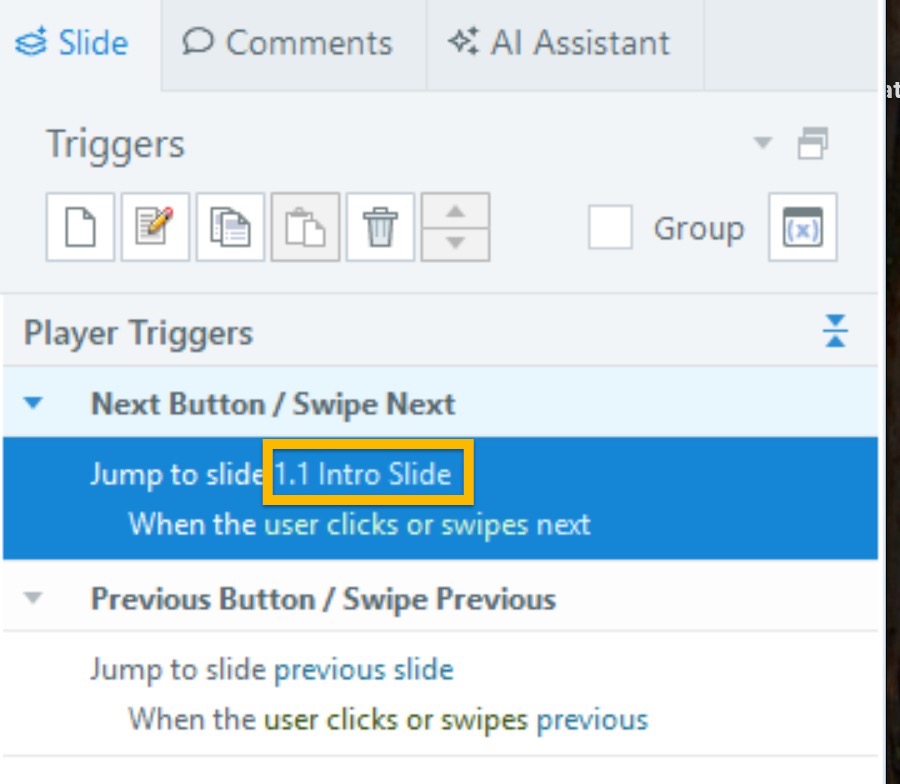
It's possible they meant that when setting a trigger, select Jump to slide and choose the first slide you created. In this example, I set a trigger to Jump to the Intro slide, which is the first slide I created.
If you have specific questions about your file, I'm happy to take a look at it here or privately in a case!
- RichardWatsonSuper Hero
Remember that a base layer slide property "revisit setting" does not override the slide layer revisit setting.
- VickiMurray-KurCommunity Member
Thanks all! Very helpful. I did not try that. Still learning! :)
- RichardWatsonSuper Hero
You are welcome. Glad we could assist.
Richard




Related Content
- 2 years ago