Forum Discussion

Hiding Layers When Seek Bar is Enabled
Hi everyone
I never use the seek bar on my courses, but a client has requested that I add one.
It works fine except for slides that have layers on them. When a layer is revealed, if you use the seek bar to rewind back to the start of the slide, the layers stays revealed.
Is there any way to trigger the layer being hidden again if the learner resets the slide back to the start using the seek bar?
Best
James
18 Replies
Appreciate you sharing your project with us, Charoma! Seekbar timelines can get tricky after scrubbing the seekbar when layers are incorporated.
This was a tough cookie! My team and I put our heads together and put all of the content from the layers on the base layer instead. With this approach, nothing will be out of sync with the voiceover when learners scrub the seekbar. Could this option work?
Since the file is private, I shared an updated version of it with you via email. Fingers crossed that solution works – we'll be standing by ☺️
- MichaelLawre947Community Member
A solution that has worked for myself was to add a cue point near the beginning of the base layer's timeline. Then I add a trigger that hides each layer when the timeline reaches that cue point.
- PaulColbyCommunity Member
Another Storyline issue. Shocking! Why add the functionality to hide layers when using the seekbar? I think probably because that would be too easy and make too much sense.
Michael Lawrence's solution to this issue seems to work, although it doesn't seem to matter where I put the cue point.
I have developed two other solutions to this issue, neither of which is ideal.
1. My layers are usually triggered by a button. If that is the case, use the trigger shown in the attached file (HideLayers1.jpg) to hide the layer when you use the seekbar to go to an area of timeline where the button that showed the layer no longer appears.
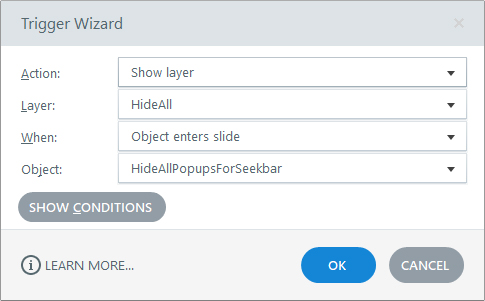
2. If that doesn't work, you can add an empty layer, let's call it "HideAll" . You can then add an invisible rectangle named "HideAllPopupsForSeekbar" onto your timeline and extend it according to where you want the layers to hide when using the seekbar. Then add the trigger shown in the attached HideLayers.jpg
- JaysonSamson-86Community Member
I had the same issue. The option 1 suggested by Paul Colby works for me.
- MarkLentzCommunity Member
With narrated presentations, I like to throw up the key words as they are spoken, and having them on separate layers works better production-wise compared to trying to cram them into the base layer. But I want the users to be able to use the seekbar without issues.
For me, an version of Michael Lawrence's solution: a cue point on the base timeline hiding all layers at the point the last one disappears, and a second doing the same thing at the very beginning of the time line. Then users can scrub away with no problem... Using the "Group Triggers" feature makes this solution appear neater.
I wish the HTML5 version could instead just "parse" the slide's entire timeline before it decides what should layers should be displayed at any point, but... as long as we can get it to work somehow in the meantime!
- BrianGrindleyCommunity Member
Thanks Paul, Option 2 worked for me. I don't like removing the drag bar on one slide as it looks messy and broken, so your workaround was perfect!
- GavinElliott-fdCommunity Member
Option 2 worked really well for me. Thanks Paul. It really should be a built in feature to hide all/selected layers when a learner uses the seek bar.









Related Content
- 10 months ago
- 29 days ago
- 5 months ago
- 2 months ago