Forum Discussion

How to hide Acceptable Responses in the Fill in the Blank Rise Block
Hi all
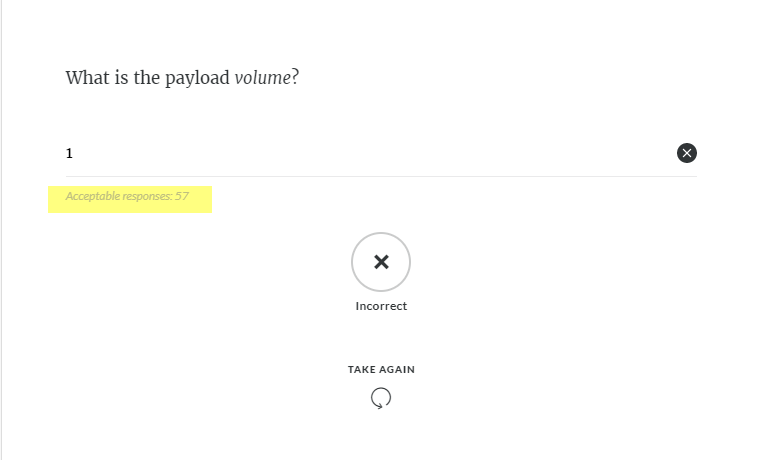
I'm trying to create a knowledge check using the Fill in the Blank Rise Block, and am having trouble hiding the acceptable answers. Is there a way to turn this off so learners can't see it?
I have attached a screenshot of the block with an incorrect response and I want to hide the acceptable response section (highlighted in yellow).
Thanks
Hello everyone, 🎉
I'm happy to let you know we released a new update for Rise 360, adding the new features below:
- Knowledge check blocks can be added directly to question banks, have their content width and answer colors modified, be required for training progress, hide the correct answer if answered incorrectly, and have a set number of retries.
There's nothing to install for web apps. New features and fixes are immediately available, though you might need to export your Rise 360 course again.
Let me know if you have any questions about this update!

73 Replies
- JohnMcDowellCommunity Member
I agree, we need this important feature! (C'mon dev team, the last response was over 2 years ago. This should've been fixed by now!)
- MollieMcCorm985Community Member
second, thirding and fourthing this request. It seems to already exist for the Quiz.
- PJalesCommunity Member
April 2023 and we still don't have this. So definitely adding my voice here as well and reinforcing that this would be so nice to have. In the meantime, I guess I will have to create a Storyline block only for that.
- HeatherJohns726Community Member
Still need this in 2023. Any update?
- MikeKlimczakCommunity Member
Why on earth would you build a knowledge check that reveals the answers by default?? How is that even a useful thing, let alone SO useful that you make it the only possible outcome of a knowledge check? Madness.
- PaulArrighi-f37Community Member
Hi folks -been three years - would love this capability!
- ChrisRichard173Community Member
Yep. hoping that is added soon.
- DianeThomasCommunity Member
I need this feature as well. We would like our learners to keep answering a knowledge check question until they get it right. There is an option for the learner to try answering the question again, but the correct answer is shown at the same time. That doesn't make any sense. I see that folks have been asking for a solution to this issue now for a few years, and I see that it has been offered in the quiz settings but not in the knowledge check settings. Any updates?
- XavierMangels-0Community Member
Any updates on this? even though I understand the Knowledge check is not scored, it would help to have the option to show or hide the correct answers, if we want learners to go back and review the lesson prior to the knowledge check, without just re-trying and click on the already shown correct answer.
- SarahBennettCommunity Member
Come on Articulate, you need to listen to your customers and actually update your product with stuff that people are crying out for. Rise is supposed to be a learning tool and yet updates to the knowledge check blocks are the most ignored requests. I was trying to use a 'Fill in the blank' knowledge check block as a way to password protect information until ready to move on. But since you give the 'acceptable answer' out without the option to restrict it, it's not serving its purpose. It's been YEARS since this was raised and it's clearly a bugbear for many people. Please can this be added to the features requests or bumped up a few places.








Related Content
- 8 months ago
- 6 days ago
- 4 months ago
- 6 months ago