Forum Discussion

Localization Closed Captions not appearing on Layers - HELP!
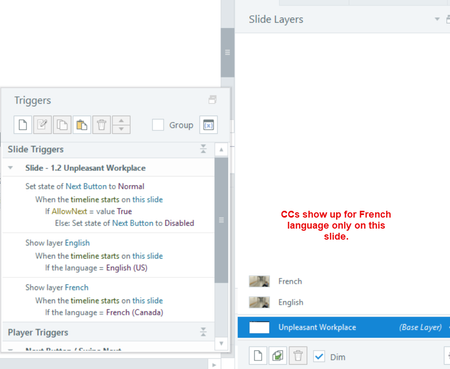

Hello! Can you include screenshots of how the triggers are set for language = French or language = English? That may help to problem solve.
Some possible solutions:
Storyline's localization system really seems to expect only one language per slide, so you can make separate slides instead of layers. I know that wasn't your original intent, but is the best way to confirm. You can duplicate the slides and have one for English and one for French.
You could also try playing both English and French audio objects on the base timeline and give each audio object its own CC file.
So that would mean import the english audio, import the french audio, and make sure they both start at 0 on the timeline.
For each audio import the closed captions, so they each have their own CC file.
Create a language variable (one for English and one for French) and use triggers to play the correct audio object. Make sure neither is on auto play.
Related Content
- 1 year ago