Forum Discussion

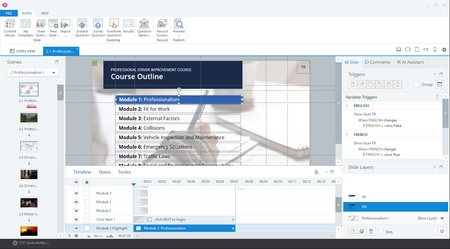
Menu Tabs Missing After Latest Update
- 7 months ago
Rolling back to the previous build (April 29 version 3.99.34516.0) fixed the issue.

I have the same exact issue after today's update. Just uninstalled and reinstalled, but still don't have menus other than File, Slides, and Help.
Articulate will likely provide a better solution soon, but for now rolling back the update allowed me to re-enable the tabs and continue working in Storyline. Here's how I did it:
- Open the Articulate desktop app.
- Expand the More Versions drop-down.
- Choose Other Versions.
- Select the April 29th version and click Install.
- RyanBoldan-efdb7 months agoCommunity Member
So, when I do the rollback and try to open the course that I was working on since the update, I get an error saying
Any ideas what I can do - I am on a deadline to launch this course today and now I can either open it and not be able to edit anything with current version - or not open it all if I roll back - sheesh!!!
- Ronnie_Pilman7 months agoStaff
Hi RyanBoldan-efdb - Project files with hidden accessibility issues won't open in earlier versions of Storyline 360. To restore compatibility, click the “Restore” or "Restore all instances" option to reveal all skipped accessibility issues. Once the accessibility issues are restored, save the project and then you'll be able to open the project in a previous version.


Related Content
- 4 months ago
- 1 year ago
- 10 months ago