Forum Discussion

Missing Fonts (according to Storyline) but Fonts Exist in System
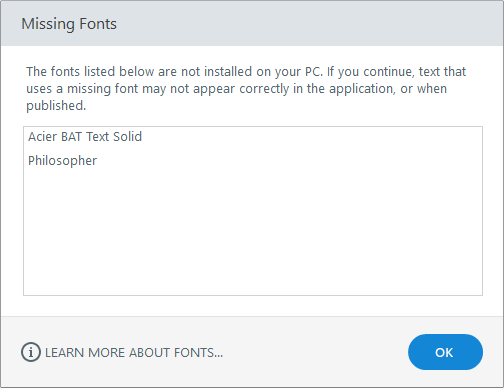
When opening my colleague's Storyline file, I get a message box (attached) telling me that the fonts listed are not installed on my PC. They are. I can see them in my fonts list and they are also in my Fonts folder. Once in Storyline, I can even select the font claimed to be missing from the Fonts menu. The problem is that it does not render it consistently or correctly. Is this a common problem and is there an easy solution?
112 Replies
- emilysteinbauerCommunity Member
Hello there
My team of instructional designers and I recently upgraded to Storyline 3. We have the newest version and update; however, we are still receiving error messages about missing fonts. From the previous comments, it seems that Articulate staff members are calling this issue a bug. Is it safe to ignore these error messages and continue building? Or do we need to install the fonts to avoid additional issues?
Hello Emily and welcome to E-Learning Heroes :)
We had an issue previously where this message was being received when the fonts were installed. This was addressed in Update 2 and you can see the details of this release and all release notes here.
Yes, please be sure the fonts are installed on your system. Let me know if that alleviates the error you are seeing.
- cindyandrussCommunity Member
What about a fix for Articulate 360? I'm getting the missing font message although the font is installed on my computer. When I view in Articulate Review, the font is indeed missing. All font in the entire output now displays in Times New Roman vs. Segoe UI.
- AllynciaWill915Community Member
Hi Team, I cannot get my fonts to appear on my storyline file. Was there a solution to this? I know I have the fonts on my pc, yet I get this attached error message. I had to restart once before when this happened. Please help since I cannot publish and create more havoc with reviewers who question all the changes.
- MalinCarlsson-aCommunity Member
FYI: This was also a problem when I changed from Storyline 2 to Storyline 3 now. The "use modern fonts" button was non excisting in the first download, I had to "search update" and install the update to even see the button :) But now my text are fine!
Whew! Sorry for the extra steps, Malin. It sounds like you may have had an older install of Storyline 3? You can always find the latest version linked here.
Let us know if you need anything else!
- GeoffHollywoodCommunity Member
This just happened to me as well. 10/30/2018.
I updated all of my Articulate apps earlier today so I am assuming I am on the latest and greatest? My process involved importing a PPT slide deck that uses a specific font we had created for marketing purposes. It's important that the right font be used. A replacement is unacceptable.
I have found that the font works everywhere else AND if I select a block of text I can select the original company font from the list and it then displays correctly. However - by that time the damage is done, as all of my slides use the wrong replacement font everywhere...so I basically need to manually edit everything again.
Seems like the import ppt feature needs to be examined for font identification issues. ???
Hi Geoff,
It sounds like the specific font you need is already installed on your system, is that right?
If you were to open a new Storyline file and insert a text box, is the specific font available in the dropdown list?
What font is used in the PowerPoint, and what replacement font is used in Storyline?
- MarianneSnellinCommunity Member
Hello
I still have the same problem, Story Line can't read the lines I need. By the way Microsoft Word and such programs can read the fonts, which mean that is installed on PC.
Hello, Marianne!
I'd like to get a couple more details from you. First, are you on the latest update of Storyline 360? To check, click the Help tab, then click About Storyline. You should see 3.22.17236.0 in the bottom-right corner.
Next, go to your Windows Control Panel > Appearance and Personalization > Fonts. Do you see those fonts listed in your fonts list?










Related Content
- 11 months ago
- 10 months ago