Forum Discussion

Multiple languages in one SCORM
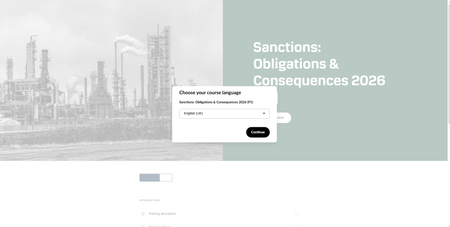

Hi Luck,
I’m glad you’re enjoying the option to publish multiple languages in one SCORM package!
When a multilingual Rise 360 course is hosted in an LMS, the learner’s language selection is saved with their progress. To choose a different language, their progress must first be reset in the LMS, which may require help from the LMS administrator.
After the reset, the learner can relaunch the course and select another language. They’ll start the training again from the beginning.
You can find more details in our Articulate Localization FAQs.
I’d love to understand when your learners would need to change languages. For example, would they be correcting an initial selection, or switching between languages to help them understand the content as they learn?
That context will help us better understand how language switching would support your learners.
- Luck1 month agoCommunity Member
Hi!
Thanks for the explanaton.
The answer to your question would be "they be correcting an initial selection".
Imagine if you accidently select Finnish language instead of English in a course with pre/post tests :)- JMManalili30 days agoStaff
Hello Luck,
Thanks for clarifying! I can see why resetting the course would feel like an unnecessary extra step just to correct an accidental language selection.
Your example helps us understand the need for learners to make that correction themselves, particularly in courses with pre- and post-tests. I appreciate you sharing it!
Related Content
- 7 months ago