Forum Discussion

NEW in Rise: Export for Translation
If you need to create courses in multiple languages, you’re going to love this new Rise feature. It allows you to export your course text to an XLIFF file* and then reimport it once it’s been translated. Like magic: all your text is replaced by the translated text. It’s that easy!
*XLIFF files are a translation industry standard, so if you’re working with professional translators, then you shouldn’t have any issues. But what if the translations are being done by a fellow coworker or friend? No problem! If you do a quick Google search, you’ll find a ton of free tools that allow you to easily edit XLIFF files.
183 Replies
- DarrenNashCommunity Member
I have a course with 14 languages to be used. As a test I exported the English version, sent it for translation and imported the Chinese version back in into a duplicate. It stays on "Processing Translation" for about 15 minutes and then just reverts back to default button of import translated text. The text still stays as English. Any advise?
Hi, Darren. Happy to help!
Make sure that you're duplicating your course first, and exporting the XLF file from the duplicate. You must import a translated XLF into the same course that you exported from. If you're still seeing a processing error, let us know!
- DarrenNashCommunity Member
So do I need to send 14 different XLF files to the translation system? A bit confusing...
Hi Darren! I'm going to put you in touch with our Support Engineers so we can take a closer look at why this is happening. You'll hear from someone on the team soon!
- TimRobinson-da0Community Member
Thanks for this feature. How do we process bulk translations when creating content for lessons that require multiple translations?
Also - when will Rise export to XLIFF 2.0 format? Thanks for asking, Tim!
You'll want to handle each translation separately following these 4 steps. There isn't a way to process multiple translations in bulk.
Currently Rise supports XLIFF 1.2, and we don't have plans to support XLIFF 2.0 right now. If that changes, we'll let you know!
- pedroCommunity Member
We're having an issue with xliff files generated from Rise 360 which we translate. It is that every paragraph is enclosed by a g element, for example
<trans-unit id="items|1|answers|0|title"><source><g id="tSAGXrO37EMvKsgh" ctype="x-html-p">True</g></source></trans-unit>
This is annoying because they appear as tags in the translation editor. Is there anything our client can do to stop this from happening? There is some actual formatting also enclosed by g elements, so I don't think deselecting "Include HTML formatting" on export is an option. Is it not possible for Rise 360 to assume a paragraph on every source and target element without it having to be spelled out like this? I believe the source element permits non-xliff attributes, so could it not be done that way?
Thanks Hello, Pedro!
What translation tool are you using?
The <g> tags are required for many translation tools, including SDL Trados and Smartcat. The tags enable the translation tool to translate formatted text (such as bold, italic, color and font size). Without the <g> tags, the file is not translatable in those tools.
If you have more questions about that, we're here to help!
- pedroCommunity Member
I understand that <g> tags are required to preserve formatting, which is fine. What's causing a problem is, as I say, when they are used to indicate an html <p> tag. Here is another example:
<trans-unit id="items|80|items|0|heading"><source><g id="8asNiPqNRyLjc3us" ctype="x-html-p"><g id="4T8XVNh-vPCU4aXZ" ctype="x-html-strong">New approaches</g></g></source></trans-unit>
The second nested g element indicating <strong> tags is not a problem. But the first one indicating a <p> tag is. Nearly every <source> element in the files we receive begins like this, apart from the varying id:
<source><g id="8asNiPqNRyLjc3us" ctype="x-html-p">
Is there another way for the author to indicate a paragraph without these extra g tags being generated? Or for the system to know to insert p tags without needing these extra g tags within the <source> element?
Thanks for clarifying, Pedro. There isn't a way to export your translation without those tags at this point, but I'll tag this discussion to update you with any changes we make that will help.
- pedroCommunity Member
Okay, thanks. Not having those tags in nearly every segment would certainly reduce the work for the translator and other people involved.
- JeffWeiserCommunity Member
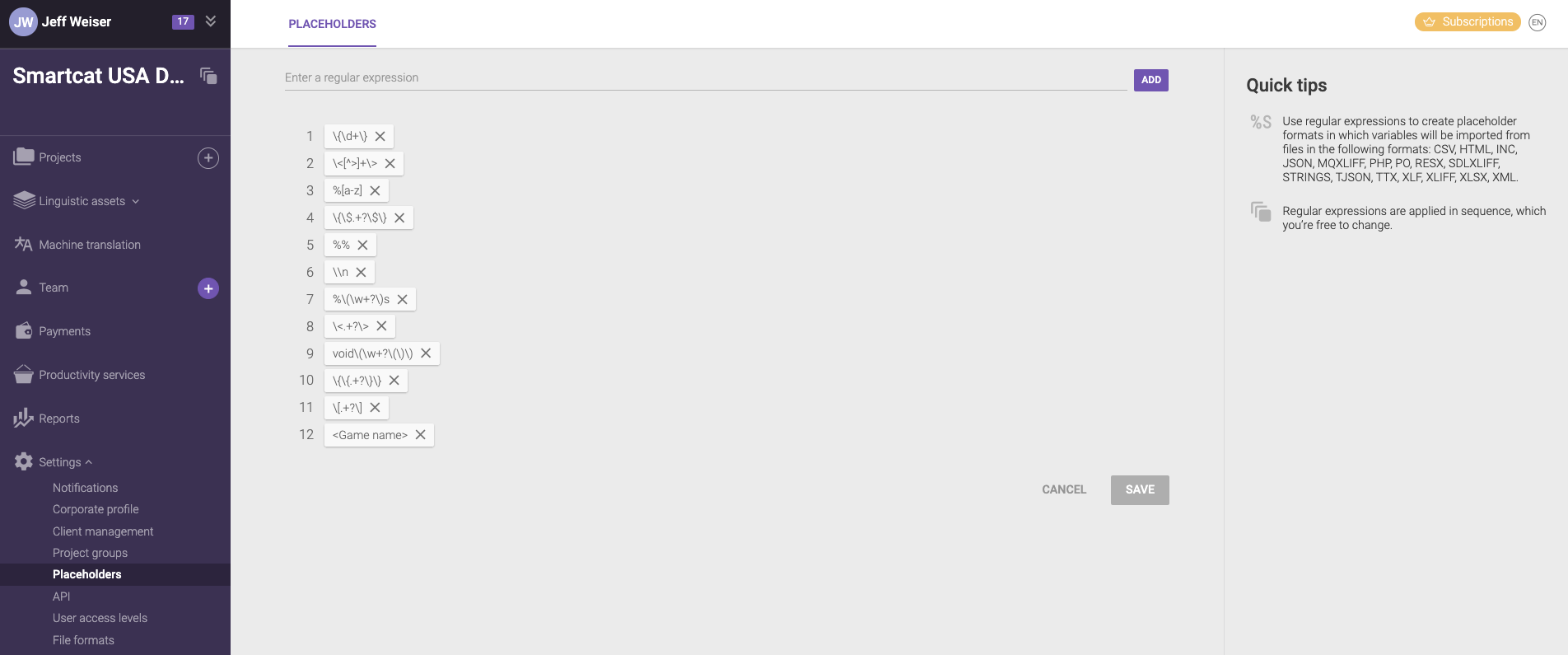
Hi Pedro, since Smartcat was mentioned here by Articulate on this thread, I'd like to contribute to how handle this type of tag issue. You can set up regular expressions in Smartcat on your own, otherwise our Product or Support team can give you a hand with this. Here is a screenshot of what the UI looks like on that screen. I'm on our Onboarding Team, and you can book some time for help with this, if you need a resolution quickly --> meetings.hubspot.com/jeff8. I help Articulate users every week, so no problem here.
- IrinaPoloubessoCommunity Member
Plus one to Pedro comment --
purple tags in the middle of the sentence confuse the translators and cause extra tress as they are worried of removing them occasionaly and destroy the formatting in the output course. - pedroCommunity Member
Well, tags in the middle of sentences are probably formatting that needs to be retained in the translation, so that's fair enough. But tags at the beginning and end of every paragraph I do have a problem with.
- JeffWeiserCommunity Member
Sure, I understand. We can try to set up the regular expressions so that Smartcat automatically isolates them. If you like, we can take 15 or 30 minutes (you'll see those options on my meeting link) to try to set it up. I have some extra features on the demo account so we can tinker a bit deeper, for the sake of trials.
- pedroCommunity Member
Thanks for that Jeff. I'm actually using MemoQ which does support regex, and also custom search/replace on import/export. The problem I'm thinking is that if you remove the tags, then there still needs to be something at the location in the file so that we know where to restore the tags, so there's no point. And they are not predictable - they actually do not occur on every paragraph, just most (I think it's headings where they don't), nor are they identical (different IDs each time). Also multiple sentences in a paragraph mean that opening and closing tags may be in different segments.







Related Content
- 10 months ago
- 9 months ago