Forum Discussion

Newbie needs Help
- 2 months ago
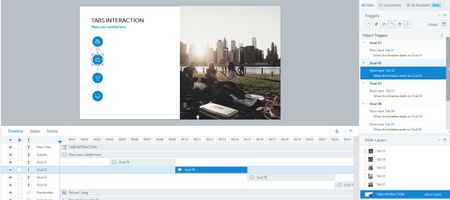
My best guess is that you copied all the icons and text from each separate tab layer and pasted them onto Tab 05 to show all tab content on that layer.
Since all icons are on the base layer, copying and pasting them into Tab 05 would also copy the triggers. As a result, all the icons and text may appear for a brief moment, but then disappear and show only Tab 01, because one of the duplicated triggers (eg. Show layer Tab 01 when the timeline starts on Oval 1). If so, make sure you remove all triggers from Tab 05.
Your setup clearly indicates that Layer 01 is being shown because one of the triggers on Tab 05 is forcing the Storyline to switch back to Layer 01.After removing the unnecessary triggers, your setup should show only Tab 05.
You can review the attached .story file for reference.


I agree with Judy's point's; it's difficult to diagnose without seeing the file. From your description though, one thing worth checking is that on Tab 5 the 'Hide slide layer when timeline finishes' is unticked. It could be that Tab 05 plays its own short timeline, hides itself, and uncovers Tab 01 sitting underneath (that's your "reverts to bullet 1").
- Absher2 months agoCommunity Member
Hi Dshaw -
When I try to drag and attach the .story file into this repsonse so you can see the programming, it says file not allowed. This is the link, but I worry that since I use the european version, it might not be openable.
https://360.eu.articulate.com/review/content/69688147-a722-41ee-b616-d1ad662e6538/review
- Absher2 months agoCommunity Member
Hi ! Nedim's solution worked! When I removed the triggers from the slide layer 05 it ended there. Apppreciate your imputting here!
Related Content
- 5 months ago
- 7 months ago
- 6 months ago