Forum Discussion

RebeccaLawre870
9 months agoCommunity Member
No longer receiving email notifications
Hello E-learning Heroes!
Has anyone possibly encountered an issue with no longer receiving notifications in your outlook when someone makes a comment or provides feedback on your project? I have c...

KristinaKish-f7
9 months agoCommunity Member
I'm having the same issue. Please advise what to do to resolve this issue.

KellyAuner
9 months agoStaff
Hi KristinaKish-f7,
I'm happy to help!
First, you may want to check your email notification settings for Review 360 comments. By default, you should receive email notifications for new Review 360 comments instantly. Here are the steps to check:
- Sign into Articulate 360 and go to Review 360.
- Click your profile icon in the upper right corner of the screen and select Notification Settings.
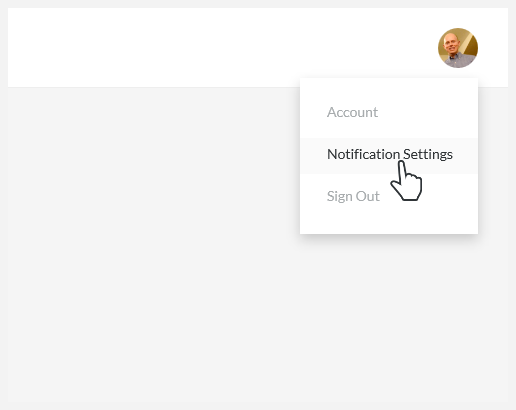
- Choose how often you want to receive email notifications: instantly, hourly, or daily.

- Click outside the notification settings menu to close it.
This is a global setting that applies to all your Review 360 projects (except projects you've muted). If you've confirmed your settings are correct and you're still not receiving notifications, I'd like to connect you with one of our support engineers so we can resolve this as quickly as possible!
Related Content
- 7 months ago