Forum Discussion

Problems with Quiz Review Texting Overlapping
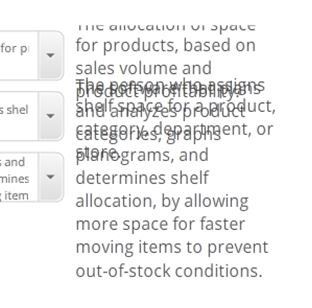

After some more thinking and testing, I'm somewhat certain the reason this is happening, in my specific case, is that the story files I'm working with started life within SL1 originally and were then converted to SL2. Somehow this "jiggled" one of the states of the answers for some quiz questions. The fix is somewhat bizarre, as well.
First, I determine which of the multiple choice answers is behaving this way by clicking through the states of each selectable answer. When I find the culprit, I'll open up 'Edit States' and then the truly bizarre happens. I merely click inside the text box (while editing that state) to place the cursor somewhere in the text, and the text instantly "jumps" back to where it ought to be. I don't actually move anything, text, text box or otherwise. Then I click 'Done Editing States' and presto! Fixed.
I'm not sure how the original quiz slides in the SL1 version of my course were set up by our instructional designers, whether they manually maneuvered the question's answer boxes/text or whether they just generated the question against the slide background and left it as-is. I suspect they may have moved the question text box and answer boxes around a bit for a more aesthetically pleasing result, but I'm not able to confirm that hypothesis.
Like I mentioned before, this course contains sensitive material and so I can't share it outside of my company, but if this happens with one of our 1500 other courses, I might be able to share those files with Articulate to help patch this for other users. I'll keep a sharp lookout!
Related Content
- 2 months ago
- 7 months ago