Forum Discussion

Rise 360 – Bug in Scenario block
When creating a Scenario block in Rise, I turned off the character on every screen because I don't want to use a character. On the overall scene settings, I have also switched 'Show character throughout scene' to 'Off'.
Nonetheless, the character is still appearing when I select the action 'Go to: End scenario'. Unfortunately, this screen seems to be ignoring the scene setting and switches the character back on regardless. Refer to screenshots attached.
Does anyone have a workaround for this bug (apart from deleting the .png file from the SCORM package after publishing)?
3 Replies
Hi KurikoA,
You came to the right place for help!
I understand you've switched the Show character throughout scene option to Off. Does this happen in the course preview and published output? Can you please confirm that you've switched this option off for the Scenario End scene as well?
After testing this out myself, selecting Scene 1 > setting Show character throughout scene option to Off, removed the character from the scenario except the Scenario End. I had to adjust this setting again in Scenario End as shown below.
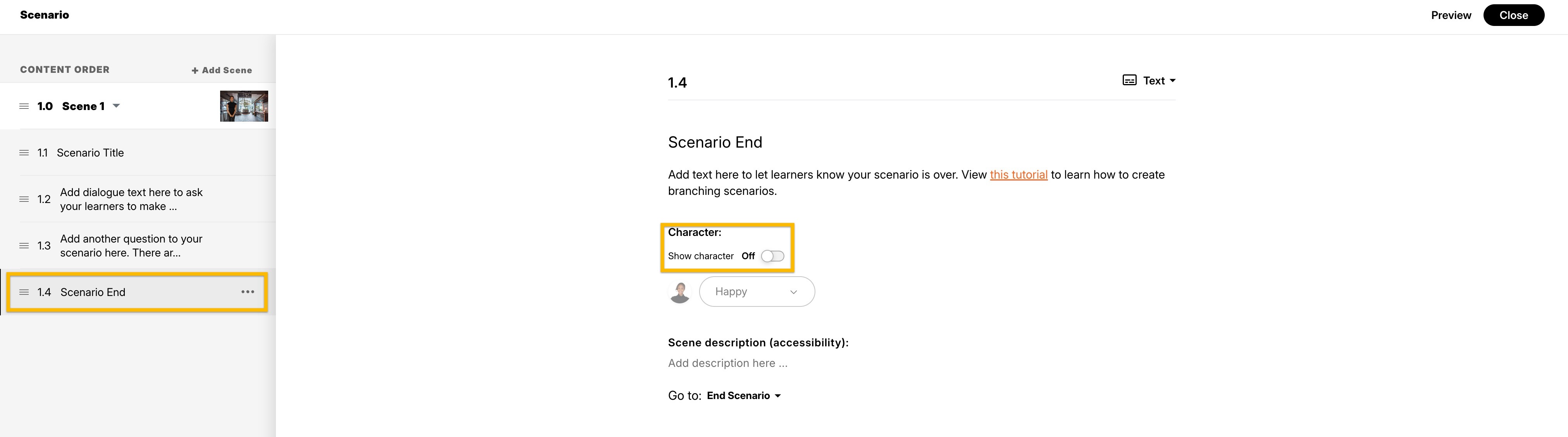
If the character still displays after making this adjustment, it'd be helpful to take a look at your course! You can share that with our team privately in a case, and we'll delete it from our systems once troubleshooting is complete.
- KurikoACommunity Member
Hi Kelly,
You'll see in the screenshots I attached to my post that the character setting was already switched to ‘Off’ on the ‘Scenario End’ screen when the issue occurred. Hence, why I reported it as a bug. So I'm not sure why you suggested that as the solution?
You'll also note that when you switch the Show character throughout scene option to Off, this automatically switches the character off for all slides in the scene, including the Scenario End slide. So, again, I'm confused as to why you suggested the need to do this as a separate step?
Anyway, the issue with the Scenario End screen (which I unfortunately only captured in screenshots instead of video) is no longer happening today – what a surprise!
However, the bug is still occurring when I use the 'End Scenario' action on any other screen in the scene. I’ve now recorded a narrated video (attached) to demonstrate this for you more clearly, but I notice that this forum doesn't accept video attachments. So I'll submit it as a private case and then loop back to this post for anyone else who's having the same issue.
Hi KurikoA,
Thanks for following up and sharing additional details with us. I'm glad to know that the issue with the End Scenario screen seems to have been resolved!
I understand you are planning to open a case with us to share the experience with the End Scenario action on another screen. I wanted to confirm if you've opened a case with us, as I'm not seeing it on our end. I'm happy to open a case on your behalf if you like!
Looking forward to hearing from you!




Related Content
- 10 months ago
- 8 months ago
- 10 months ago