Forum Discussion

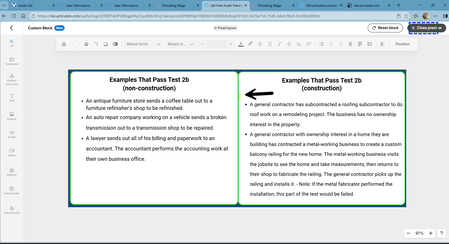
Rise 360 Custom Block "ghost object" read by NVDA
- 1 month ago
Couple of things you could try:
1. Click into the group 2 header, press Ctrl+End and then Backspace to remove any trailing empty line. Then click into the text box, press Ctrl+Home and check whether the cursor lands on an empty line or empty bullet above the first item; if so, delete it.
2. If that doesn't clear it, delete the group 2 header and text box, duplicate the ones from group 1 into group 2, and retype (or paste as plain text) the content.

Couple of things you could try:
1. Click into the group 2 header, press Ctrl+End and then Backspace to remove any trailing empty line. Then click into the text box, press Ctrl+Home and check whether the cursor lands on an empty line or empty bullet above the first item; if so, delete it.
2. If that doesn't clear it, delete the group 2 header and text box, duplicate the ones from group 1 into group 2, and retype (or paste as plain text) the content.
Thank you! I deleted group 2 and duplicated group 1. I was caught up in the "new-ness" of Custom Blocks and made it more difficult than necessary.
New block design, same old rules apply. lol
Thanks again. 😁