Forum Discussion

Rise code block feature requests
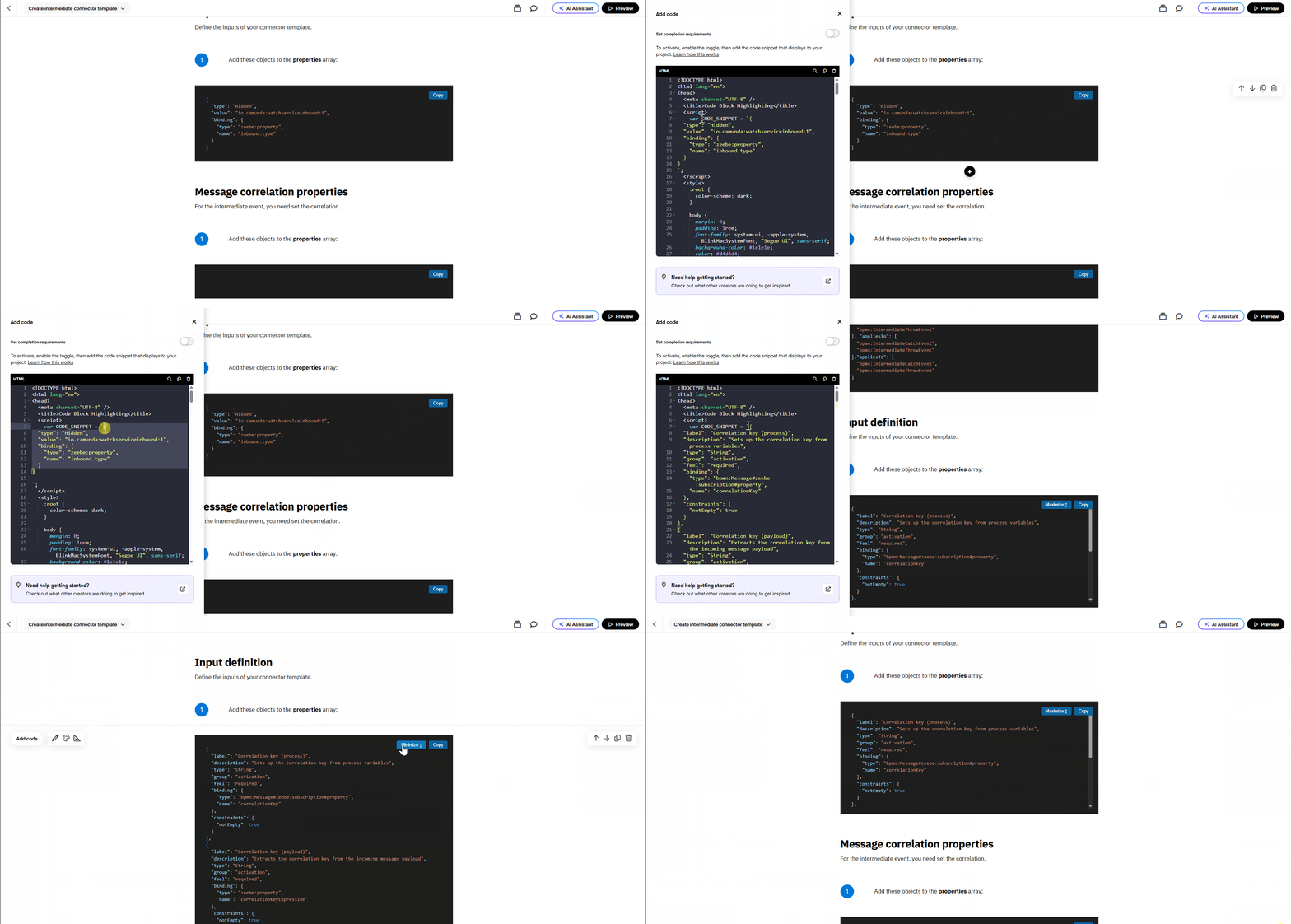
Hi there. My team uses code blocks heavily in our courses. We've created a custom code block template in order to provide code syntax highlighting, copy-paste functionality, and the ability for the learner to enlarge/shrink the code box size. Ideally, this would be available out of the box in the built-in Rise code tool (under Multimedia > Code snippet). We'd like to request implementing these features in the existing code block so that we don't have to use a custom block template as a workaround.
Ideally, the code block should:
- Provide an input field where the elearning dev can paste a snippet of code that will be visible to the learner.
- Provide automatic syntax highlighting with the ability customize the code colors and background color.
- Resize automatically according to code snippet length and screen size.
- Provide copy/paste button and a "click to view larger" button.
I've attached a GIF to show a demonstration of this functionality in the custom code block that we are currently using. Here is the code that we used to create it:
<!DOCTYPE html>
<html lang="en">
<head>
<meta charset="UTF-8" />
<title>Code Block Highlighting</title>
<script>
var CODE_SNIPPET = `{
"type": "Hidden",
"value": "io.camunda:watchserviceinbound:1",
"binding": {
"type": "zeebe:property",
"name": "inbound.type"
}
}
`;
</script>
<style>
:root {
color-scheme: dark;
}
body {
margin: 0;
padding: 1rem;
font-family: system-ui, -apple-system, BlinkMacSystemFont, "Segoe UI", sans-serif;
background-color: #1e1e1e;
color: #d4d4d4;
box-sizing: border-box;
}
.toolbar {
position: absolute;
top: 1rem;
right: 1rem;
z-index: 10;
display: flex;
gap: 0.5rem;
}
button.copy-btn {
background-color: #0e639c;
color: #ffffff;
border: none;
border-radius: 4px;
padding: 0.3rem 0.8rem;
font-size: 0.8rem;
cursor: pointer;
box-shadow: 0 2px 4px rgba(0, 0, 0, 0.3);
}
button.copy-btn:hover {
background-color: #1177bb;
}
button.copy-btn:active {
background-color: #0b4f75;
}
.editor-container {
display: none; /* hidden input area */
}
.code-container {
position: relative;
background-color: #1e1e1e;
border-radius: 6px;
padding: 1rem;
overflow: auto;
max-height: 300px;
transition: max-height 0.3s ease;
box-sizing: border-box;
}
.code-container.maximized {
max-height: none;
}
pre {
margin: 0;
font-family: "Fira Code", "Consolas", "Menlo", monospace;
font-size: 0.9rem;
line-height: 1.4;
white-space: pre;
}
/* Syntax highlighting tokens */
.token-punctuation {
color: #d4d4d4;
}
.token-key {
color: #9cdcfe; /* keys */
}
.token-string {
color: #ce9178; /* string values */
}
.token-number {
color: #b5cea8;
}
.token-boolean {
color: #569cd6;
}
.token-function {
color: #dcdcaa;
}
.token-variable {
color: #4ec9b0;
}
</style>
</head>
<body>
<div class="toolbar">
<button class="copy-btn" id="maximizeButton">Maximize ↕</button>
<button class="copy-btn" id="copyButton">Copy</button>
</div>
<!-- Hidden editor (used internally, not visible) -->
<div class="editor-container">
<textarea id="codeInput"></textarea>
</div>
<div class="code-container">
<pre><code id="codeBlock"></code></pre>
</div>
<script>
// ====================================================================
(function () {
var button = document.getElementById("copyButton");
var maximizeButton = document.getElementById("maximizeButton");
var codeContainer = document.querySelector(".code-container");
var codeElement = document.getElementById("codeBlock");
var inputElement = document.getElementById("codeInput");
var currentSnippet = CODE_SNIPPET;
var isMaximized = false;
function escapeHtml(str) {
return str
.replace(/&/g, "&")
.replace(/</g, "<")
.replace(/>/g, ">")
.replace(/"/g, """);
}
function highlightCode(code) {
var out = "";
var i = 0;
var len = code.length;
function isDigit(ch) {
return ch >= "0" && ch <= "9";
}
function isIdentifierStart(ch) {
return (ch >= "A" && ch <= "Z") ||
(ch >= "a" && ch <= "z") ||
ch === "_";
}
function isIdentifierPart(ch) {
return isIdentifierStart(ch) || isDigit(ch);
}
while (i < len) {
var ch = code[i];
// Strings: distinguish keys vs string values
if (ch === '"') {
var start = i;
var j = i + 1;
var escaped = false;
while (j < len) {
var c = code[j];
if (!escaped && c === "\\") {
escaped = true;
j++;
continue;
}
if (!escaped && c === '"') {
j++;
break;
}
escaped = false;
j++;
}
var str = code.slice(start, j);
// Look ahead to see if this string is a key (string followed by :)
var k = j;
while (k < len && /\s/.test(code[k])) k++;
var isKey = code[k] === ":";
if (isKey) {
out += '<span class="token-key">' + escapeHtml(str) + '</span>';
} else {
out += '<span class="token-string">' + escapeHtml(str) + '</span>';
}
i = j;
continue;
}
// Numbers
if (isDigit(ch) || (ch === "-" && i + 1 < len && isDigit(code[i + 1]))) {
var nStart = i;
var n = i + 1;
while (n < len && (isDigit(code[n]) || code[n] === ".")) {
n++;
}
var num = code.slice(nStart, n);
out += '<span class="token-number">' + escapeHtml(num) + '</span>';
i = n;
continue;
}
// Identifiers (variables, booleans, functions)
if (isIdentifierStart(ch)) {
var idStart = i;
var t = i + 1;
while (t < len && isIdentifierPart(code[t])) {
t++;
}
var ident = code.slice(idStart, t);
// Look ahead for function call
var u = t;
while (u < len && /\s/.test(code[u])) u++;
var isFunc = code[u] === "(";
if (ident === "true" || ident === "false") {
out += '<span class="token-boolean">' + escapeHtml(ident) + '</span>';
} else if (isFunc) {
out += '<span class="token-function">' + escapeHtml(ident) + '</span>';
} else {
out += '<span class="token-variable">' + escapeHtml(ident) + '</span>';
}
i = t;
continue;
}
// Punctuation
if ("{}[],:".indexOf(ch) !== -1) {
out += '<span class="token-punctuation">' + escapeHtml(ch) + '</span>';
i++;
continue;
}
// Everything else
out += escapeHtml(ch);
i++;
}
return out;
}
function renderCode(code) {
codeElement.innerHTML = highlightCode(code);
// Check if content needs scrolling after a brief moment to let rendering complete
setTimeout(function() {
var needsScroll = codeContainer.scrollHeight > codeContainer.clientHeight;
if (needsScroll) {
// Content is larger than container, show maximize button
maximizeButton.style.display = "block";
} else {
// Content fits, hide maximize button and adjust container height
maximizeButton.style.display = "none";
codeContainer.style.maxHeight = "none";
codeContainer.classList.add("maximized");
}
}, 10);
}
function copyText(text) {
// Try modern Clipboard API first, but catch permission errors
if (navigator.clipboard && navigator.clipboard.writeText) {
return navigator.clipboard.writeText(text).catch(function() {
// Fallback to execCommand if Clipboard API is blocked
return fallbackCopy(text);
});
}
// Use fallback directly if Clipboard API is not available
return fallbackCopy(text);
}
function fallbackCopy(text) {
var textarea = document.createElement("textarea");
textarea.value = text;
textarea.style.position = "fixed";
textarea.style.opacity = "0";
document.body.appendChild(textarea);
textarea.select();
try {
var success = document.execCommand("copy");
document.body.removeChild(textarea);
return success ? Promise.resolve() : Promise.reject(new Error("Copy failed"));
} catch (err) {
document.body.removeChild(textarea);
return Promise.reject(err);
}
}
button.addEventListener("click", function () {
copyText(currentSnippet).then(function () {
var original = button.textContent;
button.textContent = "Copied!";
setTimeout(function () {
button.textContent = original;
}, 1500);
}).catch(function (err) {
console.error("Copy failed:", err);
var original = button.textContent;
button.textContent = "Copy failed";
setTimeout(function () {
button.textContent = original;
}, 1500);
});
});
maximizeButton.addEventListener("click", function () {
isMaximized = !isMaximized;
if (isMaximized) {
codeContainer.style.maxHeight = "none";
maximizeButton.textContent = "Minimize ↕";
} else {
codeContainer.style.maxHeight = "300px";
maximizeButton.textContent = "Maximize ↕";
}
});
// Initial render from CODE_SNIPPET
inputElement.value = CODE_SNIPPET;
renderCode(CODE_SNIPPET);
// External API: call window.setCodeBlock("...") to update from outside
window.setCodeBlock = function (newCode) {
currentSnippet = String(newCode || "");
inputElement.value = currentSnippet;
renderCode(currentSnippet);
};
})();
</script>
</body>
</html>
1 Reply
Hello TSwenson85,
Thanks for sharing your insight with us! We hear that you’d like the Rise Code Block to support pasted code, automatic syntax highlighting with customizable colors, responsive sizing with expand/collapse controls, and a one-click copy option so learners can easily read and reuse code without extra work on your end.
We’ve shared your feedback with our product team. We'll be sure to share future updates in this thread so all are in the loop!
Thanks for helping make Rise 360 even better!

Related Content
- 11 months ago
- 9 months ago
- 2 months ago
- 4 months ago