Forum Discussion

DeepakMohanty-5
10 months agoCommunity Member
Rise: Extra padding appears in divider block
Hi,
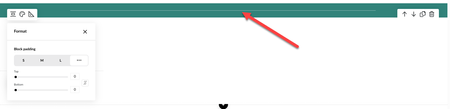
It appears there's an issue with my Rise project. The divider (image 1) that I typically insert before the course summary is displaying too thick, even when the top and bottom padding are set t...

PhilWade
9 months agoCommunity Member
This bug appears to be fixed. Is that right or am I just used to it now?

KLang
9 months agoCommunity Member
Lol you've just gotten used to it. It's definitely still not right.
- JoseTansengco9 months agoStaff
Hello everyone,
I wanted to share that this behavior is intentional so that Rise authors retain access to the divider block menu toolbar. Divider blocks retain a minimal amount of padding in authoring mode so that you don't lose access to the block menu toolbar. This remains even if the block padding is set to zero. Rest assured, this minimal padding is visible only in authoring mode and isn’t shown in Preview mode or your published output.
Let me know if you have any questions!- PhilWade9 months agoCommunity Member
Thank you, sir. I can confirm it was tricky moving our divider blocks after changing the margins to zero.

Related Content
- 9 months ago
- 7 months ago