Forum Discussion

Setting state when revisiting foe multiple slides
This used to work. In Story View, select all the slides that you want to set to your desired state when revisiting, then in the Side Properties, select it. This would change how all selected slides behave when revisited. The past several times I have tried this, with multiple courses, when I click the pull-down to get the options and select Initial State, nothing happens. The box turns blue, but no menu options appear, and it is unable to change the action.
17 Replies
- JudyNolletSuper Hero
BarryHollembeak: You're right. It was possible to adjust the revisiting Slide Properties for all selected slides in Story View.
I also can't change the "Slide advances" setting in Story View. And neither setting works in Story View even if I only select one slide.
EricSantos: I'm guessing this is a bug that came with the latest update. (I certainly hope that Articulate didn't purposely change this functionality.)
What's the scoop?
- BarryHollembeakCommunity Member
I am also noticing that you cannot change the Player Features on more than one slide at a time anymore. This whole Slide Properties feature, which used to allow for making quick and easy changes to multiple slides, is generating a lot of additional work for developers.
- JudyNolletSuper Hero
BarryHollembeak: I just submitted a case (#01310956) about the Slide-Properties-in-Story-View issue.
I'd still like to see someone from the staff comment here, so I'll tag a few more: LucianaPiazza, LaurenDuvall, StevenBenassi
- JudyNolletSuper Hero
BarryHollembeak: I heard from Articulate. The support person couldn't replicate the issue. They gave me some typical troubleshooting steps about using the latest update and working on my local drive (which I always do). Also gave me some steps about my monitor display settings (which seems completely unrelated, and I didn't bother with those).
However, I did quit Storyline and reopen it. The problem went away.
For the record, I had already recorded a Peek video of the issue, and I sent that link to support in my reply.
I also said this: It might seem like this case could be closed now. However, I believe that Articulate should investigate further. There's still an open question: Why does the recent update initially cause this problem and require restarting to fix it?
JesseTaber: I hope you and your staff will look into this. This may seem like a minor issue, and it is easily fixed (at least, for me) by restarting Storyline. But why should even that be necessary? Personally, I'd prefer fewer software updates with a more stringent validation process. Then maybe there'd be fewer problems in the community that say "Ever since the latest update..."
JudyNollet thank you for bringing this to my attention. Testing functionality like this is part of our normal release validation process, but this particular issue doesn't replicate consistently, so no one saw this internally before release. Still today, no one internally can replicate, which means there's little for us to go on for further investigation. That said, while your particular case was closed, we are continuing to look into this. If we're able to find a root cause I promise a fix will be issued.
I understand that it's frustrating. Storyline is incredibly complex, and the fact that it doesn't run in a sandboxed browser environment means we're subject to all the additional complexity that different version of the Windows operating system, hardware drivers (or virtualization), and corporate IT policies bring into the mix as well. This means there are essentially infinite different configurations that can all bring subtle behavior changes like this. I don't say this to make excuses, but rather to bring an honest and transparent view of the challenges inherent in keeping Storyline's quality and stability high.
All of that said, we are investing heavily in the underlying platform that Storyline is built on, and that should bring more predictability and stability to the application as a whole; hopefully reducing the number of unpredictable issues like this.
- BarryHollembeakCommunity Member
Thanks Judy, Jesse, Eric, and all involved,
I went through the uninstall and reinstall, but that did not change the behavior. I shut down and reopened the app, still no change. I then uninstalled the program, deleted all the files that I read in other posts that may also need to be deleted, turned off my computer, threw some salt over my shoulder, went to the gym and punched the bag a few times, and then had three shots of good whiskey, before turning my computer on and reinstalling the apps. Right now it is working. My best guess (because I am not a programmer) is that the initial update did not delete or override some files that I had to manually remove before this worked. Or maybe it was the whiskey that did the trick.
- JudyNolletSuper Hero
Glad you got it working. (Maybe try whiskey first next time. 😆)
- BarryHollembeakCommunity Member
Well, it worked for a little while, and now the issue is back. A nice time-saving feature that once worked, hope they can get this figured out.
Hi BarryHollembeak,
Thanks so much for sticking with this and for sharing all the details along the way. I can understand how frustrating it is, especially since this is a feature you rely on and it’s been working inconsistently.
Also appreciate you jumping in here as well, JudyNollet, and for sharing what you’ve seen.
I did some testing on my end using the latest version of Storyline and wasn’t able to replicate the behavior when adjusting Slide Properties across multiple slides in Story View.
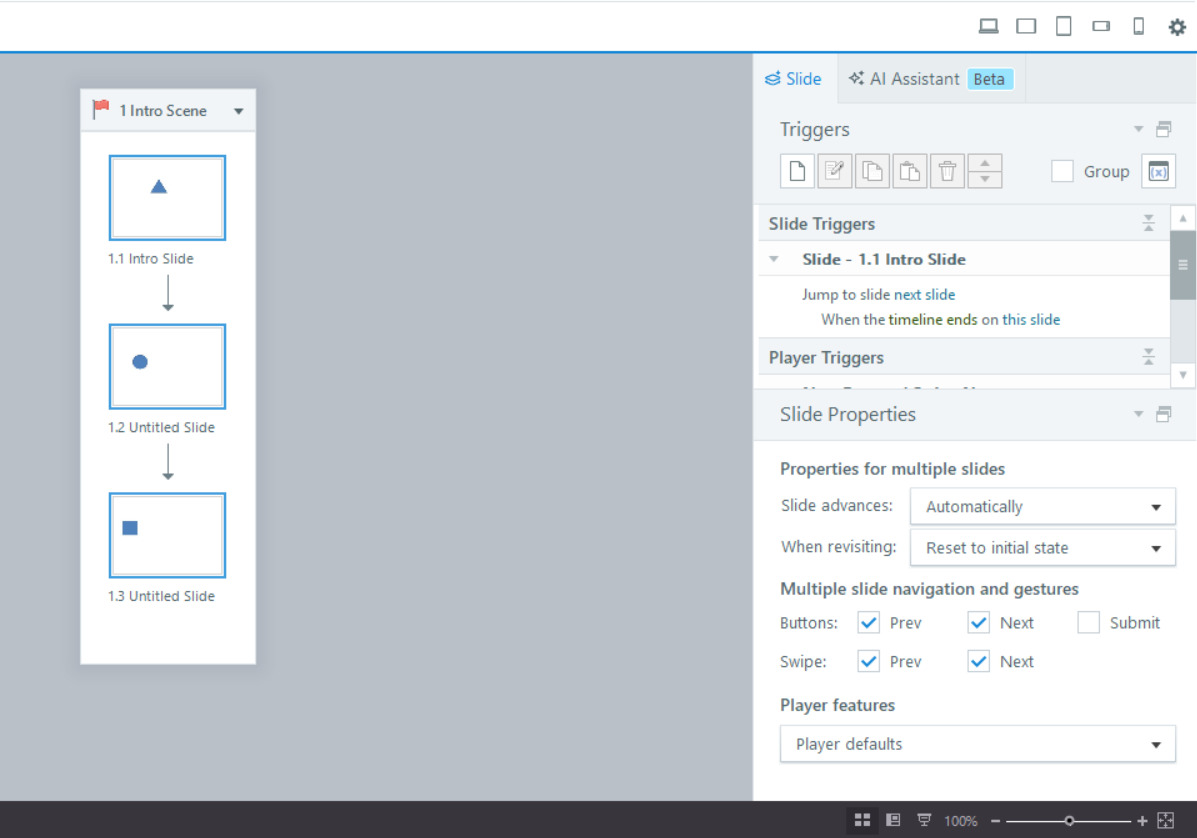
Since this seems to be inconsistent and was temporarily resolved at one point, there’s a chance it could be related to a local installation or environment-specific issue. I recommend trying the steps in this article, which walks through clearing local user data for Articulate 360 apps:
If the issue continues after that, please connect with our support team by creating a case so we can investigate further with you.
Thanks again for raising this and for your patience while working through it. It’s really helpful for us to understand what you’re experiencing.
- JeremyKauffman1Community Member
I'm hopping in to resurrect this thread, as I have had this issue for a while and it finally got to where I needed to search for a fix. I'm on v 3.116.36776.0, the 04/28/2026 release, but I've noticed (and had been grumbling about / ignoring) for at least a month across different project files and a couple of updates.
To be specific, the When Revisiting property doesn't work when multiple slides are selected. (I saw another comment about the navigation/submit buttons, and those check boxes actually are working for me.)
EDIT: I was slightly mistaken. When Revisiting doesn't work in Story view at all - not just when selecting multiples. I have to open a slide and then walk through each thumbnail down the film strip to change this property.
Bummer that the issue isn't seen consistently in order to facilitate a fix.
- BarryHollembeakCommunity Member
Sometimes, if I uninstall Storyline and then reinstall it, the feature will work 1 time. Often, I need to uninstall the program and remove all the user files, and then everything works for a couple of times before going south.
Hi BarryHollembeak,
I'm so sorry to hear you're experiencing this intermittently. Appreciate you following up!
As a troubleshooting step, I recommend checking that there haven't been any changes to your device recently. You can reference our System Requirements to see if there is anything that needs to be adjusted.
If you're open to it, we'd be happy to see a screen recording of your experience within a support case so our team can investigate this further.
Looking forward to hearing from you!
- BarryHollembeakCommunity Member
I created case number 01372510.





Related Content
- 3 months ago
- 2 years ago