Forum Discussion

Sorting Activity in Rise
Anyone have an example of a sorting activity in Rise they care to share?
38 Replies
- ManishaSachdev-Community Member
Hi Katie,
Thank you so much for making a sample Rise Course to translate what you explained. Apparently, I have figured how to change the background color. Doing so makes the entire background (including the category buckets) the same color which according too may be an accessibility issue as well. And making it colorless doesn't blend well with the rest of the lesson. Card sorting is a great way to knowledge check and I think it should be flexible to design.
I am working on Rise a lot these days , I have another pressing question on Card Sorting - So after completing the card sorting activity, a score is issued. Is there a way to monitor or measure how the learners are doing with the sorting activity? Foe examples, How many times they tried to do it? or reviewed the activity? This will help us understand where our learners are? And we can provide additional support to who are struggling? Also, by any chance can we intergrade the Rise course results in our LMS?
Thanks for always being prompt with your response.
Regards,
Manisha
Hi Manisha,
Great point about accessibility and the color changes. Also, with a sorting activity you'll want to look at the steps here to navigate using your keyboard for accessibility:
- Use the Tab key to select a category (drop target).
- After selecting a category, use Tab and Shift+Tab or the Left and Right arrow keys to cycle through the categories.
- Select the category that matches the item that’s currently displayed, then press Enter or the spacebar to move the item to the selected category. If the answer is correct, the item will move briefly to the category then disappear. If the answer is wrong, the item will shake briefly, then you can select a different category and try again.
The sorting activity isn't graded, as it's designed as a stop and check for understanding vs. a graded question type. I'll let my team know that you'd like to see this as a question type, and we'll keep you posted here if that becomes a feature request!
- PatrickBrenn623Community Member
Hello, is there a way to adjust the size of the boxes in the sorting activity to fit more text? Thanks
Hi Patrick,
Unfortunately, that’s not currently possible. If you have time to log a feature request and tell us more about your specific needs, that would be super helpful!
Let me know if there’s anything else I can help you with.
- MarisaGeisserCommunity Member
Hello - This block really needs to be updated to have zero word limitations. We should be able to put as much text on the tiles as needed.
For example, I used this sorting exercise to help colleagues understand what is and is not appropriate behavior in the currency exchange industry. For English I had no issues. I then had to get the course translated for our Spanish speaking colleagues. Now I am experiencing a big issue. The way we type sentences in English is different in Spanish (obviously). More words are being used in the Spanish translation and now I am having issues with the activity as the tile is cutting off the words do to character limitations.
Can you please put in submission box to remove the limited text on this activity? Please respond to this comment if you agree!
Hi Marissa,
I totally get that the character limit can be frustrating, especially when it comes to translation. I'm sorry to hear that you've run into an issue here.
I went ahead and submitted a feature request on your behalf. I'll let you know via this thread if I have any updates.
In the meantime, if there's anything else I can do to help, please let me know!
- PamelaCoffinCommunity Member
I would like to be able to add images to the sorting activity. Example would be sort the images into the correct categories. Is there any other way to move or match an image to another image or text? It doesn't look like images are an option in the matching block either.
Hi Pamela,
Right now, there isn’t a way to match images in Rise 360, but we do have a feature request logged for that capability so I'll go ahead and add your voice to that discussion.
You're now subscribed to this conversation which means as we share updates here, you’ll automatically be notified.
In the meantime, if there’s anything else I can do to help, please let me know!
- LindseyKnightsCommunity Member
Hi community - I'm trying to build an interaction where learners start with 30 options, and I'd like them to sort them down to their top 5. The exercise is around finding what truly motivates someone at their core.
So first level would be "Of these 30 options, sort them all into 'Not motivating', 'somewhat motivating', or 'motivating'", then second would be "of all the ones you put into the motivating category, choose your top 10. Then third level would ask them to whittle down to their top 5.
Any recommendations or resources I could be directed to?
Hi Lindsey,
This sounds like something you could build out in Storyline 360 (and import into Rise 360, if you'd like). Here are some resources to help you figure out how to build it:
- Storyline 360: Drag-and-Drop Questions
- Storyline 360 and Storyline 3: Understanding States, Layers, and Triggers
- Storyline 360: Creating Interactions with Variables
If you get stuck while you're building it, I recommend reaching out to the community in the Building Better Courses forum.
Let me know if there's anything else I can do to help! :)
- YaelKentCommunity Member
I'm also finding that I need to add more content into the sorting activity, but it won't let me add additional wording. Would love for this to expand. Please keep me updated if anything changes here!
Will do!
- DanielEgerer-aeCommunity Member
Hi Leonie,
Thanks for reaching out! Unfortunately, due to space constraints, learners may not see the entire text in sorting activities on smaller screens. Check out this article for more details.
I had a look at your screenshots and it seems like you may be using a custom font. I tested it out on my end using the default font and I'm able to see 3 lines of text. If you can, I would use a different font or make the font size smaller.
Let me know if you have any other questions.
- DanielEgerer-aeCommunity Member
Hi Allison,
thanks for your quick reply. We used a default font as well. As far as I can see, there isn't an option to making the font size smaller within the sorting activity, is it?
We tested it on different phones (iPhone, Samsung, Honor) and in review as well and we had the same problem in any case.
We think, the problem is, that the Text isn't responsive enough to fit in the sorting activity frames on phones.
Do you have any other suggestions?
Thanks in advance :)
- PatrickMurphy-aCommunity Member
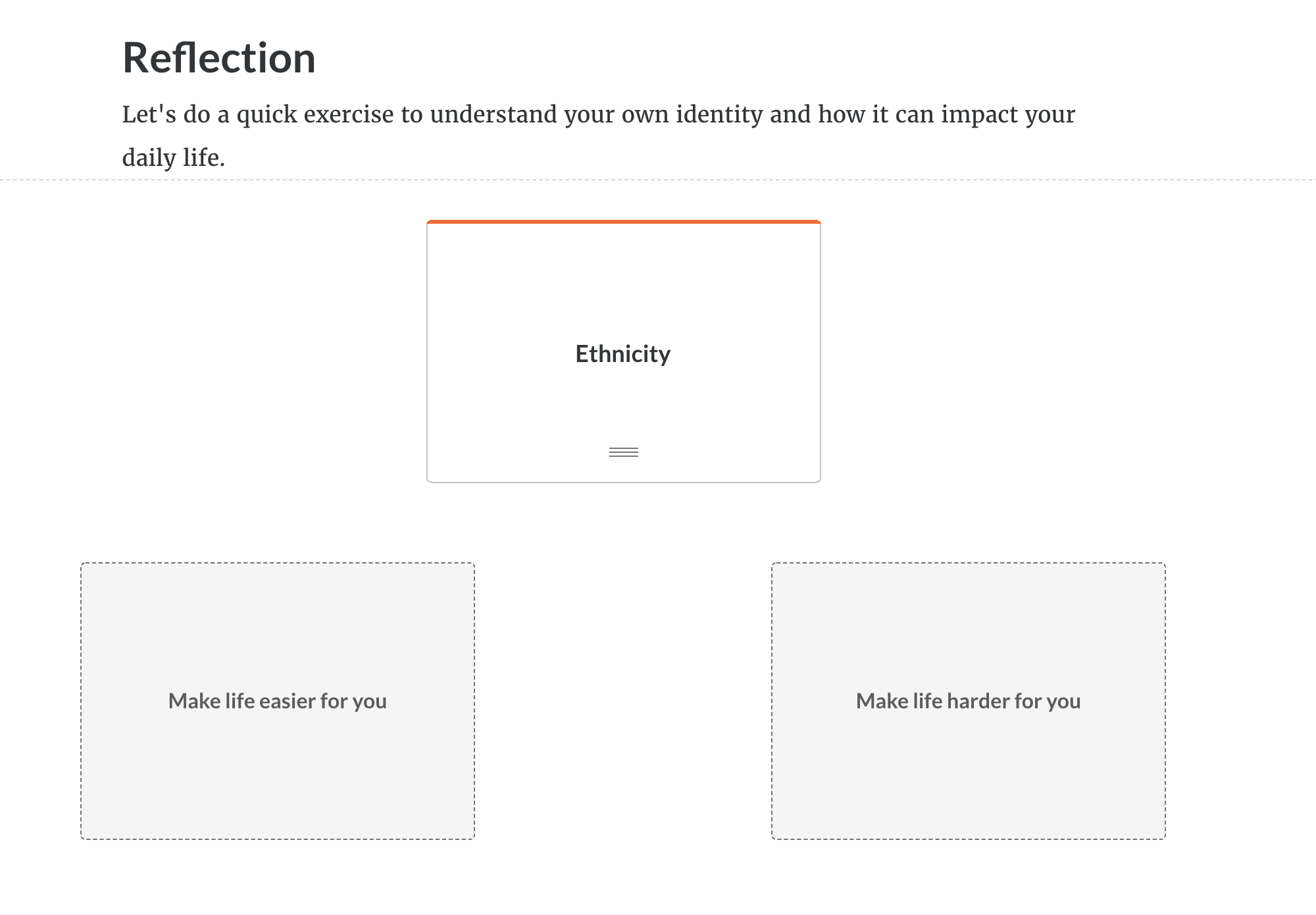
Hello, Articulate 10!
That's a cool interaction! Since the sorting block requires right/wrong answers, you may want to try another block type. Here are some ideas for you:
- Use a checkbox list block: "Select any options from the list that make life harder for you."
- Use a flashcard block: "Flip any cards that make life feel harder for you"
- Use a Storyline block, and design the interaction to mimic the sorting block, but with no right/wrong answers.
Hopfully that sparks some inspiration!













Related Content
- 26 days ago
- 11 months ago
- 5 months ago
- 3 months ago