Forum Discussion

Story View Slides Position Glitch - Slide Order Does Not Respect Numbering
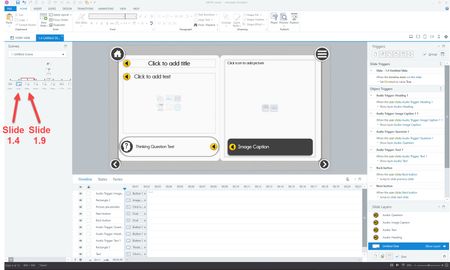
Thanks, Sandeep. On the TOC slide, I followed your tip and deleted the existing shapes (pseudo buttons) and added them in order, then added the triggers in order. After this in the Story View, the slides were in a logical order. However, as soon as I started messing with jump to triggers on other slides, the positions of the slides randomly changed. I deleted all the triggers that involved jumping to other slides, dragged the slides into the correct positions, then added triggers again. The positions are respecting my wishes for now, but I suspect, they'll randomly change when I add or edit triggers for other things. This approach (copying and pasting each shape one-by-one) took way longer before when I copied and pasted groups of shapes in a logical order.
It's a time-waster for me why the visual position of slides in Story View will change based on the order in which shapes/buttons on another slide were added. As I mentioned before, this wouldn't be as big a deal, except that it directly affects how an editor can page or click through thumbnails in the left panel in Story View, especially in branched scenarios, This can lead to errors in triggers that are harder to troubleshoot in Story View because the slides are not in a logical order and cannot be forced to remain in that logical order when I drag them into place.

Hello Robert,
Happy to chime in!
I did a simple test on my end and saw that the order in which the slides are displayed in Story View is initially controlled by the order of the triggers in the slides. Here's a screenshot so you can see what I mean:
I added the triggers to connect to the slides in this order: Slide 1.4, 1.6, 1.2, 1.5, 1.3, and this is the order that you see the slides in Story View.
Taking a look at your Peek 360 video, I couldn't immediately identify why Slide 1.9 was slotted in between 1.4 and 1.5, so we'll need to take a closer look at the triggers to figure out what's happening.
Would you be willing to share a copy of your project file here or in private by opening a support case for testing? We'll delete it when we're done!
- RobLengacher2 years agoCommunity Member
Thanks, Joe. I just submitted a support case and linked it to this discussion.
Related Content
- 1 year ago