Forum Discussion

Story View Slides Position Glitch - Slide Order Does Not Respect Numbering

Hello Robert,
Happy to chime in!
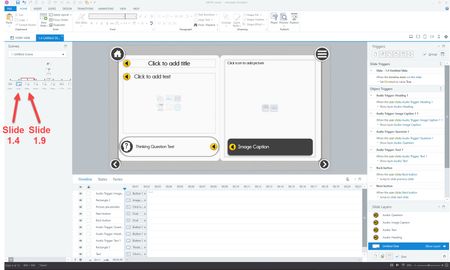
I did a simple test on my end and saw that the order in which the slides are displayed in Story View is initially controlled by the order of the triggers in the slides. Here's a screenshot so you can see what I mean:
I added the triggers to connect to the slides in this order: Slide 1.4, 1.6, 1.2, 1.5, 1.3, and this is the order that you see the slides in Story View.
Taking a look at your Peek 360 video, I couldn't immediately identify why Slide 1.9 was slotted in between 1.4 and 1.5, so we'll need to take a closer look at the triggers to figure out what's happening.
Would you be willing to share a copy of your project file here or in private by opening a support case for testing? We'll delete it when we're done!
Thanks, Joe. I just submitted a support case and linked it to this discussion.
Related Content
- 1 year ago