Forum Discussion

Storyline - Remove AI voice from My Voices
- 1 year ago
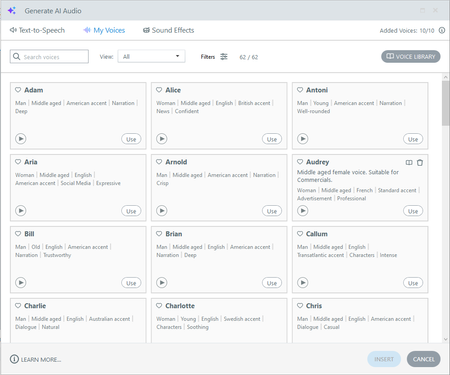
Hello YaoyaoChen-6099 , in your first screenshot, notice the "Audrey" voice has a little trash can icon. You can use that to remove the voice from your library.
Also, if you'd like an easy way to see all of your library voices at once, enable the filter and then select "Library" from the dropdown.


Hi JoseTansengco - The added voices counter says '0/0'. I can use the voices already in the 'My voices' list, the 52 already there. But I would like to use voices from the voice library. When I find a voice I want from the voice library list, if I hover over either the 'Add to My Voices' button or the 'Use' button for that voice it shows this message: "You reached your limit of voices. To add a new voice, remove one from your list" But I am unable to remove any from the 'My Voices' section as none of them have the trashcan icon next to them as in your screenshot.

Hello JessicaHoskin,
It's really strange that the counter shows 0/0. My hunch is that Storyline 360 is unable to connect to the service that validates how many voices you can use. As a troubleshooting step, please ask your network administrators to add all the endpoints listed in this article to your organization's allowlist. This should ensure all services necessary to operate Articulate AI are reachable.
If the issue persists, please open a case with our support team here to connect with a support engineer for further troubleshooting. Let us know how it goes!
- JessicaHoskin10 months agoCommunity Member
Hi JoseTansengco
I'm not sure what the problem was as it was only affecting me and none of the other staff in my organisation. However, a regularly scheduled update today seems to have fixed the issue. Thank you.
Related Content
- 7 months ago
- 24 days ago