Forum Discussion

Storyline 3 Crashes on iPad Safari and Chrome
Storyline Version 3 courses crash when clicking Next or Previous on an iPad on SCORM Cloud and another LMS called Ti LMS.
- Sent case to Articulate support
- Published as HTML5 or HTML5/flash
- SCORM 1.2 (experienced crashes on 2004 3rd Edition as well)
- iPad/IOS 10.3.1
- Does not crash on laptop and desktop browsers such as Safari, Chrome, and FireFox.
- Courses range for 40-70 screens, SCORM file sizes ranges from 17-40MB.
- Using layers for pop ups, quiz questions, narration
- Can't use the Articulate Mobile App, client requires iPad delivery
- Have developed courses of this scope in V2 with no crashing
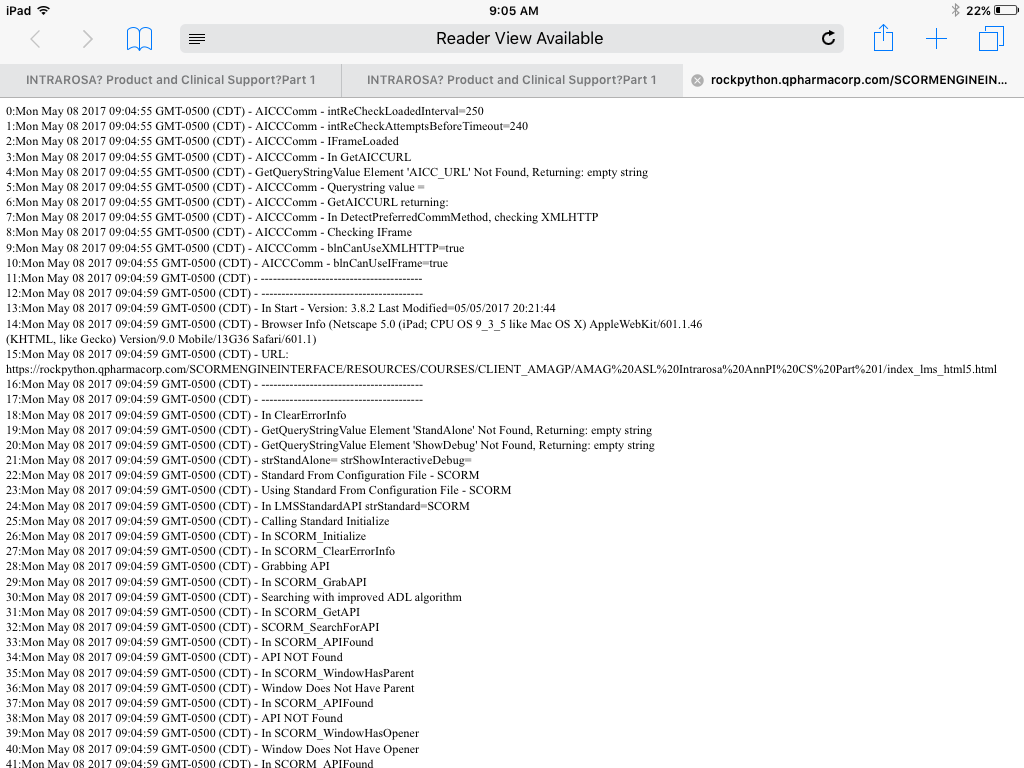
We have tested four courses dozens of times with the above settings and have crashed on the iPad. The crashing is random and we do get a debug screen (see attached). Crashing can occur at any time but seems to occur well into the course and often when clicking the previous button revisiting screens (most set to reset to initial state). But, it has crashed before finishing the course as well and when clicking Next. There is not one screen (or type of screen) that seems to cause the crash. (Can't share courses here because they are proprietary.)
We reduced the layers and removed animations but the courses still crash. We split courses in half, but they crash.
We created a 50 screen course in V3 then recreated it in V2. The course contains one screen with text, narration, a graphic, and two pop ups. The screen is repeated 25 times. I also created 25 quiz questions.
When I test the V3 50-screen course on SCORM cloud, I crash. Usually after finishing the course and then when I am going back, but it crashes.
When I test the V2 version on SCORM cloud, I don’t crash. I can go through the course multiple course times and do not crash.
Has anyone experienced this issue in either V3 (or 360)? Our thinking is that there may be an issue with V3 and that the crashing may not occur on V2, but were wondering if anyone has crashed in V3 and rebuilt in V2 successfully or has crashed in V3 and found a workaround.
We have published dozens of courses with this scope and level of interactivity in V2 and have had no crashing. This all started with V3 just recently.
Support has been good and here is their take, "Based on the series of testing performed, this occurs on iOS devices but not on Android. The initial diagnosis has something to do with mobile devices limited resource allocation which might be the cause of the issue. However, investigation is still on-going and I'll be sure to let you know for any progress." And, "It doesn't appear to be an issue specific to LMS as it also occurs when I uploaded your content in our web server. The course will crash on random slides and will reload automatically asking whether to resume or not. I've logged the issue as a possible software bug."
Regardless, we have several courses that we need to deliver for the iPad, Safari and Chrome. We have already missed our initial deadline of this past Monday. Please let me know if anyone has come across this issue. If it is a Storyline bug, it needs to be fixed immediately.
155 Replies
- PhilEaglesCommunity Member
The team above have stated they will update this thread as soon as a solution available so no I doubt there is.
- CK1CK1Community Member
Ditto on what Mark Wheeler said. It's been 3+ months since this was first reported. If there isn't a resolution then we'll (my company) have to revert back to using SL2 and not renew SL3...or explore other options entirely.
Furthermore, there should be a huge disclaimer on SL3 stating that it has issues with iPad. Developers should be aware of this huge pitfall prior to production. Long, expensive, and time sensitive projects are at risk that just can't be rebuilt in SL2 as an 'on the fly' backup solution. Articulate shouldn't sell a product that states it works on a platform when it doesn't...especially one as expensive as this. Perhaps have an 'export to SL2' feature on SL3 so there's a backup plan while this is being figured out.
I'm a fan of Articulate, but the ball has been dropped on this one. - KeithLoweCommunity Member
Although I just renewed, there should be some kind of workaround as you stated with publishing in a previous version. My issue is with Presenter (same issue). Since I had to pay for the annual renewal (Articulate 360), it seems crazy to remove it for a previous version of the software.
Hi all,
I certainly understand your frustration, and can assure you our team is hard at work on this fix. I'm sorry that it's continuing to cause you trouble, and is upsetting your customers as well. Once we have an update to share we'll post here in this discussion so as long as you're subscribed to the forum page you'll receive an update via email.
- SagarPatil-84f0Community Member
We have already started using alternate solution (custom HTML5), since there is no solution from Articulate.
- MarkWheeler-aa5Community Member
Hi Sagar, is this a code you apply to the SL3 scorm to fix the issue?
- SagarPatil-84f0Community Member
Hi Mark,
No, we are not using Storyline for new Projects, instead we are developing the Projects in HTML5, JavaScript language.
- MarkWheeler-aa5Community Member
OK thanks Sagar. We just need to fix SL3 SCORMs so iPad users have the same capability to complete the eLearning as say PC users. I look forward to Articulate's fix!
- MarkWheeler-aa5Community Member
Happy New Year Articulate. Do we have an update on this issue?
- KeLoCommunity Member
Happy New Year, an update would be wonderful to hear.
Hi all and Happy New Year!
Thanks for checking in on this issue. We've made big improvements to this in Update 10 and 11 of Storyline 360 and with those updates retested the project files. If you're still seeing an issue using the latest update of Storyline 360 we'd love to test your project as well! You can share it with our Support team here and we'll want to know what device and iOS you're using, and where the course is freezing/crashing for your and your learners.
Also, all the fixes that you see in Storyline 360 updates, will be available in the next update of Storyline 3 which is scheduled for early this year!
- SagarPatil-84f0Community Member
Thanks Ashley for the update.
In the release note of update 10 & 11, it is nowhere mentioned about fixing of the freezing/crashing issue. Please confirm if it is fixed.
Thanks








Related Content
- 10 months ago
- 11 months ago
- 10 months ago