Forum Discussion

Storyline 360 - Arabic toolbar and buttons display wrong after publish
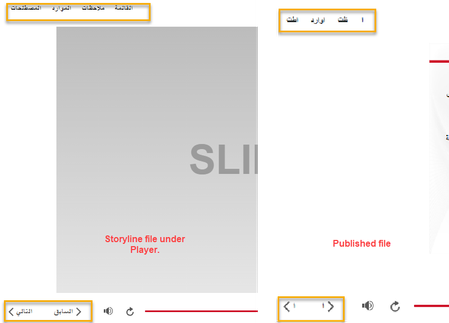

Hi, DianaPajewski!
Thanks so much for reaching out about this. Your screenshot is extremely helpful!
Can you please confirm that you're using the most up-to-date version of Storyline 360? Last week, we released an update which fixed an issue where some fonts caused Arabic text to disappear or display incorrectly in both preview mode and the published output.
If the issue persists, it'd be helpful to learn which font you're using, and also see a copy of your file for further testing. You can upload that here or privately in a support case, and we'll delete it once we're done troubleshooting!
- DianaPajewski8 months agoCommunity Member
Hi Kelly,
I am using the most up-to-date version of SL. I am using Arial font.
Another issue I'm having is that the Player Script is not showing what is contained in the Notes section. This is only happening in the Arabic courses and not any other languages in which we translated to.
- StevenBenassi8 months agoStaff
Hi DianaPajewski!
Glad to see Kelly has been helping you! Thank you for sharing your file.
After testing it on my end, I was able to replicate the same issue as well. As Kelly shared, we shipped a fix for this bug in Storyline 360 version 3.102.35072.0. However, it appears you are still being impacted by this behavior. No worries! I've opened a support case on your behalf, so our support engineers can work with you directly on this.
You're in excellent hands troubleshooting with them, and they should be following up with you via e-mail shortly!
