Forum Discussion

Prompt suggestions for AI to write intro/instruction for interactive elements

This is an interesting question, EmPatton! I don’t have an answer, but I do like the idea you mentioned about getting Storyline AI to summarize an interaction first, then using that summary to guide in writing the instructions. I think that might be a good workaround for creating a prompt that gives you the wording you're looking for.
I’m imagining a two-step workflow:
- Ask AI to summarize the interaction
Summarize the following interactive content in 1–2 sentences so I can create instructions for it. Here is the content:
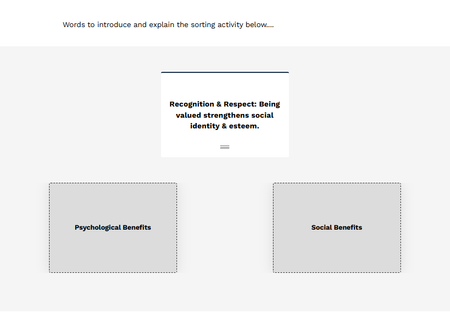
Example sorting activity
Card: “Recognition & Respect: Being valued strengthens social identity & esteem.”
Categories: Psychological Benefits, Social Benefits
- Then feed that summary right back into AI
Turn this summary into a short instruction for learners (1–2 sentences). Make it clear what they need to do. Summary: [PASTE SUMMARY]
If you end up trying this, or if you find a better solution, I hope you'll come back and share!
PS: Tagging a few people who might have some helpful tips or ideas here Daniel-Benton, GrahamBetts-add, Kate_Golomshtok
- GrahamBetts-add9 months agoCommunity Member
Hi EmPatton - For this specific use case, the best approach I would give is to use the Rise 'AI Convert' feature. Create your exercise then use AI Convert to Paragraph. It generates a short blurb that can easily be updated - then again, if it were me, I would keep it as a simple as I possibly can - don't explain what doesn't need explaining, and keep any explanations as concise as you can.
For Example: I created a 2 drop zone (Vet or Human) /5 card (Dog, Cat, Human, Child, Neutering) test and followed this approach (using AI convert). This is the paragraph it generated:
"In this lesson, you will explore how to categorize items based on their relevance to specific professions. For example, animals such as cats and dogs, as well as tasks like neutering, are associated with veterinarians. On the other hand, humans and children are categorized under doctors. This approach helps in organizing information effectively and understanding the distinct roles of each profession."
As you can see - basically explains everything to the point that negates the exercise. So I then used the 'Edit with AI' option and gave it this prompt: "Simplify the 'for example' section, as not to give all of the information away, as this will be covered in additional content." The result...
"In this lesson, you will explore how to categorize items based on their relevance to specific professions. For example, certain animals and tasks are associated with veterinarians, while others relate to doctors. This approach helps in organizing information effectively and understanding the distinct roles of each profession."
Remember, your AI target should be 80:20 - I feel like the above gets me there, so the final edits will bd manual. In this case I mildly tweaked the wording and finished on a super brief card drop explanation.
"Here, you'll explore how to categorize items based on their relevance to specific professions. For example, certain creatures and tasks are associated with veterinarians, while others relate to doctors. This approach helps in organizing information effectively and understanding the distinct roles of each profession. Below, drag each option to the matching 'drop zone'. Alternatively, simply select the drop zone that best matches each option."
Hope that's of some help.

Related Content
- 1 month ago
- 10 days ago