ai
56 TopicsHow are you designing courses for localization from the beginning?
I've been thinking a lot about localization as a design decision rather than something that happens after a course is built. One thing I've learned from working on global learning projects is that decisions made early, including how text is handled in graphics, how media is structured, how reviews are managed, and how the course is packaged, can make a huge difference once you begin scaling across languages. I'm curious how others approach this. What are you doing during the design and development stage to make localization easier later?36Views0likes2CommentsAI‑powered, real‑time role‑play platforms
Hello Heroes! Has anyone cracked this yet? I’m exploring AI‑powered, real‑time role‑play platforms that can be embedded directly into an Articulate Rise Multimedia Embed block and run within the Rise frame—without sending learners outside the course or requiring a separate login. I’ve tested a few options, including Yoodli, but that experience redirects learners out of Rise. Other platforms I’ve reviewed are either cost‑prohibitive or not transparent with pricing. Has anyone successfully integrated a truly seamless, experiential role‑play experience into Rise? I’d love to hear what you’ve tried, what’s come close, or where you hit barriers. Thank you!1.5KViews3likes16CommentsScaling feedback?
Do you have any way of providing feedback to your learners? If so, how do you think about scaling it? Hey all! I recently had a coffee chat with JulieDirksen and she said something that got me thinking (well, she said a lot of things that got me thinking but this was one I wanted to share!). She was talking about how for a long time, feedback was one of the last things in learning that you couldn't scale. But, she noted that with AI that is now changing—it's now more possible to scale the experience of receiving feedback on your work. As a community professional, scaling feedback is something I've long thought about doing via nominating experts from the community to help spread the expertise of an "instructor" beyond one single person—I'm actually going to be giving a session at Articuland next week in Orlando that touches on this! But, all of this got me thinking about different forms of providing feedback and how they have the potential to scale, and I wanted to pitch this question to the community and get your thoughts.210Views1like9CommentsDoes AI work for you or do you work for AI?
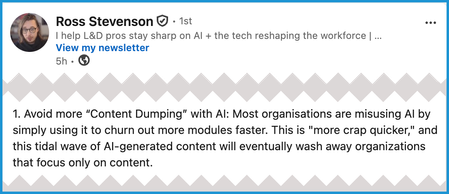
Are you a centaur or a reverse centaur? What does that mean? Here's how Cory Doctorow presents those terms in his book, "The Reverse Centaur's Guide to Life After AI": "[A] centaur is a person who is assisted by a machine... A reverse centaur is a human who is conscripted into acting as an assistant to a machine." As an example, think about Lucy & Ethel working at the chocolate factory. (Search for the video if you don't know what I'm referring to.) They're supposed to wrap each chocolate as it travels on a conveyer belt. But they can't control the speed and can't keep up. The result is hilarious in a situation comedy. It wouldn't be so funny in an actual work situation, though. Product quality would suffer, and so would the workers. Or consider this note by Ross Stevenson: (I recommend going to that LinkedIn post for his full list of takeaways from a conversation about how people learn.) So the real question is this: How can L&D pros use the new AI features in Articulate to create, review, and maintain meaningful and accurate "content" that helps improve job performance throughout their company? Of course, so many other questions have to be answered first. How big is the company? What tasks do people need to do? How often do processes/procedures change? What has to be done to ensure that materials are error free? What are the risks from errors and/or noncompliance? What's the budget? How much input does L&D have in the decision making anyway? And on and on... In other words, this discussion won't be marked as "solved." It's just here because I think there's a lot worth pondering—and this community is great at that. 😊 To paraphrase Hamlet: "No software is either good or bad, but the use case makes it so." P.S. For those who might be interested in Doctorow's book, here are more excerpts:147Views1like3CommentsJoin the Nova Expedition
The Nova Expedition is a community challenge to explore AI Avatars and multi-format translation, share what you discover, learn alongside other members, and earn 30 bonus ELH Rewards points. Here’s how it works: Learn: Explore Nova resources and choose a capability you’d like to try. Try & Share: Test Nova, then share a screenshot, work in progress, prompt, question, or small win. Connect: See what other members are trying and join the conversation with a comment, question, or idea. Influence: Tell us what’s working, what feels unclear, and what you’d like to see next. Every eligible Articulate 360 account has received 20,000 credits per seat (up to 100,000 per subscription) to explore. 🌟Complete by October 23 to earn a Nova Expedition badge and 30 ELH Rewards points! 🌟29Views1like0CommentsCreating a Prompt Library
We have about 20 or so folks across the organization using Articulate 360. I want to start a prompt library that we can all contribute to for code block prompts, AI images, etc. For those of you who have done something similar, what has worked best for you?132Views1like4CommentsIs L&D's role expanding in the age of AI?
We just published a new article exploring how AI is changing the role of L&D. One of the core ideas is that as more learning happens in the flow of work, L&D's role may expand from creating learning to helping ensure learning is effective wherever it happens. I'm curious whether that resonates with what you're seeing: Has AI changed how people learn day to day? Has it changed what your L&D team spends the most time on? Where do you see the biggest opportunity, or challenge, for L&D right now? How is your organization approaching this? I'd love to hear your perspective in the comments!1.3KViews5likes28CommentsEasier way to do Transparent PNG animations in Storyline using AI Assistant.
Hello! For anyone who has been wanting to find an easier way to use animated PNG image sequences in Storyline, here's what I recently came up with (I did a search for this topic here on Best Practices but found nothing to match - may already be old news - if so, disregard all after hello). This JS takes care of the show/hide layer task that was so time consuming for the creator using triggers and states. Here is the AI Assistant prompt followed by the resultant JavaScript: Me: 'Create a JS that shows and hides the images [Picture 1 - 30] on the timeline. The speed should be [30] frames per second, resulting in one complete simulated rotation of the coin. Response: To create a simulated rotation effect at 30 frames per second, where Pictures 1 through 30 are displayed sequentially and loop to simulate a spinning coin, I will develop a JavaScript animation using the appropriate timings to approximate 30 frames per second (33.33ms per frame). Would you like me to proceed with creating the JavaScript trigger for your slide? Me: Yes. Response: I have created the JavaScript trigger named "Simulate Coin Rotation." This trigger will: 1. Sequentially show and hide images from "Picture 1" to "Picture 30." 2. Simulate a rotation effect at 30 frames per second (33.33ms per frame). Let me know if there are additional adjustments or further enhancements you need! See attached for results. Obviously this is for proof of concept and will require further refinement - speed/pausing, etc., but refinement is as easy as prompting 'pause the animation after 3 rotations', etc.) Setting up this two-minute long process beats spending several minutes/hours creating triggers and setting up states by hand, so thought I should share it. Hope it helps. -alan PS, here's the JavaScript: // Find and reference each image by Object IDs const images = [ '5qmgHzeewKx', '6VntD4WftmZ', '68qpF1r6HPu', '6iKY1TZhCUC', '5dvzDd0iirL', '5shjC2rUjgc', '6RY4BuHuzbB', '5sCE78GZyz9', '69eZTSWRsRF', '6kb0gHMMoks', '5kIbYD5RUff', '5ky6F9fxZaH', '62UnQqLgzkj', '6gbjZjrNAiF', '66S2FRgX8al', '6VMdqURcmx7', '6WzEJUWCnKN', '5y34gJ5aiPb', '6rDpPQV5c0i', '5VTPNi9Ha3w', '5dcAeTqKxhj', '6RXO9pKotPV', '69jJxhF86Yk', '6oiTtYItgmo', '6HUOqsiJGRX', '69yAum3TwUS', '64HNtI9aayc', '5rFNGYaOXUd', '69jBWIgp8H7', '6lJfba5n8lp' ]; let currentIndex = 0; function showFrame() { images.forEach((id, index) => { const image = object(id); image.style.opacity = (index === currentIndex) ? 1 : 0; }); currentIndex = (currentIndex + 1) % images.length; } // Set all images to hidden initially images.forEach(id => { const image = object(id); image.style.opacity = 0; }); // Start cycling through frames at 30fps (33.33 ms per frame) setInterval(showFrame, 33.33);213Views1like8Comments