Forum Discussion

Query Regarding Localization and “Save Translation As” Option in Storyline
Hi Team,
Our team is currently piloting localization. In our first Storyline file, after creating translation languages, we needed to make language-specific changes to ensure the project functionality works across all languages.
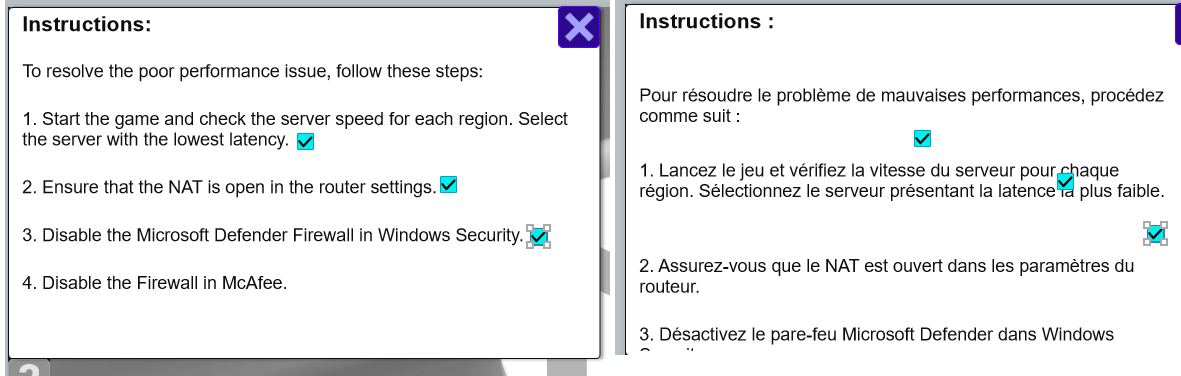
For example, a hotspot placed on text did not align correctly with the translated text after localization. To address this, we had to create a copy of the file using the “Save Translation As” option.
Could you please clarify:
- Does using “Save Translation As” incur any additional cost?
- Alternatively, can we retain the language stack intact (without disconnecting it from the source file) so that future changes in the English source file can be pushed to all languages, and then apply language-specific adjustments afterward using “Save Translation As”?
Thank you for your guidance.
3 Replies
Hi AnuVarghese-394, thank you so much for the clarification!
To answer your main question about the translation stack & Save Translations As: when the course is saved using 'Save Translation As', its connection to the translation stack is broken. So if you were to translate the exported course, that would cost additional credits. However, you could translate the stack and copy any changes to your separate language .story file.
For the alignment issue, that is expected to some extent, but would it be possible to have the checkbox at the beginning of the sentence instead of at the end?
For the variable issue, if it is a term that is consistently used throughout your course, it might be helpful to add it to a glossary.I hope that helps, but if anything is unclear or you have further questions, please don't hesitate to let us know.
Hi AnuVarghese-394, we recommend using a language trigger condition to help with situations like this. This article, "Articulate Localization: Create Multi-Language Storyline 360 Projects," provides helpful information on working with that condition. I hope that helps. Please let us know if you have any questions.
- AnuVarghese-394Community Member
Hi GingerSwart
Thank you for your input. The scenario my team is facing is a bit different, and I’m sharing the details below along with images for reference:
- The team used checkboxes/shapes to show task progress. However, after translation, the checkbox placement does not align with the translated text. It seems these alignment issues need to be addressed individually as standalone files. (Attachment: alignment issue)
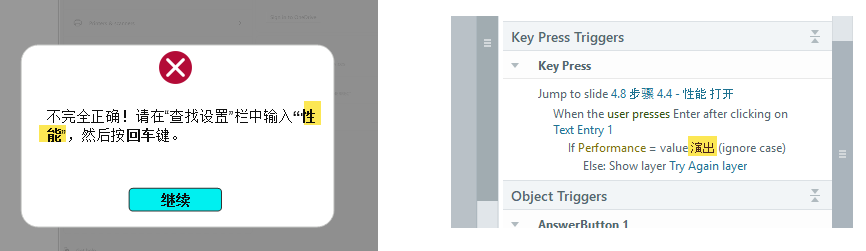
- Even with full localization, the variable values and prompt text in feedback layers are not matching in some slides. If these are not fixed individually, it should impact the functionality of the project file. (Attachment: variable issue)
My question: Can the team keep the translation stack intact for future updates (text changes) while using “Save Translation As” to address the above issues without incurring additional charges?
or are we allowed to make changes to a translated text? Does editing the translated break its connection with source file?