Forum Discussion

Creating a virtual whare experience using 360 camera and Articulate Storyline

Thanks for sharing. My exposure to NZ is contained to Moana and BENEE so this was a treat to explore.
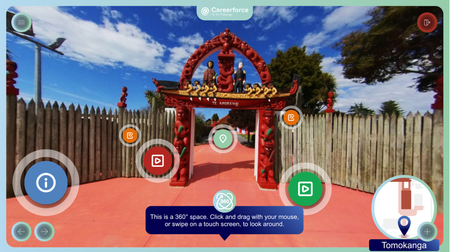
The main interface is sensible and easy to use. The course is a bit small on the careerforce page (I have no option to maximize the course) so the UI buttons seem a little small to me.
And perhaps ironically, once I get through the controls guide and to the first 360 image, the info buttons seem very large. Their pulsing white rings take up a large amount of space. I know for now I'm only looking at a gate by a parking lot, but I want to see as much of these pictures as possible.
I do think there may be an opportunity for some trivia. Maybe there's a dedicated "optional info" marker that appears on some images, providing cool facts about the place? For some learners, that can encourage deeper exploration of the 360 images. Currently, the markers are all a bit clustered together on most slides, which may inadvertently discourage looking around.
I get the impression the images were subtly enhanced with post-processing. They all look really good. Kudos to the photographers and editors. I really like the map, and the menu looks really good. Very cool project.
Now to find some NZ artists who want their music featured...
Related Content
- 1 year ago