Forum Discussion

Rise Reflection Block Builder
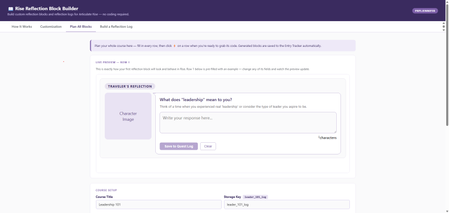

For the broken character image- did you provide a public link to the image you'd like to have there? If you plan to use the zip file method, you won't be able to see the character preview.
That said, I'm not sure how practical the mobile view will be, other than using it to preview. I don't think you'll be able to do anything with the code generated on the phone since you need a desktop browser to create the code block.
Please do let me know what settings you used, and I'll check to see if something needs to be updated.
Thanks!

Super speedy reply PrplJennifer!
I didn't add a a character, as I have a Vyond asset I want to use. How can I remove that broken character image?
And sadly you are correct, I need to to be usable across computer and phones, so wont be able to use it.
Thank you though, it is a good set up if only a computer is needed for the user.
- PrplJennifer4 months agoCommunity Member
Ah - let me clarify a couple of things.
1) To remove the character from the Reflection question, choose Standard for your Block Type in the first column of the grid. Initial is the one that uses an image.
If this is the Reflection Log preview, then choose the No image option on the Build a Reflection Log tab in the Character Image section.2) This particular tool is for the Developer to use to create the Reflection Blocks in Rise, for which you need to access Rise on a desktop computer. The resulting course would contain the Reflection Block, and it will work on a mobile device.
So the preview that you are seeing is what it would look like on a mobile device, once the code has been copied into a Rise Code Block.
Please let me know if this helps. :-)
Related Content
- 10 months ago
- 7 months ago