e-learning essentials
59 TopicsTurn a PPT Into a Rise 360 SCORM
Hello! I am new to Articulate and I am looking for something very specific. At my job, we already have a lot of great teaching material in PowerPoint. Now, we are trying to converting the PPT-content into a SCORM-file each. It worked fine with Storyline, but it is shown through the player. I am actually looking for the Articulate Rise 360 feel, having one page beneath the last. Is there any way to change the setting and achieve what I am looking for? Thank you so much! Love, KathiSolved84Views0likes5CommentsPreventing Learners from Forcing Completion/Score via Browser Developer Tools in Storyline 360
Hello Community, I’m an eLearning developer working with Articulate Storyline 360 and SCORM-based LMS tracking. Recently, we discovered that a learner was able to manipulate browser developer tools to artificially mark a course as completed/passed with a high score—without actually attempting the quiz or interacting with the content. I understand that SCORM communication happens client-side, so absolute prevention may not be possible. However, I’d like to learn from the community: What best-practice approaches do you recommend to harden Storyline courses against this type of manipulation? Are there recommended design patterns for gating completion so that it is only issued after legitimate quiz completion? Have you used centralized or conditional commit logic (for example, allowing LMS communication only after passing the final assessment)? Any experience with LMS-side configurations that significantly reduce this risk? Are there known strategies for detecting suspicious behavior (e.g., unrealistically fast completion)? My goal is to reduce risk, raise the technical barrier, and follow industry best practices—even if 100% prevention isn’t feasible. Thanks in advance for any guidance or examples you’re willing to share.70Views0likes2CommentsCourse Design Best Practices
Hello everyone...a few months ago, our Senior eLearning Instructional Designer retired and I've inherited a catalog of eLearning courses that were authored in Storyline 2. I'm working on updating courses as needed and turning my attention to better processes and best practices for course design. One of the standards I'm examining is course navigation and baseline expectations for any given course with regard to seat time, whether it has audio, etc. Because the courses I'm updating and developing will be authored in the new versions of Storyline and Rise, there is also a learning curve for the organization on using these new player interfaces. I've seen a number of creative ways this has been done, but wanted to ask if there were any recommendations for things that have worked well for you. For things like orienting the learner to the player controls, fullscreen options, etc. do you recommend creating a Lightbox overlay for Storyline courses at the beginning? What about Rise courses? Do you include a block at the beginning, during the introduction that shows learners how to use the player, etc.? I appreciate any creative inspiration and recommendations! Added screenshots as examples. My apologies for not knowing the author of the first example. I grabbed a quick screenshot when I saw this in one of the community downloads as it was very close to what I'm wanting to do. The second is an example (from a recent video course I just finished) of similar information I'd like to include in eLearning courses.Solved125Views0likes3CommentsDo you create training for Sales Enablement or Customer Service teams? Join our Template Creation Guild pilot program!
💁 Are you a trainer in either the Sales Enablement or Customer Service Training spaces? 🤝 Do you love co-creating content and networking with others in your training niche? ✍️ Do you want to build authority and credibility in your training niche with an Articulate by-line, all while helping others in your space? We’re launching a new community program just for you! Introducing: Template Creation Guilds 🎉 These four-week co-working programs will bring together 15-25 creators from specific training niches to collaborate on creating a “core template hub” for that niche. Gain connections and skills with peers in your niche while working together to produce valuable additions to your portfolio, supported by Articulate’s team. Interested in learning more? We put together an article here with all the details about: Program schedule Time commitment Who’s a fit How to join 💬 Your turn: what was the last training you created? If you work in the Customer Service Training or Sales Enablement spaces, what was the last training you created for this niche? Was it new agent onboarding, a quarterly product launch overview, a QA assessment training, or something completely different? Let us know in the comments.198Views5likes1CommentPeer Pod Coming Soon: “New to Instructional Design” — Who’s Joining Us?
We’re kicking off a brand-new Peer Pod for anyone who’s new to instructional design and you’re invited! 🎉 Peer Pods are 4-week learning groups where community members explore a topic together through weekly prompts, curated resources, and shared discussion. Whether you’re a few days or several months into your role, this is your chance to connect with peers, reflect on key topics, and build confidence together. Here’s what we’ll explore: ✨ What to focus on as you get started 📦 Intro to Articulate 360 + course design best practices 🤝 Tips for working with SMEs 💻 Best practices for incorporating AI By the end, you’ll walk away with a stronger foundation and a group of peers cheering you on. 🗓 Start Date: Monday, January 12, 2026 Participants will be added to the private Peer Pod group about a week before we begin. 👉 Want to join? Fill out the registration form. 💬 Your turn: What Peer Pod topics do you want to see next? If you could join a focused 4-week learning group, what topic would you choose? Drop your ideas below so we can build pods around what you want most. 🙌881Views14likes35CommentsDesigning eLearning for a Major Brand Like Amazon Echo: Why Prototypes Matter
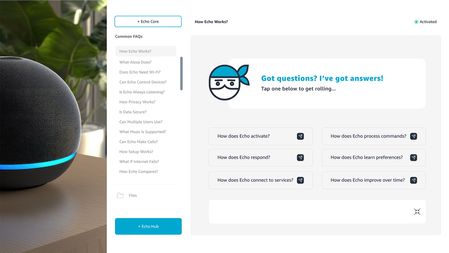
Watch the full design and prototyping walkthrough here: https://www.youtube.com/watch?v=goWNmf6XWWc Designing eLearning for a major brand like Amazon Echo requires more than strong visuals it requires experience architecture, UX systems, and functional prototyping. A moodboard is only the starting point. It defines visual language, interaction patterns, and design direction. Real value happens when that inspiration becomes a working prototype that stakeholders can interact with, test, and validate. In enterprise learning, prototypes serve three critical functions: 1. Stakeholder Confidence Prototypes replace abstract explanations with real experiences. Decision-makers can see how learning flows, how interactions work, and how the system will scale across a full learning ecosystem. 2. Scalable Learning Systems Proper template setup, including theme colors, typography, accessibility standards, and layout structures, creates consistency, speed, and reusability across modules, courses, and platforms. 3. Learning Experience Validation Prototypes test real interaction and UX logic, not theory. They validate usability, engagement, and performance before full production begins. For enterprise learning teams, prototyping isn’t optional, it’s infrastructure. It's the bridge between concept and execution. Between design vision and operational delivery.29Views0likes0CommentsWhich PingAM topics are most challenging in the PT-AM-CPE exam, and why?
I’m currently preparing for the Ping Identity Certified Professional – PingAM (PT-AM-CPE) exam and wanted to hear from others who’ve already taken it or are studying for it now. From what I’ve seen so far, the exam feels very scenario-driven, especially around how authentication and access flows are designed in real environments. Topics like authentication trees/journeys, federation (SAML vs OIDC), and troubleshooting access issues seem straightforward in theory, but can get tricky when multiple steps and conditions are involved. I’m curious: Which PingAM topics did you personally find the most challenging in the exam? Was it more about understanding the concepts, or applying them in multi-step scenarios? Did hands-on practice with PingAM make a noticeable difference compared to just reading documentation? I’m trying to balance concept review, real-world scenarios, and exam-style practice, and it would be great to know which areas deserve extra focus based on actual exam experience. Looking forward to hearing different perspectives and preparation strategies from the community.69Views1like0CommentsWhich type of certification adds more value: technical specialization or risk leadership?
Two new certifications were recently released: one focused on technical access management skills (PT-AM-CPE) and another centered on risk management leadership (ISO 31000 Lead Risk Manager). It made me think: Do technical, tool-focused certifications provide more immediate value than risk and governance credentials? At what point in a career does a risk-management certification start to make more sense? For preparation, I’ve seen some people mention practice-based platforms like CertBoosters. Have any of you here attempted something similar for these certifications, and what was your experience like? Please share your personal experience26Views0likes0CommentsAvatarGrid (Unfolding UI) for Storyline
AI video is everywhere in learning design, but the experience hasn’t caught up. Too often, video is dropped onto a slide and left to do all the work. AvatarGrid challenges that approach. Built for Articulate Storyline, AvatarGrid is an unfolding UI system that uses purposeful motion and cinematic transitions to reveal content progressively. AI videos/images, created with Higgsfield AI, Nano Banana, and HeyGen AI, feel integrated, not pasted in, supported by layered vector UI. The result is an immersive, modern learning experience where motion has meaning. Every interaction supports the story. This is what video AI-first, motion-driven UXD looks like in practice. Watch the short tutorial: https://www.youtube.com/watch?v=iLXJ_-K4vXI45Views0likes0Comments