Reach 360
136 TopicsArticulate 360 User Guides are Moving!
Hey, everyone! As we get ready to say goodbye to 2025 and hello to 2026, we're setting you up for even greater success in the new year. In the next few weeks, we’re moving the user guides you know and love in ELH over to our other documentation database in Product Support! That means you’ll soon have a “one-stop shop" for all of your Articulate 360 documentation needs. This change will also improve the accuracy and responsiveness of Artie, our AI support agent. (Did you know you can ask Artie to find documentation for you instead of searching?) Unifying our databases enables us to analyze usage more deeply so we can better tailor our documentation to meet your needs. Plus, it gives us more options for translating user guides into other languages to serve our global community. Once everything has been transferred, the directories for the individual user guides you depend on (and may have bookmarked), like those for Storyline 360 and Rise 360, will remain available in ELH for your convenience. When you follow the links to the individual articles, they’ll take you to the Product Support knowledge base. We'll have landing pages for each Articulate 360 product there as well. We have a few more things to put in place before flipping the switch, but the transition should be seamless for you when it happens in the next few weeks. Let us know if you have any concerns or questions in the meantime.Solved140Views5likes3CommentsNew Reach 360 Feature on our Product Updates Page
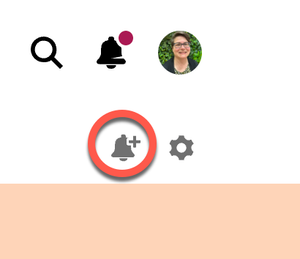
Hello everyone! If you haven't discovered it yet, we now have a whole section of our community dedicated to announcing our product updates. You can subscribe to that page by clicking on the Bell icon so you don't miss out on exciting new feature articles like this one about Reach 360's learner interface now available in multiple languages. Check out the article and let us know your thoughts about this new feature and what additional languages you want to see added.161Views4likes0CommentsCustomize or Change the Contact Person for Questions on Reach 360 Invitation
Hi Everyone! I am working to set up Reach 360. I need to customize the contact person and email address in the Reach 360 invitation email that is send to users who are imported. Currently it is showing my own work email address, but I would prefer it show my team's email address. Has anyone found a way to update this information? Here's a screenshot showing what I am hoping to update:96Views2likes1CommentReach360 - Manual Reminder or Link Options
Hello! I have a few questions: We are looking for a way to manually send a reminder to employees who have started their course but have not finished, and now they report that they cannot find the email with the link. We know there is a way to manually resend the invite when the invitation is pending, but is there a way to manually send a reminder after they have started? Alternatively, is there a place to copy the invitation link and send it to the employee directly from our email system? Is there a place in the platform to see confirmation of the invitation emails and reminders that have gone out? Thanks!145Views1like4CommentsReach courses/learning paths not loading for learners
Hello all! Wondering if anyone else is experiencing the same issue this morning. When our learners select a course or learning path to start, they are getting a screen that says "Sorry, the page you are looking for does not exist." Prior to today, we had no issues with our learners accessing courses/learning paths. I enrolled myself in several different courses and learning paths this morning, with the same error when I tried to open them. I have ensured that all courses and learning paths are live and we have not done anything different with them, so I am wondering if something is happening with Reach today? Anyone else experiencing this issue?New Hire Training Classes Added To One Path
Hello, I am new to Rise/Reach 360. I am in the process of creating 13 modules, which will be in a training "Path," for our next New Hire Training Class. The 1st class will be about 10-15 people. It's a week-long training. We will have multiple New Hire trainings throughout the year. I would like to just add the subsequent training classes to the "New Hire Training Path" as the trainings come up but at the same time, I don't want the list of people in that Path to get too big or would that even be an issue? I wonder if there is a problem doing that way (just to keep adding to the one group) or would it be necessary or advisable to create a training path per training group? The idea of that seems a little daunting. I don't know if I'm over thinking this or not. I haven't gotten into the analytics of the quizzes and final exam for each class... if I keep adding the next training class learners to the same Path, will that screw up the analytics? Normally I research everything myself but I'm on a SERIOUS time crunch and need any advise I can get, ASAP. I hope this makes sense. TIA53Views1like1CommentCan we add live chat/JavaScript to Reach 360?
We would like learners to be able to chat with us when learning in Reach 360. We use Intercom chat on our website/Help Center. We could add Intercom chat to our Reach 360 portal too with JavaScript, but I don't know if this is possible on Reach 360. Based on this community post, "some community members have had some success in adding custom Javascript to the published output". Thanks for any ideas!31Views1like0Comments