ai assistant
457 TopicsPrompt or Template to reuse in Rise
Hi there, I have about 90 courses to prepare. They will be on the same topics/same structure but for 90 different countries. I will use uniform word files that will contain the same structure and topics. The idea is to use the AI Assistant for the creation of the courses. Is there a way to reuse the same prompt in Rise so I get the same result? Can we save a previously used prompts or use the previously created course as template? Thank you B92Views0likes8Comments“When Rise AI Audio Has a Mind of Its Own…” 😄
I ran into a strange issue while creating AI audio in a Rise accordion. I couldn’t get any of the voices to pronounce all the words correctly. For example, vehicle was pronounced “Vladimir” in one voice and “vaccine” in another. There was no consistency from voice to voice—and, even stranger, Rise was adding words to my script that weren’t there. 🤔 I was getting ready to submit a support case when I wondered if the problem might not be with the AI voice itself, but with the accordion block. I created a standalone Audio block using the same script. It worked—all but one word! Since I had copied and pasted the text, I deleted the “offending” word, typed it back in manually, and...it worked! 🎉 Now I had another problem: How do I get this working in the accordion? You can’t export and import the AI audio, so I tried copying and pasting the script from the standalone Audio block back into the accordion. And for whatever reason...everything worked! Who am I to question it? It worked! 😂 I don’t know if this trick will work for everyone or in every situation, but if you run into something similar, it might be worth a try. I’m ending my Friday on a high note! Happy Friday! 🎉 Penny35Views0likes1Comment(Kind of urgent) How do I make an icon animate across a map in multiple slides?
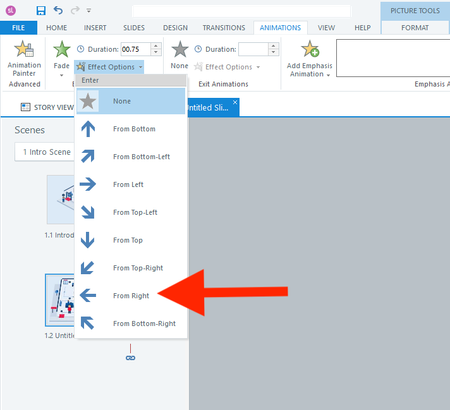
Hi everyone, I actually have two questions. I will start with the easier one first. Question 1 In a fade-in from the right animation, is there a way to adjust how far to the right the object starts? I don't want it to animate from off the right side of the slide. I only want it to start a few pixels to the right. Question 2 How do I animate the red shirt character below across 13 slides? I want it to follow each button from 1 to 13. I realize I should use the Motion Path. But what's the smartest way to use the motion path across slides? I have always found the motion path to be challenging. Thank you all for your help! :)67Views0likes3CommentsAI Avatar Improvements
A few suggestions regarding the AI avatars that I have not seen totally written out elsewhere: The Articulate voices (labeled as Owned by Articulate, Aaron - Wes) absolutely need to be listed as options when using the Generate AI Audio feature. Sometimes I need a talking head, sometimes I just need a voiceover - but I almost ALWAYS need the voices to be the same. I have a work around for this, but it is an annoying process and creates a file that is not easily editable in the future. When cropping or resizing an AI Avatar the resulting video appears distorted in Storyline, but displays correctly when previewed or published. Not a huge deal, but slightly annoying - I submitted a bug report on this. It would be great if I could attach a voice to an Avatar that is the default voice whenever I choose that Avatar. It would also be great if I could generate the "script" for the AI Avatar and had the option to Save without actually generating the video (bonus if I could generate just the voiceover, or not at all) - it could just have a placeholder load instead. This would be helpful when I have a script/storyboard that is mostly complete but I need to get further feedback at a later date. I don't like the idea of generating a video and then having to regenerate later when something changes - I try to be conscious of both my time and the resources required to make these videos. And of course, it would be great to have more granular control of the Avatar and voiceover (adding emphasis, directing the Avatar to point in specific places and such) but those are general improvements that most AI is not fully capable of at this point.55Views0likes2CommentsWhy Include AI in Articulate 360 Subscription?
Hello! After attending Articuland 2026, I am very enthusiastic about presenting evidence to convince my organization to purchase the AI component add-on to our Articulate 360 subscription. I've gathered several points on my own, but I wanted to check in if there's a one-pager or document (that's already created by Articulate) that I could present to our leadership. Thanks!Solved80Views0likes2CommentsArticulate Rise AI Tutor Defaults to ON - Concerns
Hi everyone, we are very concerned that the AI Tutor publishing feature is defaulted to ON. For our enterprise license, this is very concerning as we have no way to manage the use other than to advise our seats to not use it unless approved by their legal team. We have no way to track if groups are using it when they are not permitted, we have no way to turn it off administratively or to control who is using it. We were able to go through a process of approval for the internal AI features that are visible and available to our developers, but this is actually an end-user-facing AI function - which is outside of the scope of our original approval. This opens us to liability issues and frankly puts into question if we have to drop the use of AI entirely just to manage this vulnerability. How are you managing your developers utilizing the AI Tutor?Solved113Views1like5CommentsDifference Between "Articulate" and "Community" AI Voices
Hi, In Generate AI Audio, I noticed that some voices are labeled 'Articulate' and others 'Community'. Could you please explain the difference between these two voice types? Are there any differences in quality, support, licensing, or recommended usage? Thank you.45Views0likes1CommentDifference Between "Articulate" and "Community" AI Voices
Hi, In Generate AI Audio, I noticed that some voices are labeled 'Articulate' and others 'Community'. Could you please explain the difference between these two voice types? Are there any differences in quality, support, licensing, or recommended usage? Thank you.48Views0likes1CommentUnable to edit attachment in Interactive Video
Has anyone else run into this issue with Interactive Video in Articulate 360 AI? When I add an Attachment block, the content edit (pencil) icon that used to appear in the top-left corner seems to be missing. As a result, I'm unable to edit the attachment within the block. Just wondering if this is a known issue, a recent update, or if I've overlooked something. Thanks!60Views0likes2Comments