articulate 360 training
317 TopicsStoryline audio stops working on random slides
I’ve been working with Storyline for some time, but this time I’ve encountered an issue where I’m unable to identify any clear cause or logic behind what’s happening. I currently have four modules published from Storyline, both for SCORM and Review. During the review process, one of my colleagues commented that a particular slide did not have audio. However, when I checked, the audio was present on the slide timeline and played correctly on my end in both Review and Preview. Another co-worker of mine also confirmed that the audio worked for her. 🙃 I then published the module to SCORM and uploaded it to Moodle. While conducting final testing, I noticed that a few slides are experiencing the same issue. The audio does not play when the slide starts. To make the audio work, I either need to: go back to the previous slide and return to the slide, or let the slide timeline finish (in restricted mode), then drag the timeline back to the beginning, at which point the audio starts playing. I would prefer not to create a trigger on every slide to play the audio, as the audio should automatically play when the slide timeline starts. Additionally, most of the slides are working correctly, and only a few slides are affected, which makes it difficult to determine the cause. if anyone has encountered similar issues and have some suggestions or tips on how to fix this. I would greatly appreciate the help!!!Solved2.6KViews0likes63CommentsSlow down entire slide/voice - text to speech
Is there an easy way to slow down the text-to-speech for each slide-to-speech file? Meaning, I don't want to slow down a specific word or words but rather the entire paragraph of text on a slide. I want to slow down the entire rate for that voice file. Any way to do this? It would be nice to have this an option when the "insert text to speech" window opens. Then have a selection to slow down the rate at that point, with options of rate speeds)2.6KViews0likes17CommentsImage Carousel Challenge
Hi everyone! I am trying to recreate the Image Carousel interactive component that Rise has in Storyline (mainly because the entire module is built in Storyline, and I want the user experience to be fluid). I did some research and found a couple of videos to create an Image Carousel in Storyline, however, I'm having some issues with it. When I upload the images into Storyline, I rotate them from being landscape to portrait (even though they are saved in portrait so I'm not sure why Storyline is rotating them). I grouped the photos together and created an animation Motion Path for the images to be left to right and right to left. However, when I go to drag the end point to overlap image 1, the images all revert to being landscape, and I can't see where I should overlap the images to look clearly. But, when I preview the slide, the images move correctly so I am not sure if it's a bug or if I'm doing something wrong. Does anyone have tips on how to create an image carousel in Storyline or tips to fix the issue I have? I included a screenshot of what the slide looks like and also a screen capture showing the images move in the right order when I preview it.Solved1.2KViews0likes4CommentsText Entry box help
I've created a simulation (screen recording) where a user logs into a page. They have to enter certain fields like a workspace name, address etc... I need them to type it exactly as desired, so I have it set up like a quiz question. We are providing no feedback, as we want the learner to feel like they are in our actual program, which does not tell you if you're correct or incorrect. You type in the box, hit enter on your keyboard and if it matches, it should move to the next slide. If not, it stays and nothing happens. Problem #1- while in preview mode, when I type in the box, I see no text of what I'm typing. I have no idea if I've made a typo. How can I have the user see what they are typing as they type it? Problem #2- it doesn't move forward when hitting enter on keyboard. I have programmed the question for submit on "enter". No submit button. I used to create interactions like these in Captivate with my eyes closed but cannot figure out how to do this and I've watched videos, read the blogs. I just want the learner to see their text while typing it in, and to hit Enter. If it is good, it automatically goes to the next slide. If not, it stays on the same screen. Any assistance would be great. Thank you.Solved899Views0likes9CommentsStory line issue when you revisit a slide
So, I was working on creating my first storyline course and everything seem to be going fine. However, in one of my tests of the entire project I click on a link to a new slide I had already visited and ended up getting stuck in that slide as my return button would not appear. I check the slide state, and it is set to resume saved state. I am new to this and teaching myself as I got with support from a couple people I know. I am not using the standard pre and next buttons because I decided to add my own buttons per the request of stakeholders. The ask was to have a requirement that that listen to the slide before moving on. I have saved the 2 pages as a separate file and attached them. I could email them to anyone who can assist. Always looking to make connections. Thank you in advanceSolved896Views0likes6CommentsAI Chatbots in Storyline
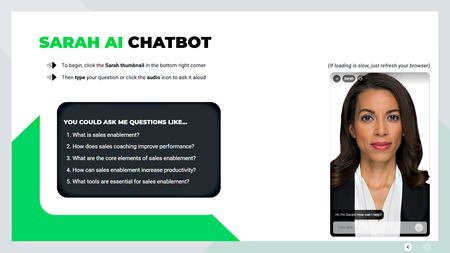
Chatbots in Storyline? Meet Sarah. What if your eLearning course could talk back? I built an AI-powered chatbot right inside the D-ID app and then designed inside Articulate Storyline, and named her Sarah. She’s more than a character. She’s a smart, interactive course concierge that answers learner questions using your course’s knowledge base. No more digging through PDFs or endless menus; just ask, and Sarah responds. Watch the quick intro: 👉 https://youtu.be/HOLTi-zFNcw?si=14xJYC-0UEFGtnYV Sarah’s just the start of smarter, more human learning in 2025.800Views4likes5CommentsStoryline 360 Quiz Try Again: Keep showing the correct answers after selecting try again
I need to be able to maintain the correct state on checkboxes for multiple response quizzes after a learner selects submit, so a learner does not have to recheck a correct answer after selecting to try again. On Try Again layer: When timeline starts on layer: Set the correct answers to correct states if selected and set incorrect answers to incorrect states if selected. When user selects Try-Again, set incorrect answers to normal states. Problem: Upon revisiting the base layer, the states are showing as designed, but Storyline does not recognize the correct answers that are selected, so when the user selects submit, it goes to the incorrect layer. How can I make this work again?Solved799Views0likes11CommentsConvert Rise to Storyline
Can you take an existing Rise course and convert it to Storyline? I have tried the PDF to PPT route and importing that into Storyline (too many distortions and slides are not even 20% the same) and read below on another possibility. I have tried multiple options from below and it just shows a location address. Thank you! From the web: Yes, you can embed Rise courses into Storyline. To do this, you must first export the Rise 360 course as a web package and extract the zip file on your computer. Then, add the extracted folder to your Storyline project as a web object797Views1like3CommentsInsert text to speech Internet connectivity error
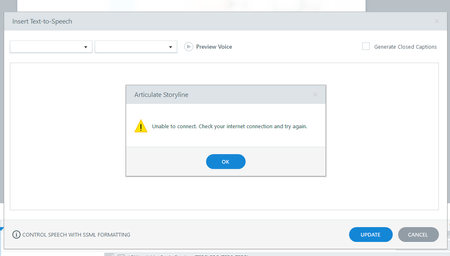
Hi Team, I am facing an issue with Insert text to speech option, tool is repeatedly showing 'unable to connect. check your internet connections and try again' error message since yesterday. I have a fair internet connectivity even while sharing this message, need urgent help as I am working on a priority projectSolved703Views0likes10CommentsAdding Up Points on Likert Scale and Printing Results/Text Responses
Need help from a Storyline expert! I have spent A LOT of time trying to create a self-assessment that measures a coaching client's willingness and ability to engage in the process of behavior change. I thought it would be fairly easy, but it has been anything but... I need the assessment to score the user's responses, based on the response they select and the associated point value. I also need for the user to be able to export and print all of their responses (the Likert Scale responses AND text entries). 1.) For the first version, I created a slider for the user to utilize when selecting their response which functions much like a Likert scale, except it's a slider. I used variables, conditions, and triggers such that the user's responses would be totaled up and they would receive customized feedback on the results slide that tells them which "category" they fit into (Not ready to change, Moderately ready to change, Very ready to change). The only problem is: during testing, when I tried to Print my responses, I could not see ANYTHING. No responses at all--not to the slider, and not the text responses. I need for the user to be able to print and share their self-assessment with their coach. I've done some research and it sounds like I have to do something with a Java Script that just seemed way too complicated so I tried a second version. 2.) For the second version, I changed the sliders to Survey questions and selected the Likert scale. I thought that Storyline would total the points automatically, but alas, it does not because the Likert Scale is a Survey question, not a Quiz question (le sigh). So, now I can't get the feedback slides to show because results are not calculating. Can someone tell me an EASY fix for something like this? Even if it's not an easy fix....anything that could better help me understand what I'm doing wrong would be so appreciated! :)Solved601Views0likes2Comments