articulate 360
3219 TopicsSlide Layer Interaction Not Working
Hi I have set up a project and I want the user to be able to click on a tab at anytime to see their score. I have set up a slide master to do this. There is a base slide which I have set to jump to a button layer once the timeline starts on the slide (the slide is set to restart at the initial state). The first layer has the button on it and when you click the button it shows a second layer with the score icon on it. The score icon layer automatically hides once the timeline ends. The theory being that it goes back to the original slide and then automatically opens the button layer again, and so on. I have done this a thousand times before, but for whatever reason the base slide does not jump to the button layer once the icon layer has closed the first time. What am I missing? https://360.articulate.com/review/content/a17552ca-5968-430e-91bb-32031f9439ae/review17Views0likes3CommentsOne Question Quiz/Survey
I would like to conclude my module not with a knowledge check, but with one question on how the audience perceive the topic. A simple question, with 5 answers. I tried to make this into a quiz with 1 MC question, but I am stuck in workarounds how communicate the chosen option to in Cornerstone via SCORM 1.2. Any ideas are highly appreciated!22Views0likes2CommentsLT Autumn Forum 2026: What's New & What's Next in Articulate 360
Join Articulate's Allison LaMotte for a virtual session about What's New & What's Next in Articulate 360 at the Learning Technologies Autumn Forum. What's New & What's Next in Articulate 360 20 October | 13:30 - 14:30 BST Free Virtual Event - Register Here Today, speed is no longer a differentiator; it's the baseline. When creators can produce training in minutes, the teams that know what good looks like matter more, not less. The gap that matters isn't how fast you can make it; it's how effective it is when you do. Changing behavior is where the difference happens. Articulate has modernized the tools you work in every day, amplified your team with an AI agent that takes the heaviest, most repetitive work off your plate, and opened a way to scale the standards you set across the business. It turns what your business already knows into learning that changes what people do. Create beyond the course: build across a new range of formats in a redesigned authoring experience and explore new features in Storyline. Meet Nova, your AI agent: for your more time-consuming work. Produce immersive, presenter-led video with custom AI avatars, and translate entire courses into 80-plus languages in a single workflow. See what's landing: get insight into how training performs and where it's driving real change, not just who marked it complete. Get a first look at what's next: an early look at where the platform is headed, and a say in shaping it.13Views0likes0CommentsArticulate Rise AI Tutor Defaults to ON - Concerns
Hi everyone, we are very concerned that the AI Tutor publishing feature is defaulted to ON. For our enterprise license, this is very concerning as we have no way to manage the use other than to advise our seats to not use it unless approved by their legal team. We have no way to track if groups are using it when they are not permitted, we have no way to turn it off administratively or to control who is using it. We were able to go through a process of approval for the internal AI features that are visible and available to our developers, but this is actually an end-user-facing AI function - which is outside of the scope of our original approval. This opens us to liability issues and frankly puts into question if we have to drop the use of AI entirely just to manage this vulnerability. How are you managing your developers utilizing the AI Tutor?26Views0likes0CommentsHow do you manage external video resources in Storyline or Rise 360?
I'm working on an e-learning project where I need to manage several external video resources before adding them to a Storyline/Rise 360 course. I'm particularly interested in how other course creators handle the workflow from sourcing a video to preparing the final media file. Things I'm considering include video quality, file size, captions, accessibility, permissions, and keeping the original source documented. In my own workflow, I also tested fdown.media for saving a publicly available video for offline preparation/reference. I'm interested in how others approach this part of the workflow and whether there are better ways to organize externally sourced media. For those working with Storyline or Rise 360, do you normally keep local copies of external videos, host them separately, or use another approach? How do you balance quality, accessibility, and course size?Show Object on second visit/revisit
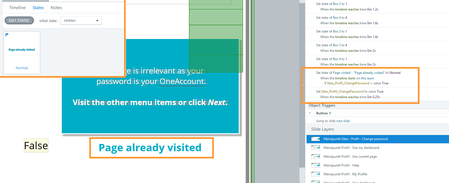
I simple want a text "page already visited" to appear at the second visit of a layer. But the text does not show up. 2 triggers: First Trigger: I set the status to "Normal" of the "page already visited"-textbox from status "invisible" on timelinestart of the layer IF variable Sites_Profil_ChangePassword is true. Second Trigger: I let the variable Sites_Profil_ChangePassword to switch to "Right" from initial "False" state when the timeline reaches 0,25 seconds of the layer. The textbox is on top of all elements in the layer and always visible. Layer Property is "Reset to initial state". This setup is working in a new file and also within the same file with a new test layer. Any ideas? As I can't create a new SL-file as there are weeks of work in it.Trigger not launching email in LMS player
I developed a course that includes a hotspot. The learner is supposed to click on the hotspot which triggers a "send email to" action. The items work in review 360 but do not in the lms player (vi LMS). Any suggestions on how to get the trigger/hotspot to work?62Views1like4CommentsUnable to edit attachment in Interactive Video
Has anyone else run into this issue with Interactive Video in Articulate 360 AI? When I add an Attachment block, the content edit (pencil) icon that used to appear in the top-left corner seems to be missing. As a result, I'm unable to edit the attachment within the block. Just wondering if this is a known issue, a recent update, or if I've overlooked something. Thanks!32Views0likes1CommentBlack Bars on the Left and Right Sides of Published Storyline 360 Course
Hi team, I’m using Articulate Storyline 360. When I preview or publish my course, I get black vertical bars on both the left and right sides of the slide, as shown in the attached screenshot. I have already turned off the Player menu/sidebar, but the black spaces are still there. I want the course content to fill the available browser/player area without these black sidebars. What is causing these black areas, and how can I remove them? Is this related to the Storyline slide size/aspect ratio, Player settings, or responsive scaling? Thanks in advance.49Views0likes2Comments