content library 360
175 TopicsFeature Request: Folders Within Libraries for Easier Course Discovery
We provide training courses for multiple systems. Learners often look for training based on the system they use, so we would strongly appreciate folders within Libraries to group courses by system. Currently, even with separate libraries, courses appear as a single list to learners. Sorting is limited to “Recent” or alphabetical order, making it difficult to find the right course as the number of courses grows. Search alone is not sufficient, as learners may not know or enter the exact system name. Learning Paths work well for courses that should be completed in a specific sequence. However, our learners often need to access a specific system-related topic when needed, so Learning Paths cannot replace folders for organizing courses. We expect to manage around 50 courses in approximately 10 folders. Thank you for considering this request.28Views0likes1CommentDirect Stock Image Library Integration in Rise 360
Would it be possible to integrate external stock image libraries directly into Rise 360? Many organizations already have subscriptions to licensed stock image libraries and use them as their primary source for course imagery. Currently, the workflow requires us to leave Rise, search the external library, download the asset, and then upload it into Rise. It would be extremely helpful if Rise could allow users to: Search connected stock image libraries directly within Rise Preview available images while working on a course Insert a selected, licensed image directly into a Rise block Retain the asset/source information for reference Connect an organization's existing stock library subscription Potentially allow AI to recommend images based on the lesson content With the continued development of AI features in Rise, I think there is an opportunity to take this even further. For example, AI could understand the content of a lesson and suggest relevant images from an organization's connected or approved stock libraries, while still allowing the course designer to make the final selection. For organizations producing a large volume of e-learning courses, this could save a significant amount of time and make the image-selection workflow much more efficient. Is integration with external stock image libraries something Articulate is considering for the Rise 360 roadmap? I'd also be interested to hear whether other Rise users would find this useful.Solved110Views1like3CommentsCustom Accordion/Interactive Blocks
Hi All, Just wondering if there are any creators out there who have experiences in creating or designing their own accordion blocks over the native block. I'm currently trying to build my own and use my own themes however I can't seem to figure out the how. Cheers, Son81Views0likes1CommentCommunity Support for Accountability-Reported for Review
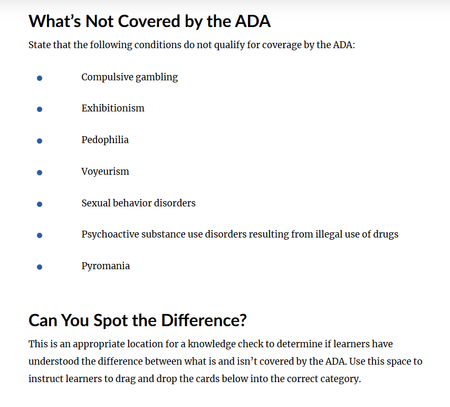
I am asking for community support for accountability to have Articulate change the language used in a course shell, using the example of pedophilia as a "condition" not covered by the ADA. While previewing the course shell for 'ADA Compliance for Employees', under 'Defining Disabilities' lesson, the attached screenshot is a list of examples of "conditions" not covered under ADA. I cannot fathom that whoever at Articulate created this content couldn't come up with ANY OTHER EXAMPLES. This content needs updated asap to include a list of appropriate reasonable "conditions" not covered by ADA. Disappointing content from an industry leader.173Views0likes2CommentsWatercolor option missing in AI Image style
Recently I started projects in both Rise and Storyline and used Generate AI image to both create new images and alter uploaded images. Both were successful and did exactly what I wanted. Today when I want to continue, the Watercolor style option is missing. When I go to one of the created images I like, the text for the prompt has disappeared. I'm only give the option to create a new image, or alter the image with a fresh prompt. I know I should have copied the prompt for the watercolor style, but I didn't. Does anyone have the old prompt saved so I can put it in the "custom" style box. I'd like to contine with the consistent look and feel of the watercolor images. Thanks!124Views0likes2CommentsFeature Request: Restore Exact Date Timestamps in the Rise 360 Library
The recent Library update replaced exact date timestamps (e.g. "14 September 2026") with relative timestamps (e.g. "3 months ago"). For anyone managing a large course library, this makes it significantly harder to organise, audit, and locate content. This idea requests that exact dates be restored — or that users be given the option to switch between relative and exact timestamps. Why This Matters to the Community Many of us manage dozens or even hundreds of courses and rely on exact creation dates for filing, version control, and content audits. Since the switch to relative timestamps: Course creation dates are no longer visible. Relative labels like "2 months ago" shift every day, so there's no way to pin content to a specific date. Date-based filing systems no longer work. Anyone who organised their library by creation date has lost that workflow overnight. The current workarounds don't solve the problem. The "recently created" filter and the alternative view showing "days ago" still don't surface the actual date. The Ask Preferred solution: Restore exact date timestamps as the default display in the Library, as they were in the previous interface. Alternative solution: Add a user-level setting or toggle that allows users to choose between relative timestamps and exact dates. Minimum viable improvement: Display the exact date on hover (tooltip) over the relative timestamp, so users who need precision can access it without a full UI change. Articulate Support has confirmed there is currently no option to change the timestamp format or revert to the previous display, so a product-level change is needed.26Views0likes0CommentsMicrolearning Real Content and Templates
Does anyone know where to find the Microlearning Real Content and Course Templates in the new user interface in Rise? I'm looking for this content: Rise 360: Use Microlearning Content Templates, but can only find full course templates.Solved113Views1like2CommentsRISE: New launch page w Library
We appreciate all the updates that Articulate has been making with custom blocks, and many, many other features these past 2 years. But today, under rigorous deadlines (our team), we are wishing we could revert back to the "legacy" UI for the opening of RISE (launch page). The new top layer (Library) seems confusing when one is in a dreadful hurry, and although I've clicked through many times today, it's not becoming intuitive, but confusing. In addition, I can no longer readily determine if I am in "Review 360" or "RISE authoring" whereas before, it was obvious, and easy to move around, know where I am. (New icons indicated "in review" or "published" have no meaning to us; but we realize every firm has their own preferred workflow.) (And yes, I do recall about 3 to 4 years ago upon a UI change involving folders, there was much controversy and we all adapted.) With changes so dramatic, I am wishing for a 'revert' to legacy UI button (like I've seen in other portals & dashboard). Nevertheless, totally regard Articulate as a top-notch software that keeps evolving, growing, and keeping up with change, innovation, and technology!156Views1like2Comments