download
115 TopicsMy Custom Rise Block Component Library
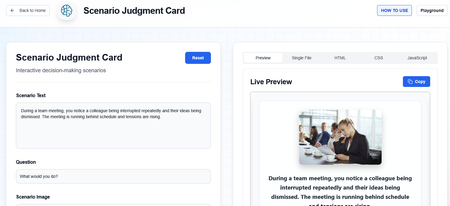
Hi everyone! I wanted to share a custom library of Rise-compatible interactive components I’ve been building and experimenting with for eLearning projects. The library includes custom-designed blocks and interactions intended to help make Rise courses more engaging, flexible, and visually dynamic beyond the default block set. You can explore the library here: https://cognitoblox.netlify.app/ This is an ongoing project, and I’d genuinely love feedback from the community: Which components do you find most useful? What kinds of interactions would you like to see added? Any ideas for improving usability or accessibility? Happy to connect with fellow developers who are experimenting with custom Rise code blocks as well! Thanks for checking it out1.3KViews21likes21CommentsAdding Dynamic Buttons
A few years ago, someone at work let me know how to make more dynamic buttons, and I have become completely addicted ever since. They make the content look a little more professional when used strategically. Look at the examples to see if you would be interested and download it if it helps. These examples are very easy to implement, but you can do a surprising amount of modifications.1.5KViews21likes12CommentsStoryline ANIMTEXT
Hey community! 👋 Creating cool animated titles in Storyline is often tedious... and rarely impressive. So I've put together 17 ready-to-use JavaScript scripts to animate your SVG texts: ✅ Slide replay handling (automatic reset) ✅ Storyline pause support (Varpause variable) ✅ One script per effect, easy to integrate Note: the Voronoi effect loads a small external library (d3-delaunay) automatically - completely transparent to the user! Have fun, test them out, and let me know which effect is your favorite! Review : https://360.articulate.com/review/content/c1587dba-5193-4d45-a4eb-2b985309b7ce/review984Views20likes5CommentsUp-Updated "Reveal" codes
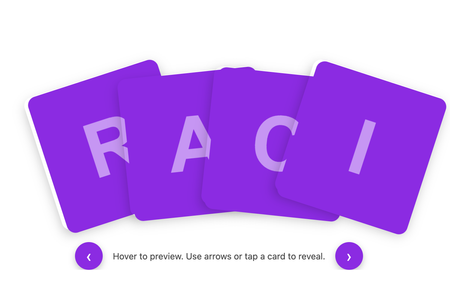
I’ve been experimenting with the original HTML code blocks included in Articulate 360’s built-in examples and wanted to share how far you can extend that base structure using GenAI to iterate and refine interactions. Starting with the default image-reveal index provided by Articulate, I used GenAI to progressively develop three new versions. I supplied my own images, created meaningful alternative text for screen readers, and introduced additional UX and accessibility improvements. Every version is fully tailorable if you want to adapt the formatting, colours, spacing or behaviour. The three examples are: Enhanced Image Reveal Grid Uses the original Articulate structure. Adds a hover zoom, a click-to-zoom state, and high-contrast purple letter tiles for accessibility. Fanned “Deck of Cards” Flip Interaction A dynamic fanned layout, more like a real card hand. Cards lift and reveal their letter on hover, flip on click, and reset if clicked again. Includes chevron navigation for easier cycling. Plain Flip Grid with Navigation A clean, accessible flip-card grid with navigation chevrons. Mirrors the deck behaviour but with a simplified layout. NOW WITH MORE EXAMPLES of what reveal styles can imagine! If you have suggestions, improvements or alternative approaches, I’d really love the feedback. And if you’d like to use or remix any part of this, feel free — I’d love to see what you create with it. Review3602.2KViews14likes13CommentsSliders and States
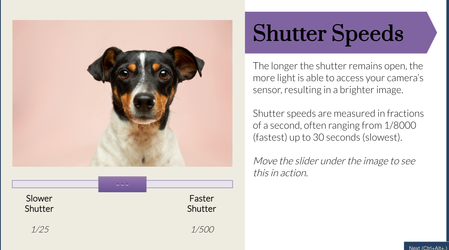
View the project here This is my first time participating in a challenge and this week's was a choose-your-own. I decided to utilize sliders and states to create an interactive short course on The Exposure Triangle. My aim was to allow the user to manipulate an image to see the effect of shutter speed, ISO levels, and aperture. I used sliders and dials to create a fun interactive process. I set triggers to change the image's states based on the slider position. For shutter speed, I made different image states with varying levels of brightness. For ISO, I added a textured rectangle over the image and changed it's transparency across different states so it added more grain over the image when the slider was moved. For aperture I created different states for the backround image with increasing blur effect (completed outside of Storyline) and added a character on top so she stayed in focus while the background blurred. The aperture slider was the most complicated! I think one way I could try to take it further is to figure out how to get multiple sliders to work together on the same image. For example, allowing the learner to have a shutter slider, ISO slider, and aperture slider on the same image to find the exact perfect settings. Thanks for reviewing! Any feedback is helpful!624Views13likes8CommentsGenerate PDF Checklist Using JavaScript
In a recent project I built a slide that contained a checklist. The learners needed to be able to download a copy of the checklist so I used JavaScript to make this possible. I thought the concept might be useful for others, so I've included a link to try this out, and the Storyline file so anyone that's interested can have a closer look. The JavaScript can be modified via the trigger that's attached to the button at the bottom of the slide.602Views11likes6CommentsImmersive Phone Conversation in Storyline
Download this cool (FREE) Phone Conversation template for Storyline; perfect for any scenario with two characters talking. It’s layered with voiceovers, triggers, animations, and clean layouts. It also uses animated APNGs, which look way smoother than jagged GIFs that struggle with transparency. Preview it here: https://www.craftuxd.com/product-page/sellsmart-freebie Check out tutorial here: https://youtu.be/kMpUcYJRNnE?si=jON1XKQtA-4AsIRP2KViews11likes6CommentsCooking Game (Jeopardy style + Gamifiation)
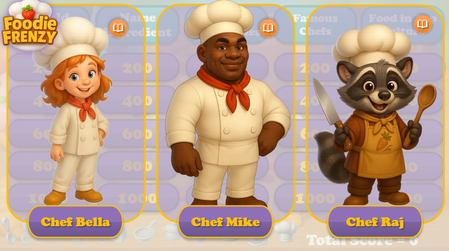
Hello Articulate Heroes! I'm excited to share my second personal project with you — a cooking-themed, Jeopardy-style game! Cooking Frienzy This project was inspired by two fantastic webinar series shared here: How to Create A Jeopardy! Style Game Gamification series I started with the "Jeopardy!" template and added the following custom features: Cooking-themed questions and answers — 5 questions across 5 categories Custom visuals — including characters, backgrounds, UI, and tokens The ability to choose one of three characters at the start of the game (and replay with a different chef assistant!) Personalized feedback and questions — with character-specific images and voiceovers A 20-second Pomodoro-style timer with a “wiped” animation Tokens awarded when the user completes a certain number of questions The characters were created using AI. Thank you for taking the time to check out the game! I’d love to hear your thoughts — feel free to share any comments or suggestions! You can check-out the game by this link: Cooking FrienzySolved2.5KViews9likes21CommentsInteractive Training Exercise
I am working on creating training modules that require the learners to engage in the training, this is my first attempt at creating this. This exercise is for Mimecast's Secure Messaging and prompts the learner to enter data into the email fields just as they would do IRL and is the last part of the lesson, which isn't needed for this exercise, but gives the needed information as to why they would do this. This uses layers variables and triggers and I am quite pleased with it so far. This is one section of the training: Mimecast try it exercise1.4KViews9likes6CommentsSafety Hazard Identification Activity
Hello community! This is my first time posting an example. Primarily because the majority of what we create is confidential. This is an activity where the majority of the feedback images and text are AI-generated through SL. It consists of 2 scenes in which the user must find 10 and 11 hazards, respectively. I welcome all feedback! https://360.articulate.com/review/content/eea8d773-78fe-4b63-a5fc-80a3f25bc8c9/review751Views8likes0Comments