graphic design
19 TopicsStop Designing Courses. Start Designing Performance. (Yes, I Made a Whole Magazine About It.)
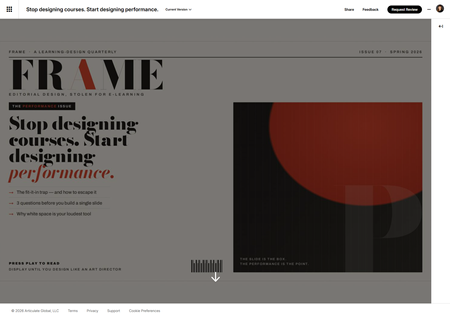
This week's challenge asked us to build a magazine-inspired layout for an e-learning course. A reasonable person reaches for a nice hero image, a pull quote, and calls it a day. I, apparently incapable of restraint, invented an entire fictional learning-design magazine — masthead, barcode, snooty cover price, the works — and then nearly lost a fistfight with my own cover image. Reader, meet FRAME. One magazine. One issue. Big opinions. FRAME has exactly one issue so far: The Performance Issue. And the cover story is, fittingly, "Stop designing courses. Start designing performance." Here's why that's not just a cute headline. The challenge quietly nails something I think about constantly: editorial design and performance design are the same move. The fit-it-in designer asks, "How do I cram all this onto the slide?" The art director asks, "What does the reader actually need to feel — and what's the one thing that matters most?" Swap "reader" for "learner" and that is the whole philosophy. So instead of slapping a magazine layout onto random content, I made the content about the thing the layout is demonstrating. The article practices what it preaches. Very normal, very healthy behavior on my part. The build (a.k.a. drop caps in an e-learning course) It's all running in a Rise Code Block — custom HTML, CSS, and JavaScript — with a real editorial type system doing the heavy lifting: Bodoni Moda for the dramatic, fashion-magazine masthead and headline Newsreader for the body copy (because magazines use serifs and we should be allowed to have nice things) Archivo for the kickers, labels, and page furniture Paper-and-vermilion palette. A proper drop cap. A pull quote sitting on a solid ink slab. A sidebar with "Three questions to ask before you build a single slide." A "By the Numbers" strip. I put a drop cap in an e-learning course, friends. We are officially through the looking glass. The cover that fought back The artwork was done. All I needed was the right size. Simple. Here is the complete, humbling timeline: Me, with total confidence: "It's 16:9." I did not look this up. I simply declared it. Claude — agreeable to a fault — went "sounds right!" and built it. Two professionals, vibing, zero sources between us. Beautiful, really. Then I actually Googled it. Google, with equal confidence, told me 1000 × 3000 — a portrait strip the proportions of a CVS receipt. (Reader, I had it backwards.) "Okay, 3000 × 1000 — a wide banner." We rebuilt the entire cover sideways to fit. It looked great. I felt productive and correct. Plot twist. At this point Claude finally checked Articulate's own docs, which calmly state that cover photos want… 16:9. My original, evidence-free guess. The one we abandoned to go chase a number Google was suspiciously sure about. We had traveled in a complete circle and ended up exactly where I started, just with more files. And Rise cropped it anyway. Because Rise dynamically crops covers, so no "correct" dimension was ever going to stop my masthead from quietly walking off-screen. The thing that actually won? I dropped the image onto a rectangle in PowerPoint, shrank it, centered it, exported a PNG. Fixed instantly. I have a whole interactive-design toolkit, and the hero of this story is a PowerPoint rectangle. I solved it like it's 2009. No notes. (I did later bake the padding in properly, so Future Me never has to do the PowerPoint Shuffle again — but the Shuffle is what got me to the deadline.) Did I use AI? Loudly, yes. I co-built this with Claude — the HTML/CSS/JS, the editorial copy, and yes, even the fake barcode. Credit where credit is due. It's a genuinely great way to go from "I have a weird idea about a fake magazine" to "the fake magazine is real and has a barcode" in an afternoon. The takeaway The information never changes. The packaging — and who you design it for — changes everything. FRAME, Issue 07. The Performance Issue. Newsstand price: press play. Display until you design like an art director. If you published a learning-design magazine, what's the cover story? 🏆 Stop Designing Courses. Start Designing Performance.Design Like an Art Director
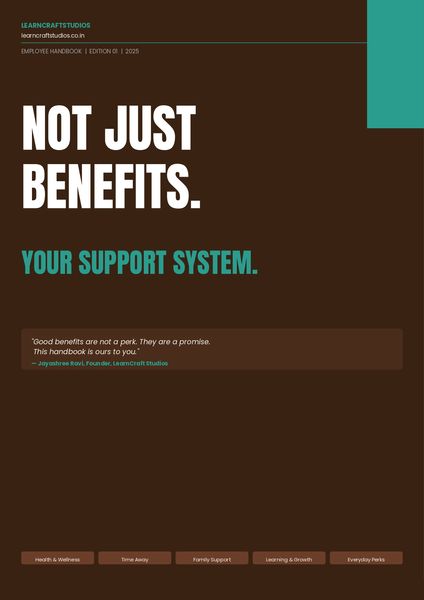
This week's challenge got me thinking about the contrast David set up so well, the fit-it-in mindset versus the editorial designer mindset. So I built both. Review here. The PDF is the fit-it-in version, a fully designed benefits employee handbook. Clean, structured, readable. This is available on the resources tab of the published file. A few Screenshots below. The art director's version takes the exact same content and reimagines it as a cinematic experience, where every frame carries one idea, typography does the heavy lifting, and nothing ever looks like a list. Would love to hear which approach you think lands harder.Meet The Leaders
Hello! For this week's challenge, I used Suno to create four Beatles-inspired tracks as a novel way to introduce a fictional leadership team. I took four regular photographic characters from Storyline and used Nano Banana in Pixlr to alter their poses to mimic the cover of the album HELP! by the Beatles. And don't worry if you've never used a record player before. In the live version of this demo there are also full instructions. The record player tonearm is actually a dial, and there's some JavaScript in the background that adjusts its position as each track plays. If you move the needle too quickly, you may make the record skip. That's not a bug, it's a feature. 😄 If you have any more questions about this build, please ask! Rock out here: https://bit.ly/elhc548 416Views5likes4Comments
Watercolor style / vintage illustrations
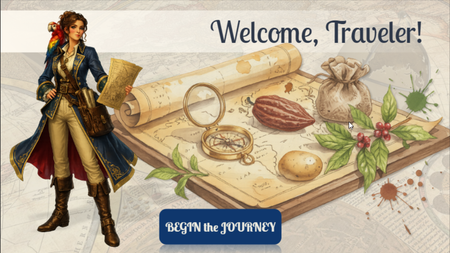
Hi, ELH community! I'd like to share a preview of my newest Storyline project, currently still a work in progress. The Secret Life of Food is an interactive learning experience that explores how everyday foods such as chocolate, potatoes, tea, coffee, and spices have influenced trade, exploration, culture, and world history. For this project, I wanted to move away from a traditional corporate look and experiment with a more immersive visual approach. I chose an old explorer's atlas aesthetic, combining watercolor botanical illustrations, vintage maps, and historically inspired characters to create the feeling of traveling through a living journal of discoveries. Learners are guided by Catarina de Silva, a fictional naturalist and explorer, as they uncover the surprising journeys behind some of the world's most familiar foods. The project is still under development, but I'd love to hear your thoughts on the visual style and overall direction. Thanks for taking a look! PROMPTS: (used for creating images in Chat GPT, Storyline AI) General style: "Vintage explorer journal aesthetic, watercolor and gouache illustration, warm parchment textures, hand-painted botanical details, historical cartography elements, museum exhibit quality, Age of Exploration atmosphere, elegant educational artwork, rich earthy palette, antique paper, subtle ink sketches, highly detailed, soft painterly rendering, casual realistic character design, storybook realism, professional educational illustration, Articulate Storyline course artwork, clean composition, high quality digital painting, National Geographic educational style, transparent background when applicable" Characters: "Full-body character illustration, casual realistic style, hand-painted digital artwork, realistic proportions, expressive face, educational museum-quality illustration, inspired by historical exploration journals, detailed clothing and accessories, subtle watercolor textures, soft brushwork, warm natural lighting, elegant pose, believable anatomy, high level of detail, not cartoon, not anime, not photorealistic, transparent background PNG." Backgrounds: "Vintage illustrated background, explorer journal aesthetic, watercolor map textures, antique parchment, botanical details, warm earthy colors, educational exhibit design, historical atmosphere, hand-painted digital artwork, highly detailed environment, immersive storytelling scene, suitable for eLearning course background, subtle depth, readable composition."291Views3likes6CommentsELH Challenge #564 - Branding E-Learning Courses with Style Guides - for Product Knowledge Training
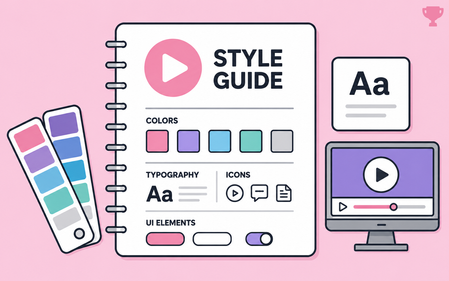
"Count me in!" This challenge arrived at the perfect time. My organization is gearing up for a new product launch, and I've been eager to experiment with a fresh approach to product knowledge training. Marketing Assets As launch dates approach, marketing usually shares product imagery and promotional materials. What I rarely receive, however, is a dedicated visual guide for the product itself. This time, I turned to Copilot to help bridge that gap. Using only the available product images, it generated a style guide that helped establish a clear visual identity and provided a strong foundation for the course design. The Outcome What began as a small collection of marketing assets quickly grew into a complete visual design framework, and influenced a visually different approach to creating training for our customer service team members. Early feedback from a pilot group has been encouraging, and I'm looking forward to rolling the experience out to more than 200 customer service agents and seeing how it resonates with a larger audience. See the results Click here to experience the course demo (scrubbed, but you'll see the style guide's influence). The style guide is embedded in the course as images, and the PDF is attached for those who prefer that format.Prompting My Way to Better Visuals
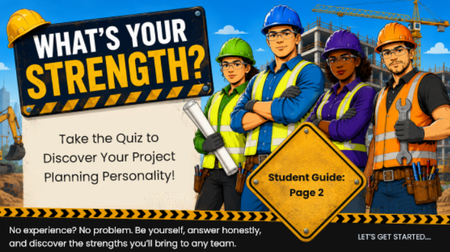
For a project we're currently developing, I wanted to create a project management "planning style" personality quiz as an engagement activity at the beginning of a module. One of the things I've enjoyed most about using AI for visuals is how quickly I can iterate on an idea by refining the prompts rather than starting from scratch each time. The Final Result Rather than using any one generated image exactly as produced, I treated each version as a design exploration. I combined elements from several iterations to create the final introductory slide for the activity. To get to the final result. I used a series of prompts: Step 1. Starting with a General Concept I usually begin with a broad prompt and then refine it based on the results. For this project, I started with: "Create a 16:9 illustration with a construction theme to introduce a project planner personality quiz." This prompt relied on an earlier prompt that generated the quiz concept itself: "Create a project planner personality quiz with different personas. The quiz should involve 5 to 10 questions and make scoring simple, such as based on score ranges or whichever answer letter appears most often." The first image captured the overall concept well, but it wasn't quite right. Step 2. Revising and Refining The initial illustration felt a little too youthful for my audience. It reminded me more of an animated children's style than something designed for adult learners entering the telecom workforce. So my next prompt was: "Make this more photorealistic. Ensure all people are wearing appropriate eye protection." While I liked the direction, I realized the rest of the module used illustrated graphics rather than realistic artwork. Instead of starting over, I continued refining the same image with another prompt: "Modify the characters so they are styled like a graphic novel for an adult audience." The style now fit the audience much better, but the colors were darker than the rest of the course branding. My final refinement was: "Modify to a brighter pop art style. Ensure all workers are wearing proper PPE, with no jewelry and hair properly restrained."120Views2likes2CommentsVisual Hierarchy
In this Storyline 360 example, I demonstrated the importance of by organizing content to guide learners' attention toward the most critical information first. Rather than presenting multiple concepts on a single slide, I broke the content into a series of focused slides, allowing learners to process information in manageable chunks. This approach reduces cognitive overload, improves clarity, and creates a more engaging learning experience by ensuring each element has a clear purpose and place within the overall design. View Below is an image of mailers that I receive and get lost in all the noise of too many items to look at.Magazine-inspired design for Onboarding course cover slide
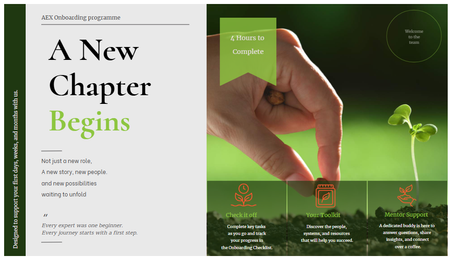
Hi, this week challenge is so timing and inspiring to me, especially when it comes to renovating my onboarding programme. So I thought Why not give it a try! It was my first time to explore Custom Blocks, especially trying different Typo, shapes, lines and everything else. P/s: With this design I hope the onboarding experience to feel more like opening a digital editorial publication than a typical corporate training course. Would love to hear any room for development.Challenge #545: Dynamic Blur Effect & Blue Carbon 🍃
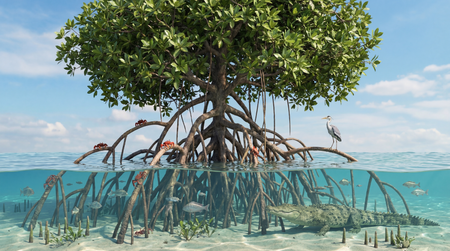
Hi everyone! 👋 For this week's challenge on increasing readability with blurred backgrounds, I wanted to combine visual contrast with a mini-lesson on Mangrove ecosystems and "Blue Carbon." Mangroves are beautiful, but their intricate root systems create a very "noisy" background that completely swallows any text. To fix this, I decided to go beyond a static before-and-after slide and make the blur interactive. Behind the Scenes: Instead of using multiple image states or transparent shapes, I used a single high-res image and linked a Storyline slider to a JavaScript trigger. As you drag the slider: JS dynamically increases the CSS filter: blur() property of the background image. A dark overlay dynamically increases its opacity up to 40%. The hidden information blocks smoothly fade in. This approach keeps the file incredibly lightweight and makes the transition buttery smooth! Dynamic Blur Effect & Blue Carbon 🍃 I'd love to hear your thoughts!