instructional design
869 TopicsRise 360 Custom Block "ghost object" read by NVDA
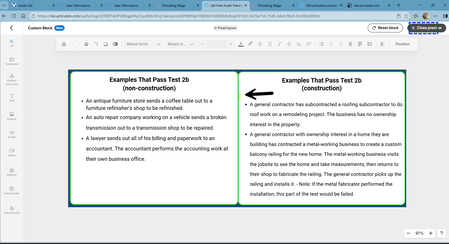
Hello, I have created a custom block with a canvas and two groups. Each group consists of a background, a header and a text box. When I test the content using NVDA, a "ghost object" is identified in the second grouping. NVDA recognizes it between the heading and the text content. (see the arrow pointing to the location). I can find no extra or hidden objects in this block. I have reviewed the Objects as well as the Focus Order. I am new to custom blocks and cannot think of where else I can look to find the "ghost object" being recognized by NVDA. Can you help me? :-( Thank you!28Views0likes1CommentText to Speech - Sound help Phonetic spelling (make this sound like...)
Hi, what am I doing wrong? I need this to say "con-duct" - not conduct. like, conduct a training. Do I have this programmed correctly? I have the <speak> and </speak> in the beginning/end of the text. below is what I am using.... <phoneme alphabet="ipa" ph="ˈkuhn‑DUKT">conduct</phoneme>31Views0likes2CommentsText to Speech problems
Hi there I don't know what's happened in some of my Articulate 360 eLearnings but when I go to edit the Text to Speech text on a slide it's showing me text from the previous slide, although it previews the correct text. I'm very confused :( This has also happened to a colleague so it's not just my pc or work. I'm using the latest version. Any thoughts on what's going on would be much appreciated :) Thank you.Solved114Views0likes8CommentsRise Continue Buttons Disappearing
Hi everyone, Our team is running into an issue with Rise courses in our LMS (Moodle). When a learner clicks the browser’s back button, the Continue buttons inside the Rise course disappear. The only workaround we’ve found so far is to delete the learner’s attempt, which forces them to restart the course from the beginning. Has anyone else experienced this? If so, have you found a solution or workaround that doesn’t require resetting their progress? Thanks in advance!374Views0likes9CommentsRise 360 Challenges: Saving, Video Loading & AI Avatar Limits
Hi everyone, I wanted to share some of the challenges we have been experiencing while working with Rise 360 recently. We really like the platform and some of the new features are genuinely useful, but we’ve run into a few issues that are making the overall experience a little difficult. One of the biggest concerns is content not saving automatically. There have been instances where we’ve made changes to a course, though they were saved as it always does, and later found that the changes were not retained. When you’re working on course development for several hours, losing changes like this can be quite frustrating. We’ve also noticed that videos can take a very long time to load, which makes reviewing and working with video-based content quite difficult, especially when we’re trying to work efficiently. Another area we’d really appreciate some improvement in is the AI Avatar Video feature. We understand that this is currently a Labs feature, and we’re excited about its potential. However, the available token allocation feels quite limited for a feature that is being offered as part of the platform. Once the available tokens are used, there doesn’t seem to be a clear way to replenish or purchase additional tokens and continue using the feature. We also reached out to support regarding this, but unfortunately, we weren’t able to get a clear answer on how we could continue using the feature once the tokens were exhausted. We completely understand that Labs features may have limitations and that the feature is still evolving. At the same time, if a feature is useful enough for course developers to incorporate into their workflow, it would be great to have a clear and practical way to continue using it, whether through additional tokens, a way to purchase more, or another option. We’re sharing this because we genuinely see a lot of potential in Rise 360 and would love to make better use of these features. Hopefully, these points can help improve the experience for other course developers as well. Would love to hear if anyone else has experienced similar issues or has found workarounds for them.119Views1like2CommentsRestrict course access
Hey articulate community, I am trying to develop a course where a new employee who could also be a new manager can go through the same course, but the manager has an additional portion like a manager manager‘s corner that shares manager only teachings and learning regarding the topic. I am trying to obviously restrict that to the manager that’s hired and not open it to employees so any suggestion would be appreciated I created a sample course with 3 parts and 4th part needs to accessible only to particular role - trying to avoid creating 2 lessons for same with one more tab Has anyone tried that ? thanks62Views0likes4CommentsCustom Blocks Accessibility/Screen Reader testing
Hi all, I’m having an issue with Tab-based keyboard navigation not working, and I’m looking for a fix or workaround for accessibility/screen reader testing. I have custom blocks throughout, but when I tab through them, it goes straight to the next interactive button, like the Continue button divider. What’s odd is that later in the lesson, tabbing does detect a paragraph field within the custom block. My current block setup is Canvas > Shape > Text and Icon Image. I tried adjusting the focus order, but that didn’t help. To reproduce it: add a introduction template custom block, then create a blank canvas > add a shape > add a text box inside the shape then add a Continue divider, and open preview mode. When tabbing, it will detect the Introduction heading, then skips the custom block and goes directly to the continue button. I found a similar thread that matches my situation: https://community.articulate.com/discussions/discuss/custom-blocks-accessibility/1238624 Hope to hear from you all soon :)90Views1like3CommentsLive Typing +Submit Button Function
Hi Community! I am working on this project where I have a slide with two text entry boxes. They both have the same setup where they have the exact same "Submit" button at the bottom of each input box. I need help adding the following features to the slide: User can only type in one box at a time. "Submit Note" button becomes Normal when the user starts typing, not when the box loses focus. Otherwise Submit should be disabled. Since user can only type in one box at a time, of course only one Submit button at a time should be enabled. Users should have the option to type in one or both of the boxes in order to advance There are already some codes in here but neither of them is accomplishing the above. Note: Please avoid rearranging other triggers on the slide not related to the objects in question. Advice? Thanks in advance!34Views0likes2CommentsI only want one video to play at a time.
I am working with Storyline 360 and have four videos embedded on one slide. The problem is that when one video is playing and the learner clicks another, the first video keeps playing in the background. I want only one video to play at a time. What triggers or variables should I use so that any video currently playing automatically pauses when the learner selects another video? I have added the slide I am asking help with. Thank you! :)Solved184Views0likes13CommentsI built an automated QA tool for .story files
Over my time as an ID, I've spent a lot of time reviewing Storyline files — my own and my team's. And honestly, I can't tell you how many times something got missed. I once saw a training end up on Reddit where it said "Your doing a great job." Secondhand embarrassment is real. So I built Clariqo. You upload a .story file and it runs automated checks across the full file: Content: Grammar, clarity, readability scoring (nine models including Flesch-Kincaid and CEFR), banned terms, and word count per slide. Technical: Quiz questions not reporting to the LMS, triggers pointing to deleted slides or missing layers, orphaned layers, and player settings validation. Style: Font family, size, and color checked against your style guide. You review issues by slide in a browser editor, fix them, and download your updated .story file. No export, no conversion, just straight Storyline. It's in closed beta right now. Reply here or email me at [email protected] if you want an invite code. It's free during the beta period.100Views3likes1Comment