javascript
45 TopicsSimple Tabs
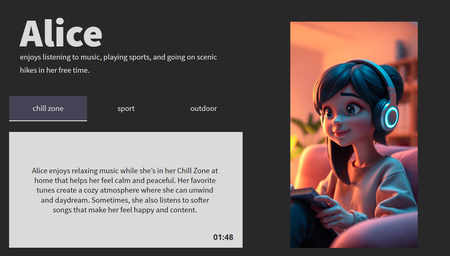
That’s probably the most accurate way to describe this submission, possibly the most boring interaction I’ve ever produced for an eLearning challenge. Ironically, it’s built around tabs, which can be pretty useful when done right (keep them simple, clean, and don’t overthink it). But here’s the twist: If you manage to stick around for 2 whole minutes, you’ll unlock a reward, a downloadable Storyline file. Because if you’ve got the stamina to survive two minutes of my "creativity," you deserve something. Inside: 🕒 A global timer built with JavaScript 🎞️ Image transitions powered by the Web Animation API 🎁 And who knows, maybe a surprise or two. LaunchCopy The File
Hello! This is a twist on the classic 'tab interaction that looks like a file of papers', which uses a Drag and Drop interaction instead of traditional Click To Reveal. But I've built in fallback controls to make it more accesible, of course. This was also a chance to play around with Rise's new AI Avatar feature, and extend that footage using Google Flow to create the two 'cut scenes' that bookend this experience. Check it out here: Copy The File | EngageBrainTrain.com 390Views2likes5Comments
The Construct
Hello! It's surprising - and a little bit troubling - how AI seems to 'get' certain pop culture references in your prompts. Hopefully, this homage is pretty obvious! The imagery was created using Google Flow and Rise's AI Avatar tool, with the interaction controlled in Storyline. If you view this demo on a desktop, you will need to press the Y and N keys. But if you view it on a mobile device, you will need to swipe left or swipe right. TRY IT OUT HERE: https://bit.ly/elhc557 146Views0likes1Comment
Rise notes utility
I added a global utility bar to my Rise course to add a simple 'notes' piece, data is kept in the browser's local storage and it will not write to SCORM. Because of the global nature of this addon, it can be a handy way to make the functionality, and even some branding, always available to users across your entire course. 1.3KViews14likes14Comments
The Last Impression
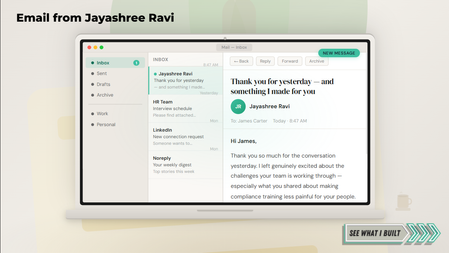
Check it out here! First impressions get you in the room. But what happens after you leave? Most candidates send a thank-you email and hope for the best. This entry makes the thank-you the portfolio piece. I may have made a guest appearance in a hiring manager's inbox for this one. The experience opens as an email mockup, unfolds into a four-tab interactive, and walks the hiring manager through the conversation, a microlearning sample, the design thinking, and a warm close. Because first impressions get you in the room. The last impression gets you the offer. If you turn every touchpoint into a design opportunity, let's connect — Jayashree RaviRace Back To Base
Hello! Can you make it back to base before the sandstorm hits? Play now. The thing I really love about working with vectors is how scalable they are. Even the tiniest details remain crystal clear when you scale them up. I built this demo using elements from a single vector pack created by Macrovector on Freepik. To create the illusion of movement, I used PowerPoint to recolour the wheels on the Mars Rover vehicle, and isolated parts of the tyre track. I then made a GIF using these shapes. And then placed the GIF over the modified SVG image in Storyline. This allowed me to turn the motion on/off using state changes. Pretty much everything that moves in this demo is a GIF, tucked away in a state change until it's needed. Having access to high-quality, easy-to-use graphics allowed me to focus on the instructional elements and the scoring mechanic. The 'wronger' your answer, the quicker your oxygen will deplete. Even if you reach the third question, if your oxygen hits zero, you will have to start again. This is controlled by JavaScript, which adjusts the value of the variable by a set amount when triggered. var player = GetPlayer(); var penalty = 35; // Change to 45 or 55 depending on the button var battery = player.GetVar("Battery"); var elapsed = 0; var interval = 100; var steps = 10000 / interval; var amountPerStep = penalty / steps; var timer = setInterval(function() { elapsed++; battery = Math.max(0, battery - amountPerStep); if (battery === 0) { player.SetVar("Battery", 0); clearInterval(timer); } else if (elapsed >= steps) { player.SetVar("Battery", Math.round(battery)); clearInterval(timer); } else { player.SetVar("Battery", Math.round(battery)); } }, interval); The eagle-eyed among you will have also noticed that when this demo runs on a desktop, the closed captions that accompany the narration have been repositioned and have a slight 'glitch' effect as they appear. This is also achieved with JavaScript. Despite the recent improvements to the closed caption feature in Storyline, sometimes I prefer to manually override the position of the captions to better suit my layout. This code only reliably works in desktop view, though. const mobileView = window.innerWidth < 768 || window.innerHeight < 500; var storyW = 1280; var storyH = 720; var boxLeft = 850; var boxTop = 430; var boxWidth = 350; var boxHeight = 200; var captionFontSize = 20; function positionCaptions() { if (mobileView === true) { console.log("Mobile view detected - caption positioning skipped."); return; } var leftPct = (boxLeft / storyW * 100).toFixed(2) + "%"; var topPct = (boxTop / storyH * 100).toFixed(2) + "%"; var widthPct = (boxWidth / storyW * 100).toFixed(2) + "%"; const css = ` .caption-container { position: absolute !important; transform: none !important; } .caption { position: absolute !important; left: ${leftPct} !important; top: ${topPct} !important; width: ${widthPct} !important; font-size: ${captionFontSize}pt !important; transform: none !important; z-index: 1000 !important; } @keyframes glitchstutter { 0% { opacity: 0; transform: translate(-10px, 4px) skewX(-8deg); filter: blur(6px); } 8% { opacity: 0.8; transform: translate( 10px, -4px) skewX( 9deg); filter: blur(3px); } 12% { opacity: 0; transform: translate(-8px, 2px) skewX(-6deg); filter: blur(7px); } 18% { opacity: 0.9; transform: translate( 8px, 3px) skewX( 6deg); filter: blur(1px); } 22% { opacity: 0.1; transform: translate(-12px, -2px) skewX(-10deg); filter: blur(5px); } 28% { opacity: 1; transform: translate( 6px, 0px) skewX( 4deg); filter: blur(1px); } 35% { opacity: 0.3; transform: translate(-6px, 4px) skewX(-6deg); filter: blur(3px); } 42% { opacity: 1; transform: translate( 4px, -2px) skewX( 3deg); filter: blur(1px); } 50% { opacity: 0.6; transform: translate(-3px, 1px) skewX(-2deg); filter: blur(1px); } 60% { opacity: 1; transform: translate( 2px, 0px) skewX( 1deg); filter: blur(0px); } 75% { opacity: 0.95; transform: translate(-1px, 0px) skewX( 0deg); filter: blur(0px); } 100% { opacity: 1; transform: translate( 0px, 0px) skewX( 0deg); filter: blur(0px); } } .caption-glitch { animation: glitchstutter 0.6s ease-out forwards !important; } `; let style = document.getElementById('custom-caption-style'); if (!style) { style = document.createElement('style'); style.id = 'custom-caption-style'; document.head.appendChild(style); } style.textContent = css; var capEl = document.querySelector('.caption'); if (capEl) { var observer = new MutationObserver(function(mutations) { mutations.forEach(function(mutation) { capEl.classList.remove('caption-glitch'); void capEl.offsetWidth; capEl.classList.add('caption-glitch'); }); }); observer.observe(capEl, { childList: true, subtree: true, characterData: true }); capEl.classList.add('caption-glitch'); } console.log(`Captions positioned at left:${leftPct} top:${topPct} font:${captionFontSize}pt`); } document.addEventListener('DOMContentLoaded', positionCaptions); positionCaptions(); I had a lot of fun making this. It still surprises how much mileage you can get from a small number of visual assets. If you have any more questions about this demo, please ask.
Could You Pass the 1912 Exam?
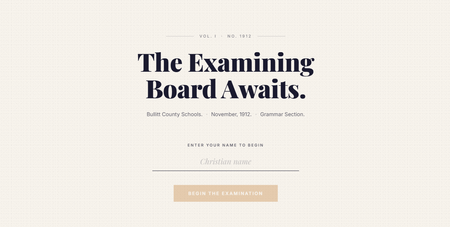
The examining board is waiting. In 1912, Bullitt County students gathered at the courthouse once or twice a year to sit the Common Examination. The local newspaper urged even seventh graders to start preparing early. It was a big deal. For Challenge #549, I didn't redesign the exam. I stepped into it. It starts by asking for your Christian name. Not your name. Your Christian name, because that is what a 1912 Kentucky schoolmaster would have said. That one detail sets the tone for everything that follows. The examiner knows your name and isn't shy about using it. The margin notes are handwritten and pointed. The feedback is sarcastic, whether you are right or wrong. Your result arrives as the front page of the Bullitt County Gazette. Personalised headline, rubber stamp verdict, and Superintendent O. Harned's wax seal. If you score zero, the editors note they have done what they can. Go on then. Submit for marking.Custom Interview Leave-Behind Templates to Win Job Offers
We created a Rise 360 module that enables learners to design a customizable interview leave-behind template—something they can reuse and adapt for any opportunity. https://www.brilliantteams.com.au/customisable-interview-leave-behind-templates/Challenge #544: Brand Storytelling Accordion (Powered by AI & JS!) 🚀
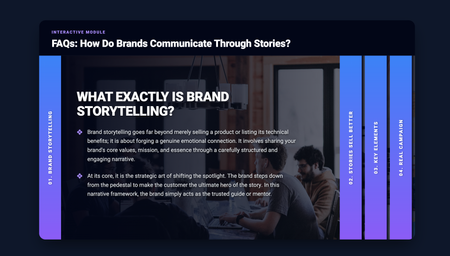
Hi everyone! 👋 Here is my entry for this week's Accordion Interactions challenge. For the content, I decided to focus on Brand Storytelling and how brands communicate through stories rather than just hard data. I thought it would be a valuable mini-lesson for anyone interested in marketing or instructional design. But the most exciting part for me was the behind-the-scenes creation process! Yesterday (March 24th), I had the opportunity to attend the "10 AI Assistant Capabilities You’re Missing & 10 Tips to Master them" event by David Anderson, which discussed the implementation of the AI Assistant in Articulate. Around the same time, I watched an excellent video tutorial by Learning Dojo titled "Building a Sliding Accordion with New Learning Prompts Tool". I felt so inspired that I decided to test out the prompts from prompts.learningdojo.app mentioned in the video, implementing them directly into the Articulate Storyline AI Assistant. To my surprise, it worked wonderfully! 🤯 The AI generated the structure for a fully functional HTML/CSS/JS accordion. I simply placed it inside an "Execute JavaScript" trigger when the timeline starts on a blank slide. Then, from my side as an instructional designer, I only had to tweak the CSS styles (giving it a clean design with a deep blue/purple gradient) and make a few minor adjustments to the code to structure the content into two levels and ensure the text fit perfectly. I think this is a fantastic tool and workflow for adding interactive and custom UI elements to our courses. AI keeps surprising me every day! You can check out my interaction here: Brand Storytelling Accordion Hope you like it! I'd love to read your feedback.The South Africa Big 5
Hello! I'm currently sitting in Joburg Airport, waiting for my flight back to the UK after a terrific week in South Africa with New Leaf Technologies. After the Learning Indaba, I was very fortunate to spend some time with the team at Kwalata Game Lodge in Dinokeng Game Reserve. Inspired by that experience, here's my demo for this week's Accordion Challenge. This demo uses JavaScript to 'shuffle' the five parts of the accordion, reordering their z-index positions, so that the selected part always appears beneath the other four. var player = GetPlayer(); var animalValue = player.GetVar("ANIMAL"); var ids = { GrassFgd: "6HxcFGzoBsU", ELEPHANT: "6YFFSsUIcdG", RHINO: "6f62e0IMC4F", LION: "5ohBXuBxrO4", BUFFALO: "6moj2Qru7Il", LEOPARD: "6DwuJlPK3xT", GrassBgd: "64KgCoIDN33" }; // Priority order: index 0 = highest z-index (frontmost) var animalOrder = ["ELEPHANT", "RHINO", "LION", "BUFFALO", "LEOPARD"]; function getEl(id) { return document.querySelector('[data-model-id="' + id + '"]'); } function getZ(id) { var el = getEl(id); if (!el) return 0; return parseInt(window.getComputedStyle(el).zIndex) || 0; } function setZ(id, z) { var el = getEl(id); if (el) el.style.zIndex = z; } var zBgd = getZ(ids.GrassBgd); var zFgd = getZ(ids.GrassFgd); var zBase = zBgd + 1; // zBase+0 = selected (back), zBase+1..4 = others low to high // So Elephant (highest priority) gets zBase+4 when not selected, etc. if (!animalValue || animalValue.trim() === "") { // Reset: Elephant highest, Leopard lowest in the group for (var i = 0; i < animalOrder.length; i++) { // i=0 (Elephant) gets highest: zBase+4, i=4 (Leopard) gets zBase+0 setZ(ids[animalOrder[i]], zBase + (animalOrder.length - 1 - i)); } } else { var selected = animalValue.trim().toUpperCase(); // Selected goes to the very back of the group setZ(ids[selected], zBase); // Remaining animals keep their relative order, stacked above var zCounter = zBase + 1; // Walk from lowest priority to highest (Leopard up to Elephant) // so that Elephant ends up with the highest z-index for (var i = animalOrder.length - 1; i >= 0; i--) { if (animalOrder[i] !== selected) { setZ(ids[animalOrder[i]], zCounter); zCounter++; } } } // Re-pin grass layers setZ(ids.GrassBgd, zBgd); setZ(ids.GrassFgd, zFgd); Each section of the accordion is also made using an SVG image, as the transparent areas of a PNG image would have blocked users from clicking any sections beneath it. Right! I have a flight to catch! Visit the Game Reserve here: https://bit.ly/elhc544