lms
38 TopicsRise 360 - Not Getting Quiz Score Report
We have created a project in Rise 360 & added quiz at the end, we tried exporting in both ways as 'Track the quiz' & 'Track with course completion' still once we upload in our LMS (SuccessFactors), If user completed or passed quiz it was showing as 'yes' but not giving report of quiz score. If User Completed the lessons but failed in Quiz it was showing as 'No' but the content is not getting locked & not showing the Failed Status. Can you guys help me over here.207Views0likes0CommentsGet learnername, coursename and coursedate from Cornerstone LMS
I have been tinkering to get the learername, coursename and coursedate from cornerstone lMS ( Cornerstone on demand) but am unable to make it work. i have made it work in Scormcloud but am unable to find the correct way. can someone be of help. thnx724Views0likes3CommentsLearners Getting Stuck Randomly in Courses
Issue: SCORM 2004 v 3 & 4 courses getting stuck on random slides within an online course in our PeopleSoft LMS: next and submit buttons don't work. Strangely, some learners successfully complete the course the first time through; others have to retry multiple times (and progress is NEVER saved when this issue occurs); still others never successfully get through. When/Where: randomly at any time, for any learner, in any browser, in any course (Rise and Storyline) in our LMS (PeopleSoft). Can it be replicated? Yes. Though the issue occurs randomly, I can replicate the exact same issue every time when I manually disconnect my network cable, then reconnect. There's no indication that my connection dropped, but upon reconnect, the course is 'stuck'. The only way to exit it at that point is to close the window or use the browser's back button is the only option to get out--and doing so does NOT save progress, even if progress had been saved previously. What we've tried: clearing cache; multiple browsers; changing player settings (launch in new window and/or using the connectivity alert). Previous research informed us if we use SCORM 2004, our LMS requires either V3 or V4 and the Passed/Failed or Passed/Incomplete options, so we did not re-test those settings. Testing: one of the courses was tested in SCORMCloud and Reach 360 successfully--it never got permanently stuck in either LMS upon disconnect/reconnect. Also tested a sample SCORM 2004 V3 course from another vendor in our PeopleSoft LMS--that course was successful, never getting permanently stuck in the course. Question: is there a setting I'm missing? Do we need to alter our js files? I'm planning to compare the published output from the sample SCORM course from the other vendor to our published output files, but there are a LOT of files to look at. Does anyone have tips on what files to focus on? js? xsd? xml? Or ideas on what else to check?916Views1like8CommentsProgress Tracking
I am exporting a course built in Articulate Storyline with 3 "scenes" or modules. Ideally, we would like the progress bar in our LMS to show the exact point where the learner is, even if they close out of the course part way through a module. As of now, I am able to get one of the three scenes to track the progress as complete/incomplete with only either 0% for incomplete and 33% for complete, as well as the check mark and unlocking the second module for the learner to continue. However, with the exact same export settings adjusted for increased slide #s, the second and third exported scenes uploaded into our LMS aren't registering as complete/incomplete, % change on progress bar, or check mark to show completion. Here are screenshots of the export settings that I am using for the first module (the one that is working/tracking progress) and the only difference with the other two is I've changed the tracking "slides viewed" number to indicate the number of slides in those scenes (36 of 73 for scene 1, and then 62 of 73, and 73 of 73 for the two unsuccessful scene exports). Our LMS is through Adobe. Underneath those two screengrabs, I've included one of the LMS, showing how the first module gets a check mark upon completion, but after completing the second module there is no check mark or increase of progress bar. Please let me know any tips or advice on this issue, or if there is a direct contact I can inquire about this issue with, thanks in advance!627Views0likes0CommentsLaunching another SCORM module from a completed SCORM module?
Hi there, I don't know if my title is quite right, but what I'm asking is, if there is a way to automatically go to the next scorm module after the user completes the first one. We have 4 SCORM modules, but they are all part of one course. We are using a Moodle LMS. So, instead of the user completing and then closing the module to return to the main course screen to select the next module, we would like to see if when they complete the module, it will just go to the next module automatically. I hope that makes sense! Looking forward to hearing from anyone who knows! Thanks!531Views0likes2CommentsCourse completing in client's LMS in the first five slides
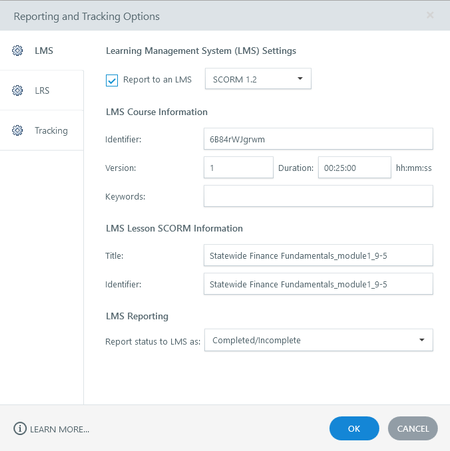
Hello All, We have multiple courses that we have completed for a client where it is completing early in their LMS, in the first five slides. The client uses SCORM 1.2 and the courses were initially set to complete at 100% of slides viewed. We have made the following changes to try to resolve this issue: Added a manual course complete trigger to timeline start of last slide and changed the tracking to Using triggers to complete course. Changed version number in Reporting and Tracking Options. Changed Identifier information in Reporting and Tracking Options. Published out a brand new sample project with the tracking set to when the learner has view 100% of slides to eliminate any other variables that may be slipped in during development. This resulted in the same early completion. We are unable to recreate this issue in SCORM Cloud. All courses test and, based on the debugger, send a complete status on the final slide. We are in the process of reaching out to the client's LMS support for troubleshooting, but in the meantime, I was wondering if anyone has come across this issue before.492Views1like3CommentsMoodle workplace examples
Dear community, I'm looking into Moodle Workplace for a pretty big userbase. So far, as a user, I only have had one experience with an LMS built on Moodle Workplace and the UX wasn't great, though the functionalities seem to cover all our needs. Do you have links to companies or organizations that use Moodle Workplace? Good and bad platforms are welcome at this crucial decision time. Best, Josh74Views0likes0Comments4 Reasons Your Learners Will Love Taking Training Hosted on Reach 360
There are so many reasons it’s worth investing in training, including boosting productivity, reducing turnover, and improving employee satisfaction. But getting access to that training hasn’t always been easy for learners. Live learning experiences like in-class training and webinars have cost, scheduling, and pacing barriers. And while e-learning lowers those barriers, sharing and tracking that training through a traditional LMS can add its own challenges—for example, limitations around who can be enrolled or interfaces that are clunky or don’t work well on mobile devices. It’s no surprise that all this can lead to frustrating learning experiences or, worse, exclude some people from training opportunities altogether. But now there’s a simple solution specifically designed to overcome these issues: Reach 360, Articulate’s frictionless LMS. Let’s take a look at four reasons learners are loving this modern, intuitive solution. 1. They Can Take Training Whenever They Want—at Their Own Pace Live training absolutely has its place for employees, contractors, and sometimes even customers. But learners can find it tricky to fit it into their schedules, since they have to be available at a specific time—and sometimes place as well. These instructor-led sessions require every attendee to keep up with the same pace, which leaves some feeling left behind and others eager to move through the content faster. And learners have to be up for committing a long block of time to the class all at once. But with Reach 360, people get a learning experience that’s flexible for their specific needs. Training content is available on-demand, so they can access it whenever works best for them. They can go through the content at whatever speed they find comfortable. They can break the course up into smaller chunks to make it easier to fit into their lives. And they can easily access a wide range of courses, not just the ones being offered in their location or time zone. 2. They Can Learn Wherever They Want—on Any Device As mentioned earlier, many LMS solutions are only optimized for computers, making mobile access awkward if not impossible. For learners who don’t have a desk job—such as people who work in retail, healthcare, manufacturing, and construction—this creates a frustrating barrier, requiring them to step away from their work when they’re assigned training or need to refer back to information in a course. And even people who regularly work at a computer might appreciate having multiple options for accessing it. With Reach 360, though, courses work beautifully on computers, mobile phones, or tablets. This device flexibility makes it easier for people to complete or revisit courses wherever works best for them, whether that’s at a desk, on a worksite or sales floor, or even on the go. And if they want to start a course on one device and then switch to another, that works too. With the entirety of your training content at their fingertips, your learners will feel supported and confident that they have access to everything they need to be successful. 3. The User Interface Is Intuitive, so It’s Easy To Find What They Need Some of the most common complaints with traditional LMSs revolve around ease of use. When learners find the experience clunky, hard to navigate, or needlessly complex, they’ll try and avoid it—and, unfortunately, your courses in it—at all costs. And if your course library is hard to explore, chances are people are missing out on valuable learning resources that they’d love to take advantage of if only they knew they existed. Ease of use is where Reach 360 shines. Thanks to an intuitive user interface, learners can quickly find all the courses they need with just a few clicks. Content they’ve been assigned is front and center on the home screen, so they never have to wonder what they’re required to take and when it’s due. And the course library can be customized for specific groups, so the content they see when they browse through it always fits their needs. So instead of wasting time trying to figure out how to find or take courses, they can focus on what’s important—learning. 4. It’s Easy To get Started—With or Without a Corporate Email Address If learners find it a hassle to create a new account on your LMS, chances are many of them will give up on training before they even begin. It’s not uncommon for people to find the account setup process in traditional LMSs awkward and time-consuming. And sometimes the hard parts are completely out of their hands, requiring them to wait for help from an LMS administrator to get everything settled. For those who don’t have a company email address, though, this experience is often even worse. Since some LMSs require users to have a company email address to access the system, that can leave contractors, customers, and employees without a corporate email completely locked out of training. With Rise 360, access is easy for everyone. Getting set up in the system takes just minutes. And learners can create an account with any email address—corporate or personal. Wrap-Up If you want a modern and flexible way to share training—and one that’s welcoming to everyone who needs your courses—Reach 360 is the solution. With Reach 360, your learners will appreciate being able to access training in an intuitive environment whenever they want, wherever they are, with any email address, and on any device. Want to learn more about Reach 360? Check out these handy resources: Announcing Reach 360: A Quick & Easy Way To Deliver Training How To Share & Track E-Learning With Reach 360 7 Ways To Enroll Learners in Online Training With Reach 360 5 Reasons To Share Your Course With Reach 360 If you’re already an Articulate 360 subscriber and want to try Reach 360 for yourself, ask your account admin to activate it for you. And if you’re new to both Articulate 360 and Reach 360 and are looking for an easy way to create and deliver training, start a free trial.581Views0likes0Comments5 Reasons to Share Your Courses With Reach 360
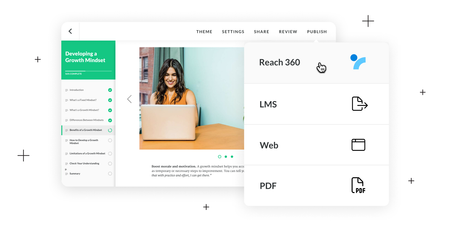
If you’ve heard of Reach 360—the frictionless LMS by Articulate—you might be wondering if it’s a good fit for your organization. In this article, we’ll walk you through five reasons our customers are loving it—and why you might too. 1. It’s Easy to Set Up Whether your organization is new to e-learning and needs to hit the ground running or you’re unhappy with your current LMS and looking for an alternative, hearing that 69% of learning management systems (LMSs) take three months or more to implement might take the wind out of your sails. But never fear! With Reach 360, you can get set up in a matter of minutes—so you can start sharing courses with learners right away. 2. You Can Share Courses Quickly The traditional workflow for uploading courses can take weeks. You publish it as a SCORM package, send it to your LMS admin, wait for them to upload it to the LMS, and then test it to make sure everything works. If it doesn’t, then you need to troubleshoot the course and do all those steps over and over again until it’s working as expected. It can be a long and painful process. If you need to quickly help people learn new skills, you can’t wait weeks to get your course out. And with Reach 360, you don’t have to! You can build and upload your courses seamlessly from the Articulate 360 dashboard—in just a few clicks! And because the apps you use to create and host your courses are all built by Articulate, you know your courses will work perfectly every time. There’s truly no easier way to train your employees! 3. You Only Pay for Active Learners For many organizations, training needs ebb and flow. At the start of the year, you might need to roll out compliance courses, and then nothing else for a few months. Or there could be a big hiring push and onboarding, followed by a freeze. Seasonal employees might need quick upskilling before busy periods. Unfortunately, most LMSs require you to purchase and manage a fixed number of seats. And because each seat is often expensive, organizations often don’t have budget to buy everyone a seat for the entire year. As a workaround, they buy fewer seats and shuffle them around to learners who need them, which can be complicated and time-consuming. Sound familiar? Good news: Reach 360 is different. Learner pricing and management are flexible—to match your variable training needs. Learners only count toward your costs when they take training. So if they take compliance courses in January and nothing else for the rest of the year, you’re not paying for all the time they weren't using the system—saving you tons of money! 4. It’s Easy to Manage Learners and Courses Traditional LMSs can be complex and cumbersome. The admins who manage them often have to take extensive training to learn the system’s ins and outs. And even after they understand how the LMS works, they can end up spending much of their time on tedious tasks and troubleshooting with little to no value add. With Reach 360’s user-friendly interface, admins can jump in and start managing learners and courses right away—no training required. They can enroll learners, build learning paths, view and generate reports, and more in just a few clicks. Reach 360 takes the pain out of training administration, so admins have more time for important tasks. 5.The Learner Experience Is Intuitive and Mobile-Friendly L&D pros often tell us that their learners struggle to figure out how to access their courses. And it’s no wonder! Many LMSs have outdated and clunky user interfaces that don’t behave the way modern websites and apps do—leaving learners feeling lost and confused. Not to mention that while today’s learners are mobile, many LMSs are clunky—or even inaccessible—on phones and tablets, which creates even more frustration. That’s why learners love Reach 360. It’s a modern web app specifically designed to work on all devices with a user interface they intuitively know how to use. Your learners will love experiencing the engaging, responsive courses you create with Rise 360 and Storyline 360 in an equally responsive and intuitive learning environment. And when training is easy to take, learners can focus on learning—the way it should be. Wrap-Up So if you’re looking to set up an LMS quickly, want to streamline the course distribution process, have variable training needs, or simply want to provide a better experience to admins and learners—check out Reach 360. It could be exactly what you need! Want to learn more about our frictionless solution for distributing training? Check out these handy resources: Reach 360: A Quick & Easy Way to Deliver Training How to Share & Track E-Learning With Reach 360 4 Reasons Your Learners Will Love Taking Training Hosted on Reach 360 7 Ways to Enroll Learners in Online Training With Reach 360 If you’re already an Articulate 360 subscriber and want to try Reach 360 for yourself, simply ask your account admin to activate it to access the starter plan for free. And if you’re new to both Articulate 360 and Reach 360 and are looking for an easy way to create and deliver training, start a free trial.743Views0likes0CommentsReach 360: A Quick and Easy Way to Deliver Training
Do you need a way to train contractors, partners, franchises, or other learners who can’t access your LMS? Or maybe your LMS doesn’t work well on mobile devices, and the people you need to train don’t have access to computers. Whatever the reason for needing another way to reach learners, Reach 360 can help. What is Reach 360, you ask? It’s our fast, flexible, frictionless LMS that allows you to: Publish and share your Storyline 360, Rise 360, or third-party training with learners in minutes. Track and analyze learner activity with easy-to-read, exportable reports. Manage variable training needs with flexible pricing based on the number of active learners. Watch this video to learn more: Want to dig even deeper? Check out these articles: How to Share & Track E-Learning with Reach 360 4 Times to Share Your Course with Reach 360 4 Reasons Your Learners Will Love Taking Training Hosted on Reach 360 7 Ways to Enroll Learners in Online Training with Reach 360 If you’re already an Articulate 360 subscriber and want to try Reach 360 for yourself, ask your account admin to activate it for you. And if you’re new to both Articulate 360 and Reach 360 and are looking for an easy way to create and deliver training, start a free trial.2.6KViews1like5Comments