other
531 TopicsHow can I start a motion path where it ended in a previous slide?
I created a curved motion path for an icon in slide one. In slide two, I want that curved motion path to be a straight-line motion path, starting where the curved motion path ended in the previous slide. How do I accomplish this?5Views0likes0CommentsHelp Embedding Interactive Storyline Map into SharePoint Online
Hi! I'm hoping someone can help me figure out how to display an interactive map I created in Storyline directly on my company's SharePoint site. I'd love for my colleagues to be able to interact with the map right on the SharePoint page rather than having to download it/open it separately. Is this possible? I've looked at these two posts from before, but it still didn't work: https://community.articulate.com/discussions/discuss/embedding-storyline-into-company-sharepoint/1021044 https://community.articulate.com/discussions/discuss/viewing-articulate-360-content-in-sharepoint-online/774255 A few of the comments mentioned converting the story.html file to story.aspx, so once I did that and uploaded it, it wouldn't let me select it through the File and Media web part. Then when I tried to embed, it launched File Explorer instead. Has anyone successfully done this recently? Thank you!!Option to prevent Articulate 360 updates from recreating desktop shortcut?
Hello, Is there a setting or installation option to prevent Articulate 360 from creating a desktop shortcut during updates? On my corporate managed Windows computer, the shortcut is recreated after an update even when I have deleted it. It (probably) appears in C:\Users\Public\Desktop, so in our corporate environment a standard user cannot remove it without administrator assistance. I appreciate that shortcuts may be useful for some users, but I prefer to keep my desktop clear and can launch Articulate from its existing location. Could you advise whether there is a supported way to stop the shortcut from being created, or consider adding an option to disable it? Thank you.73Views1like6Comments(Kind of urgent) How do I make an icon animate across a map in multiple slides?
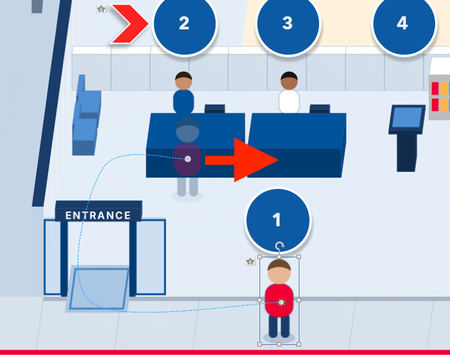
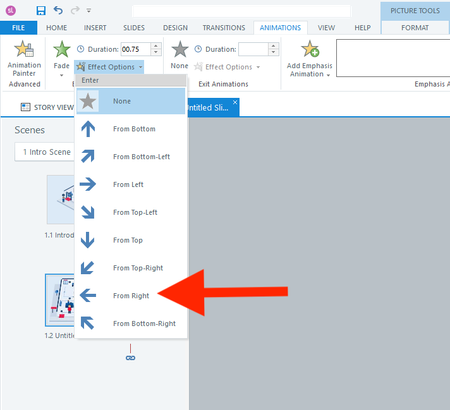
Hi everyone, I actually have two questions. I will start with the easier one first. Question 1 In a fade-in from the right animation, is there a way to adjust how far to the right the object starts? I don't want it to animate from off the right side of the slide. I only want it to start a few pixels to the right. Question 2 How do I animate the red shirt character below across 13 slides? I want it to follow each button from 1 to 13. I realize I should use the Motion Path. But what's the smartest way to use the motion path across slides? I have always found the motion path to be challenging. Thank you all for your help! :)72Views0likes3CommentsAI Avatar GUI needs work
The AI Avatar generator needs some tweaks. First when opening the program, my screen is locked onto that GUI. I can't switch back and forth between storyline and the GUI. Need to fix this. Second, when exiting I am told that I have unsaved changes with the option to 'cancel' and continue working or 'discard unsaved changes'. Will someone please tell me how to 'save'. I have scoured the GUI and can find no way to save. I would like to, I keep having to reset Avatar and voice each time I launch it. George112Views0likes7CommentsBuying AI credits is not easy
It would be great if I could simply purchase AI credits through my company card on account instead of having to work this through email exchanges to sales. This process sets be back a day or two in production. Can't this process be automated?Solved53Views0likes1CommentIn Storyline, how can I prevent the Player Next button from working until all layers are visited?
I am using Storyline. I have a large course with many slides. One slide has four layers in it. I want the player's next button to remain inactive until all of the layers are viewed. Each layer has several icons to be viewed, as well as a close button to go back to the main layer. How can I prevent the player's next button from being active UNTIL each layer has been viewed? I added a Storyline file to help with this solution.131Views1like6CommentsHow are museums using Articulate for member and visitor education?
I'm curious how museums and cultural organizations are using Articulate 360 beyond traditional employee training. For example, there are quite a few opportunities to create short interactive modules for new members, volunteers, or visitors things like museum orientation, explaining membership benefits, preparing visitors for special exhibitions, or providing accessibility and visitor-guideline information. I'm particularly interested in the mobile experience. Museums increasingly communicate with members digitally, so it seems useful to connect an Articulate course or interactive module with other parts of the member experience. I've also seen museums use digital membership platforms such as MembershipAnywhere for things like digital membership cards and member communication. I'm wondering whether anyone here has experimented with combining that type of digital member experience with Articulate content. For those working with museums or other membership-based organizations, what types of interactive content have worked well for you? Are you using Storyline, Rise, or a combination of both?17Views0likes0Comments