rise
95 TopicsWhat’s New in Articulate 360
Discover the latest Articulate 360 features Join us on July 28th at 11 a.m. ET [U.S.] for our What’s New in Articulate 360 webinar. See David Anderson, Director of Training, walk through all the latest features. You’ll learn how to: Let experienced learners test out of Rise courses on topics they’ve already mastered. Automatically update live Rise courses without re-uploading them to your LMS. Customize AI-generated images without leaving Storyline. Register Here608Views0likes3CommentsProduction Tips for Working in Rise 360
In this webinar, you’ll learn production tips to help you become even more effective at creating courses in Rise 360. We’ll cover how to build custom lessons with blocks, adjust course settings to get the right look, use images effectively, and more.1.8KViews0likes0CommentsRise 360: Deploy Content Rapidly with Quick Share
Sharing Rise 360 training with a quick share link is easy. Quick Share is a lightweight distribution tool for rapidly sharing everyday training. It also offers a per-course dashboard that collects training views and, when the guestbook function is enabled, the names and emails of learners. Anyone can access content with a quick share link by simply copying and pasting the URL into a browser. Learners are taken directly to the content and can either start the training immediately or access the training after providing a password, guestbook information, or both. If your course is offered in multiple languages via Articulate Localization, users will be able to select an available language. Keep reading to learn more. Publish with Quick Share Access Engagement Metrics FAQs Publish with Quick Share Publishing a quick share link is available to course owners and managers only. Open the content to share from the Rise 360 dashboard. From the course outline or microlearning, click Publish in the upper right corner of the screen. Select Quick Share. At a glance, you'll see what settings are enabled. Skip to the final step if you don't wish to modify the defaults. To require a password to access the training, select the password status, enter a password, and then click Save. Learners won't have access to the training unless they enter the password whenever they use the quick share link. To disable the guestbook, click the guestbook status, toggle the guestbook Off, and click Save. This requires learners to enter their name and email address each time they access the training. To have quick share content update automatically as creators make changes, select the Live Updates status, toggle on Enable live updates, and click Save. Click Copy link to share the URL with your learners. Tip: Articulate Localization users, set the default language by navigating to that language in the stack and publishing to Quick Share from there. Learners will still be able to choose their preferred language. Update Quick Share Content When live updates are disabled, learners don't see content changes until they're published. When a creator makes changes to training shared via Quick Share, a blue dot appears next to the Publish menu. Another blue dot appears next to Quick Share. To make changes visible to anyone with the quick share link, select Quick Share and click Publish updates. Access Engagement Metrics Course owners and managers can view the number of learners who have viewed content by opening the Publish menu. The view count and number of guestbook entries are listed on the Quick Share option. Select Quick Share and click View engagement to see your Guestbook. Guestbook entries are sorted by view date, with the most recent views at the top. If a learner visits your training more than once, only their most recent visit is noted in the guestbook. Click Export to download a CSV file that includes learner names, email addresses, and the date they last viewed the training. Note: The view count includes repeat views by the same learner. You may need to refresh your training view to see the latest engagement information. FAQs How is Quick Share different from Reach 360? Quick Share is a lightweight distribution tool to rapidly share everyday training when robust reporting and learner management isn't required. Reach 360 is a full-featured learner and content management distribution platform with deep analytics. It supports advanced publishing options such as completion criteria and certificates, and it tracks learner progress. I have a trial account—can I use Quick Share? Quick Share is available to anyone with an Articulate 360 account. However, during your Articulate 360 trial, external links and code blocks are disabled in content shared via Quick Share. How is Quick Share different from an LMS? Quick Share doesn't require a third-party platform to distribute content. Anyone can see a shared training without having to log in or create an account. However, advanced LMS features such as certification and centralized reporting aren't available when distributing via Quick Share. Can I embed content on my webpage using quick share links? No. If you embed a quick share link on your webpage (usually done by inserting the quick share URL into iframe code), the content won't display. We recommend publishing a web package if you need to host the content on your own server. Can I share quick share links outside of my organization? Will non-Articulate customers have to sign up for an account? Quick share links can be shared with any learner, not just members of your organization. These links take learners directly to the content without needing to sign in. Is there a way to log who views my quick share links? The guestbook is enabled by default for quick share links. When enabled, learners must enter their email, first name, and last name to access shared training. View learner information by selecting View engagement on the Quick Share screen for your training. Is there a limit to how many learners can view training via Quick Share? At this time, there are no limits on the number of learners who can view training accessed via Quick Share. Do quick share links expire? Quick share links expire only when the associated training is permanently deleted or when the subscription is deactivated.11KViews9likes0CommentsBusiness Maths Essentials
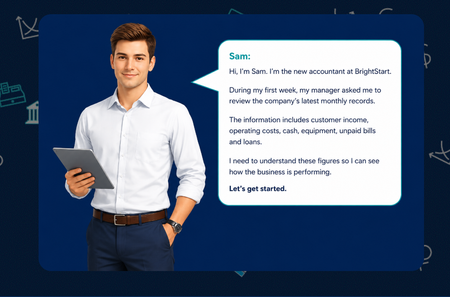
Hello everyone... For this week’s challenge, I decided to experiment with a simple combination of Articulate Rise, ChatGPT and PowerPoint. What started as a small idea quickly developed into a complete, scenario-based learning activity. I created Business Maths Essentials for new starters, using Sam, a newly appointed accountant at BrightStart, to guide learners through key financial terms, classification activities, profit-and-loss calculations and a final decision-making task. The learner supports Sam, a new accountant at BrightStart, as he works through four practical tasks: understanding key financial terms, classifying business figures, calculating profit or loss, and interpreting the wider financial position. The activities were created as responsive HTML, CSS and JavaScript components that can be placed inside Articulate Rise Code Blocks. The design uses clear instructions, immediate feedback, running totals, simple calculations and accessible keyboard controls. Consistent TS4 branding, restrained 44 px emojis and visual status cues help learners navigate the content without distracting from the learning objective. The modular structure also allows each activity to be used separately or combined into a complete learner journey. For the course banner, I adapted a template created by Tom and used PowerPoint’s Morph transition to produce a simple animated GIF, which I placed in different locations. Attached is the Rise Banner Template I used - Source : E-learning Heroes View the course: Business Maths Essentials Enjoy Dr NadiaBeyond Click-and-Read: Crafting Engaging E-Learning with AI Assistant
Unlock the power of AI Assistant in Articulate 360 to enhance your e-learning courses. Learn how to transform linear content into dynamic, interactive experiences. Discover practical ways to use AI features for creating impactful images, engaging interactive blocks, and effective quizzes that truly resonate with your learners.3.3KViews0likes0CommentsPaint by Num-Birds: Songbird Identification Tool
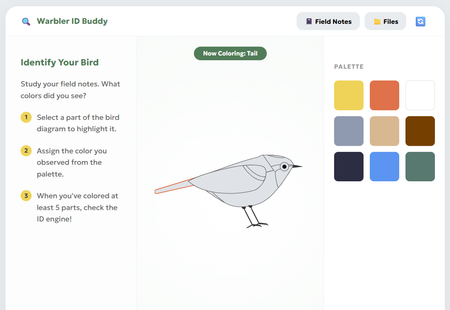
This interaction pushes learners to get curious and creative while identifying some of the most notoriously difficult bird species to spot - warblers! The paint-by-numbers interface paired learning materials (like snapshots, anatomy diagrams, and their own field notes) introduces learners to the fundamentals of bird identification, and allows them to explore this process of visually ID'ing a bird for themselves. Review Here: https://360.articulate.com/review/content/54d099bd-477a As a team with avid birdwatchers, trying to "onboard" people to the hobby always poses a classic blocker: "How do you tell the birds apart?" Though sound, habitat, and other factors play a role, visuals are the first pillar of identification that beginners start to familiarize themselves with. Using Rise's code block, we wanted to create a tool that went beyond flip cards, checklists, and other default interactions. Leveraging HTML/CSS, we created a workshop space that: Breaks down key features to note for ID'ing through an interactive diagram Offers as much or as little support they may need in the form of the snapshots, diagrams, and facts in the "Files" Provides a challenge to apply what they've learned by identifying the "Field Notes" recordings To build this block, we used a mix of vibe-coding and human code expertise! Once we had refined our idea on our own, Gemini was enlisted to help create the basic UI and functions. The functionality was refined and adjusted many times for user ease and clarity. Finally, we looped human experts back in to polish the code, refine the diagram, and squash any stubborn bugs. It was a whirlwind learning experience! Some takeaways: Having the AI refine snippets of the code ensured overall block integrity. We made the mistake at the start of having Gemini spit out a whole new HTML file to adjust minor pieces; we found it changed things that we hadn't asked it to, and actually got "lazy", condensing body text and dressing down UI elements increasingly with each iteration Knowing when to use AI, and when to call in a human expert was our superpower. Gemini deeply, SERIOUSLY struggled trying to create an SVG of a bird. So, we took the monstrosity it outputted and edited the code ourselves to create an image we were happy with! We also enlisted our senior developer to jump in and fix some serious coding errors that had made the block totally un-playable. Not all AI's are made equal: Canva's AI was very promising for vibe-coding at first, but Gemini ultimately became our tool of choice as it provided the most accurate and useful responses. We chose this activity because as bird lovers, we know that warblers in particular have such subtle differences - a black eye ring on one bird might make it a totally different species from the next! The ability to paint and visually describe these tiny differences seemed like the perfect learning opportunity for this challenge (and get our other coworkers on board with birding)! Let us know what you think! Were you able to paint a perfect match? Created by Aamir Aman, Tal Castillo, and Ryan Young.4.2KViews37likes15CommentsHow to Add a Custom Interaction Using the Code Block in Rise
This tip comes from RonPrice, Chief Learning Officer at our certified training partner, Yukon Learning. Do you need some custom content in your Rise course but you're not sure how to start? Use the code block! All you need is an idea. It's that simple. Creating a custom block has never been easier using the Rise Code Block. In this video, we will show you: How to use AI to quickly generate some code for an interaction How to insert the AI-generated code into your Rise course Resources: Yukon Learning YouTube Channel Code Block Group. Join the code block group in ELH to ask questions, post examples, and learn from other e-learning designers.274Views1like0Comments