rise
98 TopicsCan one Rise course report each module’s completion to the LMS separately?
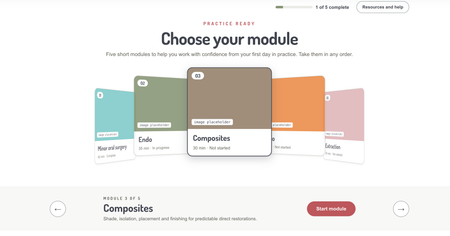
Hi all, first time posting on this! I want to house 5 short pre-learning modules in a single Rise course, behind a custom-style landing page where learners choose a module (see the attached screenshot). What I'd like in the LMS is for each module to register as its own completion, so a learner can finish one without the whole course being marked complete. The course would only show as complete once all 5 are done. Has anyone achieved this? Specifically: Can a single Rise course (SCORM or xAPI) report progress per section, or only overall completion? Is there a way to track “1 of 5 complete” in the LMS rather than just a percentage? If not, would you suggest 5 separate Rise courses linked from a hub, or a different setup? We’re using Workday and exporting as SCORM 1.2 / SCORM 2004 (eventually xAPI. Any tips or workarounds would be really appreciated. Thanks, Danielle14Views0likes1CommentBuilding a Responsive Custom Block with the New Labs Feature
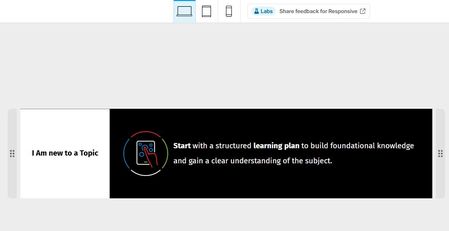
For this week's challenge, I experimented with the new Responsive Custom Blocks feature in Labs and used it to create a custom block that automatically adapts to desktop, tablet, and mobile views. The new container-based layout made it easy to reorganize content across breakpoints while keeping the design clean and consistent. A key objective was preserving icon quality, and the responsive controls allowed the layout to resize without stretching or distorting visual elements. The device previews and flexible container settings made testing and fine-tuning very straightforward. Overall, I found the feature intuitive and surprisingly powerful. It significantly simplifies the creation of device-friendly custom blocks, and I think it would be a fantastic addition to Rise 360 if it becomes an official feature. Great work by the Articulate team, and I'm looking forward to seeing how this feature evolves!Business Maths Essentials
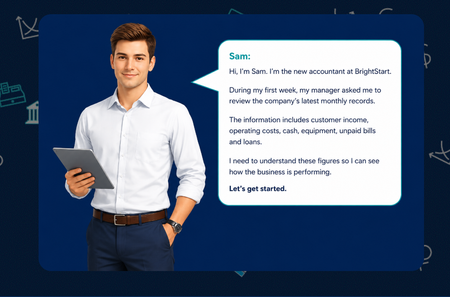
Hello everyone... For this week’s challenge, I decided to experiment with a simple combination of Articulate Rise, ChatGPT and PowerPoint. What started as a small idea quickly developed into a complete, scenario-based learning activity. I created Business Maths Essentials for new starters, using Sam, a newly appointed accountant at BrightStart, to guide learners through key financial terms, classification activities, profit-and-loss calculations and a final decision-making task. The learner supports Sam, a new accountant at BrightStart, as he works through four practical tasks: understanding key financial terms, classifying business figures, calculating profit or loss, and interpreting the wider financial position. The activities were created as responsive HTML, CSS and JavaScript components that can be placed inside Articulate Rise Code Blocks. The design uses clear instructions, immediate feedback, running totals, simple calculations and accessible keyboard controls. Consistent TS4 branding, restrained 44 px emojis and visual status cues help learners navigate the content without distracting from the learning objective. The modular structure also allows each activity to be used separately or combined into a complete learner journey. For the course banner, I adapted a template created by Tom and used PowerPoint’s Morph transition to produce a simple animated GIF, which I placed in different locations. Attached is the Rise Banner Template I used - Source : E-learning Heroes View the course: Business Maths Essentials Enjoy Dr NadiaWhat’s New in Articulate 360
Discover the latest Articulate 360 features Join us on July 28th at 11 a.m. ET [U.S.] for our What’s New in Articulate 360 webinar. See David Anderson, Director of Training, walk through all the latest features. You’ll learn how to: Let experienced learners test out of Rise courses on topics they’ve already mastered. Automatically update live Rise courses without re-uploading them to your LMS. Customize AI-generated images without leaving Storyline. Register Here749Views0likes3CommentsHow to Add a Custom Interaction Using the Code Block in Rise
This tip comes from RonPrice, Chief Learning Officer at our certified training partner, Yukon Learning. Do you need some custom content in your Rise course but you're not sure how to start? Use the code block! All you need is an idea. It's that simple. Creating a custom block has never been easier using the Rise Code Block. In this video, we will show you: How to use AI to quickly generate some code for an interaction How to insert the AI-generated code into your Rise course Resources: Yukon Learning YouTube Channel Code Block Group. Join the code block group in ELH to ask questions, post examples, and learn from other e-learning designers.475Views1like0CommentsCould You Pass the 1912 Exam?
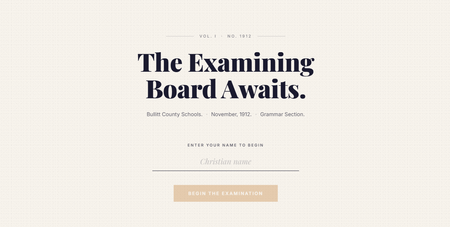
The examining board is waiting. In 1912, Bullitt County students gathered at the courthouse once or twice a year to sit the Common Examination. The local newspaper urged even seventh graders to start preparing early. It was a big deal. For Challenge #549, I didn't redesign the exam. I stepped into it. It starts by asking for your Christian name. Not your name. Your Christian name, because that is what a 1912 Kentucky schoolmaster would have said. That one detail sets the tone for everything that follows. The examiner knows your name and isn't shy about using it. The margin notes are handwritten and pointed. The feedback is sarcastic, whether you are right or wrong. Your result arrives as the front page of the Bullitt County Gazette. Personalised headline, rubber stamp verdict, and Superintendent O. Harned's wax seal. If you score zero, the editors note they have done what they can. Go on then. Submit for marking.Agentic Diagnostics: A 3-Tier AI Career Consultant for Personalized Learning Paths
The Problem: Most organizations know they need to train everyone on AI, but they don't know the specific pain points of their different roles. Standard surveys are slow, have low response rates, and often miss the "in-the-moment" hurdles learners face. The Solution: risecodeblockbuildathon For my Rise Code Block Build-a-Thon submission, I’ve built a tool that replaces the "one-size-fits-all" curriculum with an Agentic Diagnostic Engine. How it Increases Interactivity & ROI: Bespoke Consultation: After foundational training, learners don't just see a list of courses. They meet a "Consultant Bot" where they must describe a real-world hurdle they face with AI. Intelligent Prescription: Using Gemini 2.0 Flash, the tool analyzes their specific problem statement and prescribes the single best path from a 36-course catalog. Zero-Survey Insights: This is the game-changer. Because learners must enter their problem to proceed, the system collects qualitative data in real-time. Real-Time Data Dashboard: While the learner gets their custom path, L&D admins get a live "Hurdle Heatmap" in a private Google Sheet. Instant Analytics: No need for separate surveys. Targeted Strategy: Admins can see exactly which departments are struggling with "SME timelines" or "Technical Integration" as it happens. Security-First Architecture: ☁️ Google Cloud Function: Server-side Python keeps the Gemini API Key 100% hidden from the browser. 📜 Google Apps Script: Manages the secure bridge and logs the diagnostic data. 📂 Clean Frontend: Modern index, css, and script files provide a premium UX within Rise. We’ve moved from "guessing what people need" to "knowing exactly what they face"—all while they learn.313Views0likes2Comments