Forum Discussion

Articulate 360 Open Forum: Ask Your Questions
There's a lot to explore with the new Articulate 360, and we know there will be questions along the way.
Not sure where your question fits? Start here.
This is the place for general questions or questions about the launch that don't fit into one of our dedicated Q&A threads.
If your question is specifically about Frontline, new content formats, Nova & credits, integrations, or team management, head to the topic-specific Q&A below, where the Articulate team will be answering questions.
Explore the Q&A threads
Looking for something else?
For questions that require us to look at your specific account, subscription, billing information, or troubleshoot a technical issue, our Support team is the best place to get help: Contact Support
And if you're looking for help building something or want ideas from other community members, start a discussion in Exchange Best Practices.
27 Replies
- MichelleEhle531Community Member
Not sure where this question belongs, so I'll post it here. I'm very interested in creating a role-play scenario/situation where the learner talks to an AI avatar in real-time, as was demonstrated in the Articuland Keynote address. Is that functionality only available with Frontline?
Hi MichelleEhle531, the real-time AI avatar role-play demoed at the keynote will be a new artifact type coming to both Articulate 360 AI and Frontline. What's live today in both products is AI Avatars (pre-generated video) and Scenarios (branching, click-to-choose).
- MichelleEhle531Community Member
Thanks, Katie-Jordan! Is there an ETA on when that new artifact type will be available in Articulate 360 AI?
- mp2mCommunity Member
Was asked today by client if uploaded attachments (training docs) used to build AI assisted content in Rise is kept confidential?
Hi mp2m Your content never trains Articulate's foundation models without your permission, and data sent to our AI subprocessors is not stored after processing completes. You can see the full updated terms in our Terms Of Service and Data Processing Agreement.
Hope that helps!
- EmileeAttebe175Community Member
The new scenario updates are really neat. Is it possible to put these scenarios into a storyline course, or are they still limited to only Rise courses?
Hi EmileeAttebe175, adding the new Scenario format directly into a course isn't available yet, but it's on the Rise roadmap!
In the meantime, if you're working inside an existing Rise course, Scenario (classic) is still the way to build a branching experience directly in it.
For more questions around this or any of the new content formats, I'd recommend hopping over to this thread.
- CherylKentCommunity Member
Hello, I can't see a thread for the analytics feature in rise 360. Can you explain the date selection. It is set to "last 180 days" and not active for me. I would like to get monthly total sessions for my courses. Please advise how I can do this. Thanks.
CherylKent, I recommend you open a support case.Then you can walk through what you are trying to do, and they can share what's available.
- BridgetBorsa-13Community Member
Hello! With the theme fonts, is there a reason they don't apply to interactive blocks like process, flashcards, tabs, etc? I have to manually put these in each time but only in these blocks. The font size also doesn't save. Is there a way to make a default color as well? I have my colors stored in the theme that I can selected but wondered if there was an easier way. Thank you!
- EricSantosStaff
Hi BridgetBorsa-13,
Thanks for your patience, and sorry this one slipped without a reply for a while. On the fonts, I covered the headings font behavior for these blocks in my reply on the Brands beta thread, and the list of blocks that use the headings font includes process and tabs along with flashcards.
For default text color, there isn’t a theme-level setting, so that has to be set in each block. Font size defaults are limited too, though Block Defaults in Labs lets you set background and heading size defaults across a course. It doesn’t cover every setting or block, so it may not fully solve this.
To understand the font size piece better, when you change the size, does it go back to the default when you add a new block, or does it reset on a block you’ve already edited?
- adrienblake530Community Member
Thanks for setting this up. A general question: will courses built in the older version of Storyline and Rise open and edit normally in the new Articulate 360, or is there a conversion step we should plan for before updating?
- EricSantosStaff
Hi adrienblake530,
Thanks for asking this, and we appreciate your patience while we got back to you. Checking before an update is a smart move.
For your Rise courses, your existing Rise 360 content is still there and intact in the new experience, and the authoring experience is mostly the same as before. You’ll find your courses in the Training Library in the left sidebar, and the Understanding Your New Dashboard article walks through it. The article doesn’t list a conversion step for existing courses. One thing to keep in mind is that the new dashboard applies when AI is enabled, so a subscription or group without AI enabled keeps the previous dashboard with separate Rise and Review apps.
For Storyline, a few details would help us point you in the right direction. Which version of Storyline were your projects built in, and does anyone on your team open or share files across different versions? And when you mention updating, do you mean updating Storyline 360 to the latest release, moving to the new Articulate 360 experience, or both?
- jamescarter3Community Member
Thanks for setting this up — really helpful to have one central place for general questions during the launch!
The topic-specific threads are a smart move too. Keeps things organized and makes sure questions reach the right team members faster.
A couple of things that would help the community:
- Estimated response times — even a rough timeframe would help people know what to expect
- Pin the most common questions as they come in so others don’t have to repeat them
Looking forward to seeing how the new Articulate 360 shapes up — exciting update! 🙌
- EricSantosStaff
Hi jamescarter3 and stephanie4,
Thank you both for the kind words and for taking the time to share your suggestions. Having one place for general questions during a big launch is what we hoped this thread would offer, and it’s great to hear that the topic-specific threads are helping questions reach the right people faster.
I also appreciate you pointing out how helpful it would be to know roughly when to expect an answer and to see common questions pinned. That’s useful insight into what would make the experience smoother for you.
- stephanie4Community Member
Having one place for general questions is really helpful, especially during a big update. I agree that pinning common questions would save everyone time. A rough response time would also help users know when to expect an answer.
- AmberLeeMogg-00Community Member
Good afternoon, just curious when there will be an audio option for the responses within a scenario block? Thank you! :)
- EricSantosStaff
Hi AmberLeeMogg-00,
Thanks for asking, and for sharing what you’d like to see in scenario blocks. It sounds like you’d like learners to hear the response choices in your scenario, not just read them. At the moment, the responses in a scenario block don’t have an audio option, and I don’t have a timeline to share.
I’d love to learn more about what you have in mind so we can understand how this would fit into your scenarios. What would audio on the responses add for your learners, and are you picturing the choices read aloud, or something more, like the character responding in voice?
- CoombespCommunity Member
Hi - WIth the new Articulate 360 AI - Is there a new way to Magic Lesson Import? It used to be where the AI assistant wat in the top right corner and all instructions lead to the old way. DO we have guidance on a new way?
- EricSantosStaff
Hi Coombesp,
Welcome to the community, and thanks for asking. It sounds like you’d like to find Magic Lesson Import now that the AI Assistant menu has moved. You’re right that the instructions you’re finding describe the old setup, and the AI Assistant menu in the top right was retired in September.
Here’s where to find it now, and I’ve included a screenshot that shows the menu.
- Open your course to the course overview page, where your lessons are listed.
- Click Add Content.
- Select Lesson, then choose Magic import.
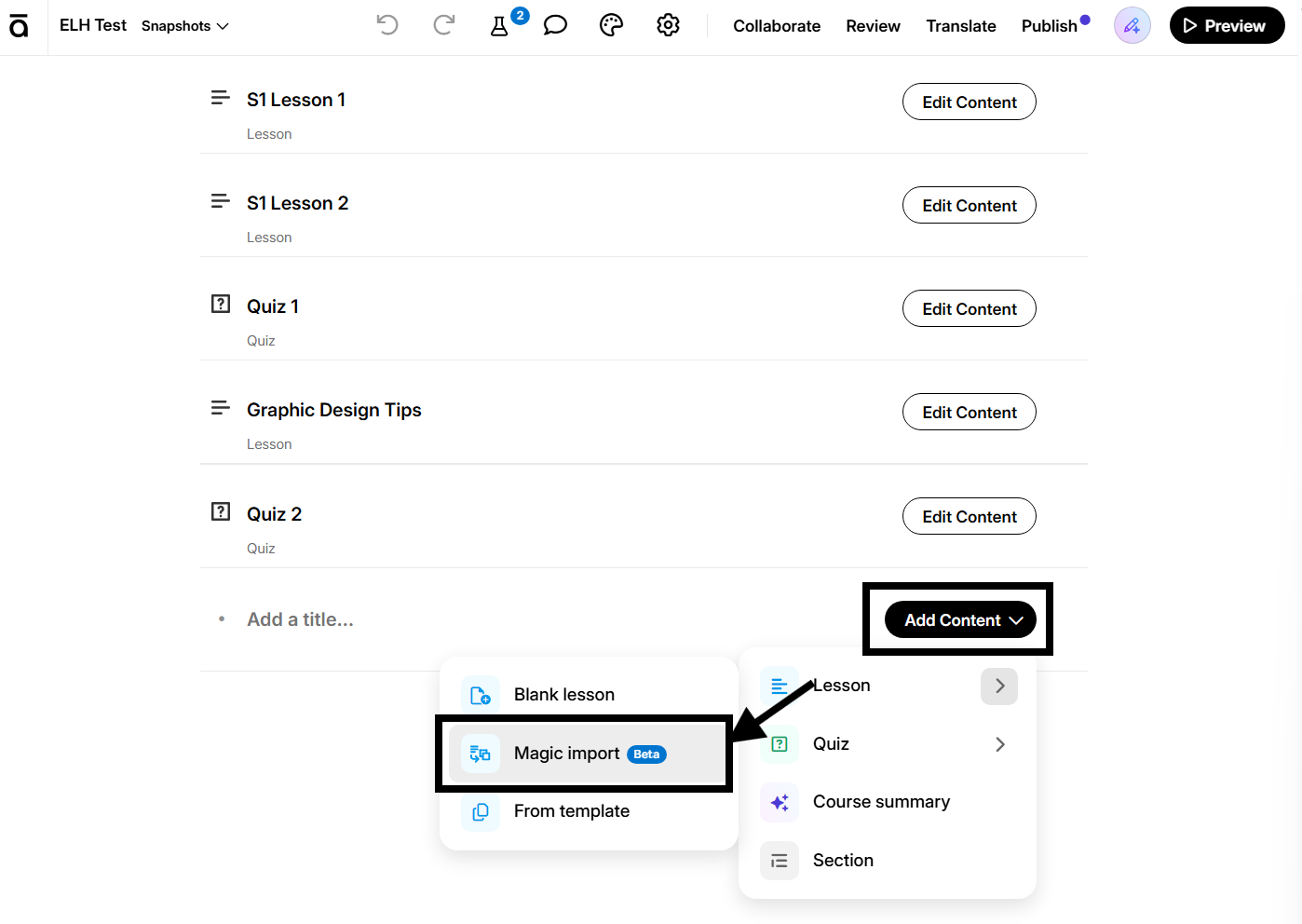
In the menu it’s shortened to “Magic import,” and it’s still marked Beta. Once you’ve opened it, the tips for preparing your document in our Magic Lesson Import article still apply.
Let us know if there’s anything else we can help with.











Related Content
- 1 month ago