Forum Discussion

Articulate Localization - Shrink Text on Overflow Bug
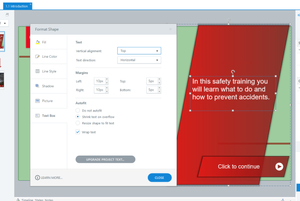

Hi StevenBenassi / KellyAuner ,
The Autofit option, whilst it sounds great on paper, is not ideal in many cases because some languages need up to 30% more characters for the same amount of English text (e.g., Hungarian, Bulgarian, Ukranian). Whereas Japanese needs like 30% of the amount of space of an English text.
So, in a Localized Project (that contains multiple languages) the largest language (in other words, the language that requires the most amount of characters) determines how large the textbox will be. This does not work because some languages are so wordy that the text boxes become ridiculously large for languages that require far less characters (e.g. English, French).
Therefore, I heavy rely on 'Shrink Text on Overflow'. because languages like Bulgarian shrink 0.5 or 1.0 and then fit in the box, instead of creating overly large boxes.
In other words, in order to make Localization a feature I can use with my team we need to be able to 'shrink text on overflow', if we cannot do this we will not be able to save time and traditional methods will remain more efficient.
In short: We cannot deliver projects with extremely large text boxes because some languages use a lot more characters (simply take a look at the screenshots from KajDekkers again and you can immediately see how much space the Ukrainian text takes up). So, we need the text to adjust to the box, not the box to adjust to the text. It doesn't matter if the text is 0.5 or 1.5 smaller, people can still read it just fine.
Please discuss this with your team and I would be happy to use Localization with my team for all our projects.
Best regards.

Hi PapaJohns!
We appreciate the feedback on the type of functionality you'd like to see in Articulate Localization!
I've relayed all of your requests to our product team, and we'll be sure to update you as soon as we have news to share.