Forum Discussion

Assign points when a user views the whole video only

Darren: Have you considered putting an interaction into the video (via a hotspot and a lightbox) at the end - or close enough to the end that the learner could rightfully claim to have watched the entire video? I'm thinking of a couple tweaks that I saw referenced here:
https://elearningdesigner.com/interactive-video-quiz-elearning/
If you did this, you could assign an initial number of points (say, 20) for that interaction. You could associate a couple of variables with the appearance of that interaction that would decrement each time the variables are triggered, so they would only assign fewer points (say, 10 for the second try, 5 for the third try) each time the interaction appears.
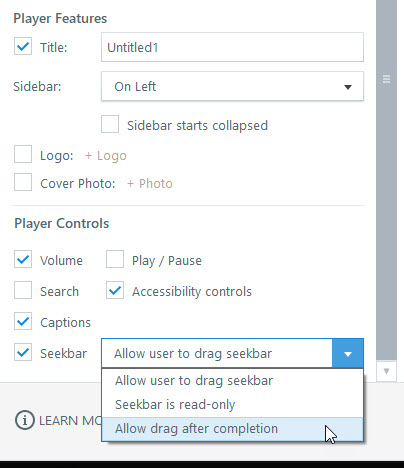
As for the scrub back and forth: in SL360, you can set the timeline to "allow drag after completion," which means that the learner can't do anything but sit through the video until it completes - at which point he or she can revisit whatever is desired. Again, assigning a variable related to point values could be used here, too.
Just some ideas to think about.
thanks for the reply. I tried the hotspot and variable route but it is requires too many steps in the workflow when dealing with may videos and scenarios etc. I am one of the very few who understands how to use variables and triggers etc to an advanced stage in our company. Almost all of our internal 500 content creators use Rise and Storyline at their basic levels just to get content out and simply want easy to use options. They are getting their heads turns, which I can understand by the applications that do that for them. The scrolling parallax look and feel is also a major request now as we need to look at that anyway. I think the scrolling parallax effect should be something Rise could do. Vertical navigation is something I have requested several times for Storyline over the years also.
Related Content
- 3 years ago
- 5 months ago
- 3 months ago
- 5 months ago