Forum Discussion

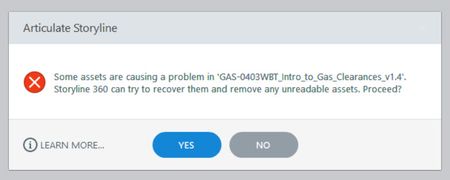
Corrupted Unreadable Imported Assets
- 1 year ago
Hello StephanieSmi779,
Sorry to hear about the trouble with the corrupt assets!
I appreciate the troubleshooting you've already done. You did a great job recovering those assets, and the steps you applied align with the recommendations in our knowledge base article below:
File corruption is unpredictable, and there's no straightforward way to determine what causes it. Common causes are environmental (disk errors, power outages, improper shutdowns), viruses, failed Windows updates, and even file size (i.e., very large files have a higher risk of corruption). Consider these preventative measures to protect your project files and assets.
If the problem happens again, let me know, and I'd be more than happy to assist you further. You can also connect with us privately in a support case if you want more targeted help.


Hi,
I'm having trouble with it too. Most (but oddly not all) of my AI-generated and hand-checked closed captions just vanished with this error... Had to get a tmp file to avoid losing too much of the work. 😣
- StevenBenassi4 months agoStaff
Hi Jean-MichelP729,
Sorry to hear that you've also encountered file corruption while authoring in Storyline. Great to hear that you recovered a working backup from your temp folder!
Based on that error message, it sounds like the file became partially corrupted while Storyline was saving or updating the project resources. Working directly from network or cloud drives can sometimes interfere with Storyline’s save process, and lead to file corruption. Were you working off of your local hard drive when this issue occurred?
Looking forward to hearing from you!
