Forum Discussion

Did an update at some point break my DIY tabs?
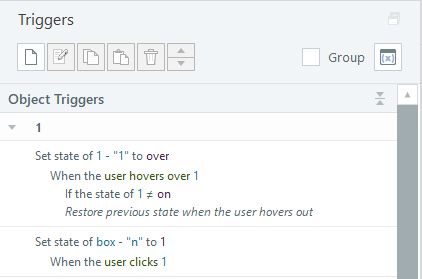

Hello brucefrench . Let me summarize your problem to make sure I understand correctly: when you select (for example) tab2, you want it to remain selected (dark green) and not be changed by hovering the mouse over it (very light green) until you select another tab (1 or 3 or...). Only unselected and unopened tabs can be affected by hovering.
(I have the impression that jaybeecnc has not resolved this issue...)
If that's the case, OK.
I don't think you can solve the problem with just your tab states because, as far as I can tell, the normal state always returns after the hover state. To be confirmed by the Articulate staff.
So, I suggest a workaround and I'm SIMPLIFYING. There are so many triggers...
Look at the second slide of your .story file that I'm sending you back.
First, I use the built-in states for your tabs: Normal (green), Selected (dark green), and Hover (very light green with dark green text), which is simpler. You can add animations (fade in and fade out for example) to the states: I did this on the Hover state of tab1.
When I click on tab 1, your white box displays the associated content (1) AND a copy of the Selected state of tab1 on top of tab1. This way, even if tab1 below is affected by the mouse hover, it is no longer visible.
The same applies when the box displays its content (2) AND a copy of the Selected state from tab2 above tab2. And so on.
And there you have it. I deleted about 25 triggers, I think. In the end, I'll only have 7. And it works as you want it to.
In the demo, I only did the first 3 tabs. Copy and paste tab3 into tab 4. Add a state 4 to your box. Adjust the content. The triggers will automatically duplicate. Adjust the trigger terms. Then move on to tab5. Etc.
Don't forget to link the tabs with “Set of buttons.”
Is that clear enough? Let me know. I hope this helps.
Thanks for that. I'll have a good look at it.
Related Content
- 12 days ago