Forum Discussion

Error uploading Rise course to SABA
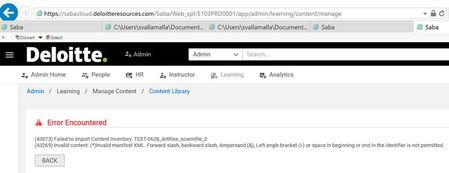
Heard back from my client. They found a file that had name starting with a symbol (-). This is a file name assigned by Articulate Rise when I publish the course. The client changed the file name to remove the symbol and was able to upload it to their SABA LMS successfully.
Is there a way to prevent Rise from assigning file names that start with a symbol?
Is there a way to find all the instances of a file name in all the output created when publishing in Rise?
- Crystal-Horn6 years agoStaff
Thanks for the follow-up, Steve. We found an indication that some LMS servers won't accept that symbol as the first name of a file. I'm going to meet with our team to see how we can improve the file encoding during the publishing process to avoid this issue. I don't expect an immediate change, but we'll keep you posted.
If you suspect this issue in other output, you can unzip and open the output folder, and look in the
scormcontent > assetsfolder. I arrange the files in that folder by name so that any files that start with symbols will be listed first. The assets will also be listed in the lmsmanifest.xml.I'm sorry the file naming caused this issue for you!

Related Content
- 2 months ago
- 9 months ago
- 5 months ago