Forum Discussion

How do I export Closed Captions?
- 2 months ago
You can get the .vtt files from the .story file. Copy the .story and change the file extension to .zip then extract the zip file and you’ll find the .vtt files in \story\media. If you want to search for the phrase without manually looking for it you can open the media folder in VS code (right click, open with code), and use search in folder to find it.


JeanMarrapodi-c You must be running one of the older Storyline builds. Update to the latest version. You should be able to export all captions in a project.

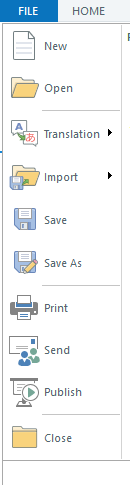
Hmmmmmm, Nedim I update whenever I get the notifications that say I need to update. I checked and found out what the culprit was. I was one of the Beta testers for Storyline features earlier this year, and I thought they did away with that, but lo and behold, I was in the beta version, which doesn't show export in the file menu. I opened up the non-beta version, and VOLIA!! There it is in the menu. What a weird thing to have left off. Oh well. Mystery solved. HOORAY. Thanks to both of you.
Related Content
- 1 year ago
- 3 months ago
- 2 years ago