Forum Discussion

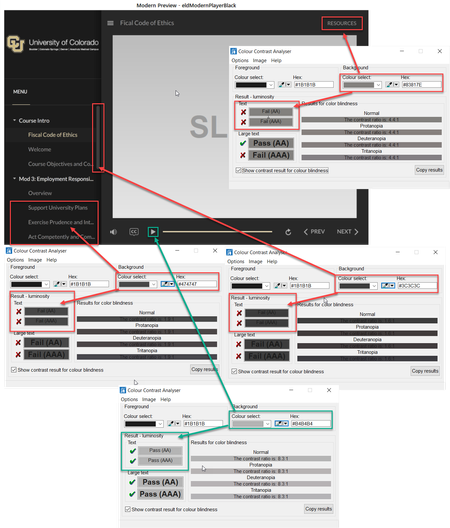
Modern Player Accessibility Issues with Color

Hi, everyone.
I have great news to share!
We just released another update for Storyline 360. In Update 50, we’ve included important fixes and new features.
One of the features we’ve included is:
The modern player meets WCAG accessibility guidelines for visual contrast and color so all learners can read the text, decipher the icons, perceive the controls, and navigate easily. Learn more about modern player accessible contrast.
To take advantage of this update, launch the Articulate 360 desktop app on your computer and click the Update button next to Storyline 360. You'll find our step-by-step instructions here.
Please let us know if you have any questions by posting here or by reaching out to our Support Engineers directly.
- LaurieLyons4 years agoCommunity Member
Yay! Thank you!
- NicoleDuclos-cb4 years agoCommunity Member
Hi
I updated this morning and now lightboxes are behaving oddly. Please see this example.
Now when viewing in 360, engage interactions are not behaving correctly. The first time viewed, they view fine. Any time after that I get a white screen where the interaction should be and everything freezes - can’t close lightbox or use nav.
I have a course I'm working on that includes engage interactions in lightboxes as well as other lighboxed slides with no engage interactions. They are all behaving like this. In the example I provided, only the lightbox with the engage interaction is doing it.
This was not happening yesterday or any other day previously.
Other lessons with the same functionality that were uploaded to Review360 prior to this latest update are displaying correctly!
Nicole
- NicoleDuclos-cb4 years agoCommunity Member
03/24/21 Update - I reinstalled the previous version of Storyline and my files function correctly now. And again, all files that were published to 360 PRIOR to the latest update function correctly. Files published AFTER the latest update do not.
03/25/21 Update - The response I've received so far:
"Thanks for writing back and sharing your test results.
After careful testing, I have identified that using the lightbox trigger option "Use navigation controls" is causing the lightbox of Engage Interaction to freeze.
I’ve logged it as a possible software bug. From here, I’ll meet with my team to take a closer look so we can determine next steps."


Related Content
- 8 months ago